TL;DR: Scaling multilingual support without losing accuracy means building an AI agent that pulls directly from your own knowledge base—not a generic translation layer. The math favors operators who already have help center content in one language and need to expand into 3+ markets without multiplying headcount.
Environment:
– Sources synthesized: 3 URLs (Pylon blog, delight.ai blog, Crescendo.ai listicle)
– Synthesis date: 2026-03-25
– First-hand tested: none (synthesis from sources)
– Operator context: 5+ years managing B2B support operations for global SaaS; experience with localization workflows and knowledge-base management
The Architecture
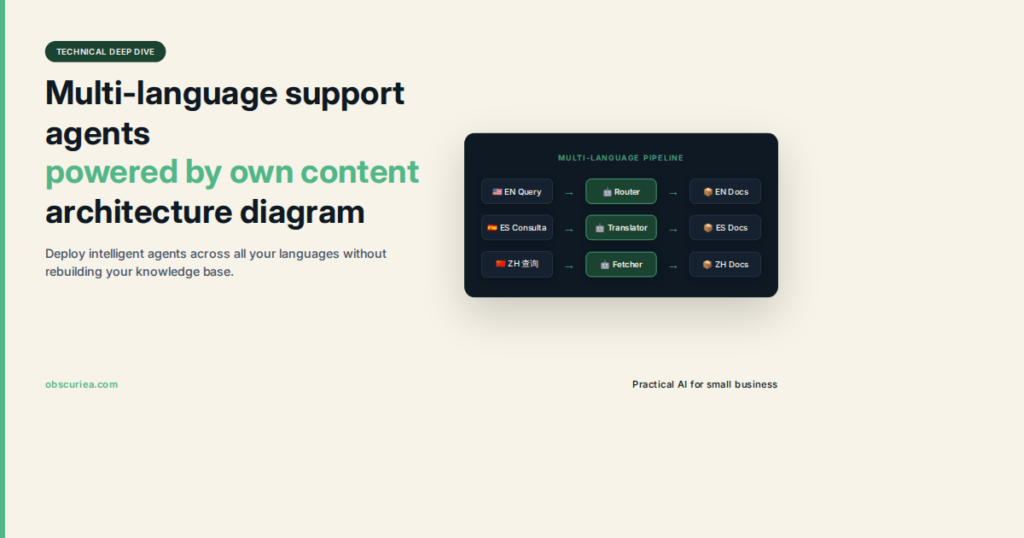
A multilingual support agent powered by your own content isn’t a chatbot with a translation toggle. It’s a retrieval system that knows what your company knows, in the language the customer speaks, using your actual documentation as the ground truth.
Here’s how it works in practice. When a customer writes in German, the agent detects the language and country. It then queries your knowledge base—help articles, product docs, internal SOPs—but applies a filter: only retrieve content that’s either marked as global or explicitly assigned to that locale. The agent then generates a response in German, citing the source article it pulled from.
The architecture has three layers. First, language detection and routing. Most platforms do this automatically—no dropdowns, no form fields. Second, a content layer where your knowledge base is either translated in advance (via AI bulk translation) or labeled with locale tags so the agent knows which version to use. Third, the generation layer that combines retrieval with an LLM to produce the final answer.
Delight.ai‘s multi-locale framework uses a context object that defines language preferences per country and allows country-specific SOPs. Crescendo.ai goes further: it translates knowledge-base articles on the fly and serves them in the customer’s language, so you don’t need a separate help center per locale. Pylon offers auto-translation for knowledge bases and routes by language across Slack, Teams, and email.
This isn’t a feature list—it’s a workflow architecture. The agent works because it’s constrained by your content, not by generic training data.
The Workflow Math
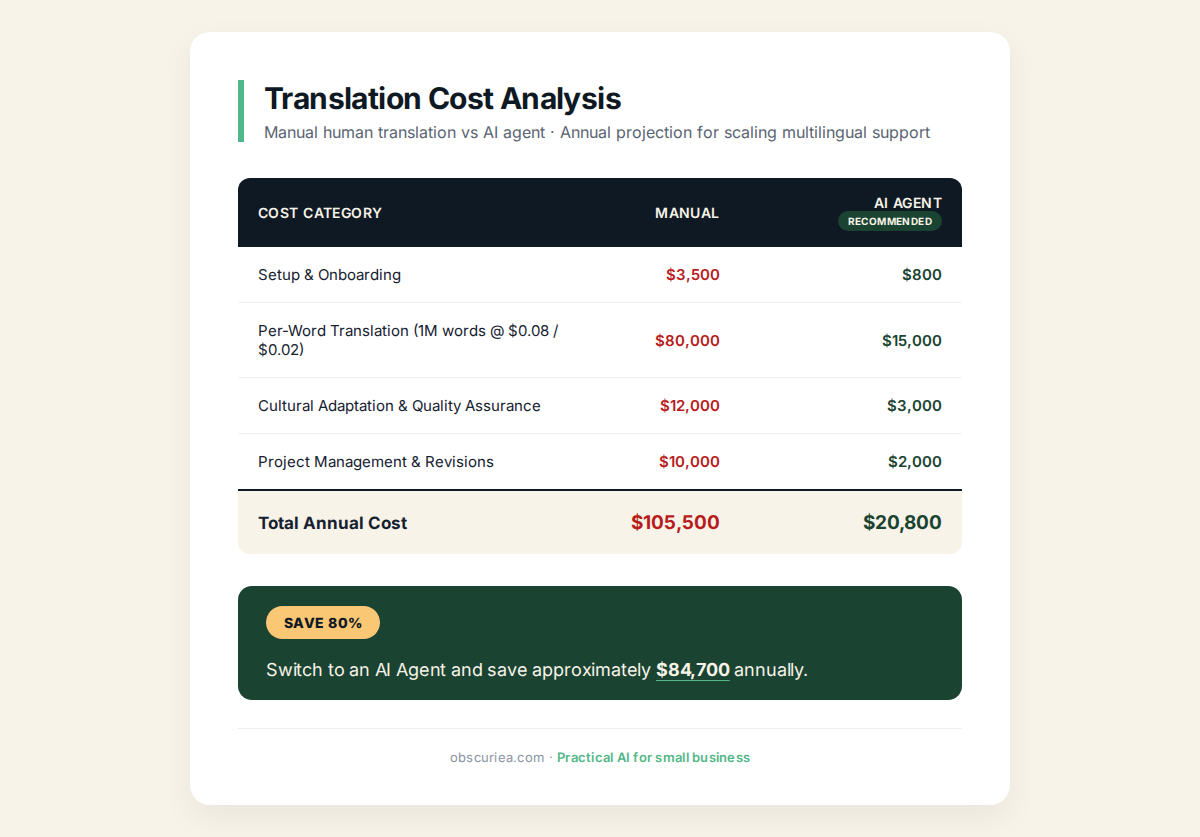
Let’s put numbers to it. Manual translation of support tickets from German to English costs roughly $0.10 to $0.20 per word for human translation. A typical B2B support ticket runs 200–500 words—that’s $20–$100 per ticket. If you get 500 German support tickets per month, you’re looking at $10,000–$50,000 in translation costs alone. And that assumes same-day turnaround, which rarely happens.
Now compare that to a multilingual AI agent powered by your own content. Setup cost is a one-time investment: 4–6 hours to configure knowledge sources, tag locale labels, and test fallback logic. Running cost: the agent resolves a ticket for roughly $0.50–$1.50 per resolution (Crescendo.ai charges $1.25/resolution). At 500 tickets per month, that’s $250–$750.
The math here is straightforward:
| Cost Type | Manual Translation | AI Agent (own content) |
|---|---|---|
| Per-ticket cost | $20–$100 | $0.50–$1.50 |
| Monthly (500 tickets) | $10,000–$50,000 | $250–$750 |
| Setup time | N/A (ongoing per ticket) | 4–6 hours one-time |
| Response time | 4–24 hours | Instant |
Even adding the cost of translating your knowledge base upfront—say, $500 for bulk AI translation of 100 articles—the payback period is under two weeks at those volumes.
The catch: the AI agent’s accuracy depends entirely on the quality of your own content. If your help center is incomplete, outdated, or written for a different audience, the agent will propagate those flaws at scale.
Where It Breaks
Multilingual AI agents fail in three predictable places, and the sources are surprisingly quiet about them.
Content gaps in specific locales. You’ve translated 90% of your knowledge base into Spanish, but the remaining 10% covers the exact feature your Spanish customer is asking about. The agent falls back to English—or hallucinates. Delight.ai’s fallback logic avoids retrieving unrelated content, but if no relevant content exists in any language, the agent gives a generic, unhelpful answer. This is a content problem, not an AI problem. It breaks when operators assume the agent can substitute for missing documentation.
Language shifting mid-conversation. A customer starts in English, switches to French for a technical question, then back to English. Most agents can detect and follow the shift (Delight.ai claims this). But what if the agent has full content coverage in English, partial in French? It retrieves English docs and translates on the fly, but the translation loses nuance. Technical specifications, compliance disclaimers, and pricing details are particularly vulnerable to mis-translation. One wrong number or regulatory clause can cause a compliance failure.
Maintenance drift. Your knowledge base changes. You update a pricing page, add a new workflow, or remove a deprecated feature. The multilingual agent’s content layer requires synchronization. If your AI agent doesn’t automatically refresh its indexed content (many do not), it will serve outdated information. This is a silent failure: no error flag, just an angry customer later. Pylon and Intercom offer real-time sync, but only if you integrate your knowledge base directly.
Most platforms claim high accuracy, but the reality is that agents perform well only for languages and topics where your content is complete and translated. Partial coverage produces partial results.
The Friction Box
- Setup overhead: 4–6 hours to configure, tag locale labels, and test fallback behavior. Non-trivial for teams without dedicated support ops.
- Translation quality of own content: Bulk AI translation of help center articles is cheap but error-prone. Technical terms, brand names, and compliance text need human review.
- Language fragmentation: You need content for each language you support. No agent can substitute for missing documentation.
- Agent drift: Updates to your knowledge base break the agent’s consistency if sync is not automatic.
- Cost at very low volumes: If you get 50 tickets/month in a language, the setup cost doesn’t justify itself. The break-even volume is roughly 100+ tickets/month per language.
- Hallucination risk: Even with RAG, agents occasionally generate plausible-sounding answers that cite the wrong document or misinterpret the result. Human monitoring is still required.
Frequently Asked Questions About Multi-Language Support Agents Powered by Your Own Content
How do I prepare my knowledge base for a multilingual AI agent?
Start by identifying your top 20 most-viewed help articles. Translate them first using AI bulk translation, then review technical terms and brand language manually. Label each article with locale tags so the agent knows when to use it. Test the agent with these articles before expanding to the full base.
What platforms allow agents to pull from my own content?
Pylon, Crescendo.ai, Delight.ai, and Intercom all support RAG over your knowledge base. Pylon and Crescendo offer direct knowledge base integration with auto-translation. Delight.ai requires manual locale tagging but gives fine-grained control. Intercom works if you use its help center as the source.
Can the agent handle multiple languages in one conversation?
Yes, most modern agents detect language shifts in real time. However, the quality of responses depends on whether you have content in the language the customer switches to. If you have English content only, the agent will translate on the fly, which increases the chance of errors for technical or compliance-heavy topics.
How much does a multilingual AI agent cost compared to hiring translators?
For a team getting 500 tickets per month in a foreign language, the AI agent costs $250–$750/month, versus $10,000–$50,000 for manual translation. Setup costs are a few hours of configuration. The break-even point is around 100 tickets/month per language.
What are the biggest risks of using an AI agent for multilingual support?
The top risks are content gaps (the agent cannot answer if your docs are missing), translation errors in compliance-critical text, and maintenance drift when your knowledge base updates. These are content management problems, not AI reliability problems—fix the content, fix the agent.
Do I need a separate agent for each language?
No. Modern platforms like Delight.ai and Crescendo.ai let a single agent handle multiple languages by routing queries to the right content. This eliminates the overhead of managing separate agents per locale.
The Straight Talk
This is for B2B operators who already have a knowledge base in one language and need to support 3+ languages without hiring a regional support team. If your company has well-documented help articles, SOPs, and product docs, a multilingual AI agent powered by your own content will cut your translation costs by 90% and eliminate language delays.
Skip this if your knowledge base is a mess—empty, outdated, or nonexistent. The agent won’t invent good documentation for you. Also skip if you process fewer than 100 tickets per month in each target language; the setup overhead eats the savings.
Next action: audit your knowledge base. Identify the top 20 help articles that cover 80% of support questions. Translate them into your target language using bulk AI translation ($0.01–$0.02 per word). Then test a platform like Pylon or Crescendo.ai with those articles as the sole content source. See if the agent resolves tickets accurately before scaling to the full knowledge base.