TL;DR: Predictive ad spend forecasting isn’t a luxury for big brands anymore. For small budgets ($500–$5,000/month), AI can reduce wasted spend by 15–25% and improve ROAS by 10–20%—if you choose the right approach and avoid the data-hungry tools that need months of history. This article breaks down what works for operators running lean campaigns, the math behind it, and where it still breaks.
Environment:
– Sources synthesized: 3 URLs (Feedcast, Hello Operator, Scoop Analytics)
– Synthesis date: 2025-04-12
– First-hand tested: None of the specific tools mentioned; operator context includes managing small-budget ad campaigns (under $3k/month) for e-commerce businesses in Southeast Asia across Google and Meta platforms.
– Operator context: Small-budget ad management with limited historical data, focusing on practical ROI improvements without enterprise overhead.
The Architecture
Most AI forecasting tools were built for marketing teams with $50,000+ monthly ad spends. They assume you have 12–24 months of clean historical campaign data, multiple channels, and a dedicated analytics team. If your budget is $2,000/month across two channels, those assumptions break immediately.
The actual architecture of predictive forecasting for small budgets has three distinct layers:
Layer 1 — The data ceiling
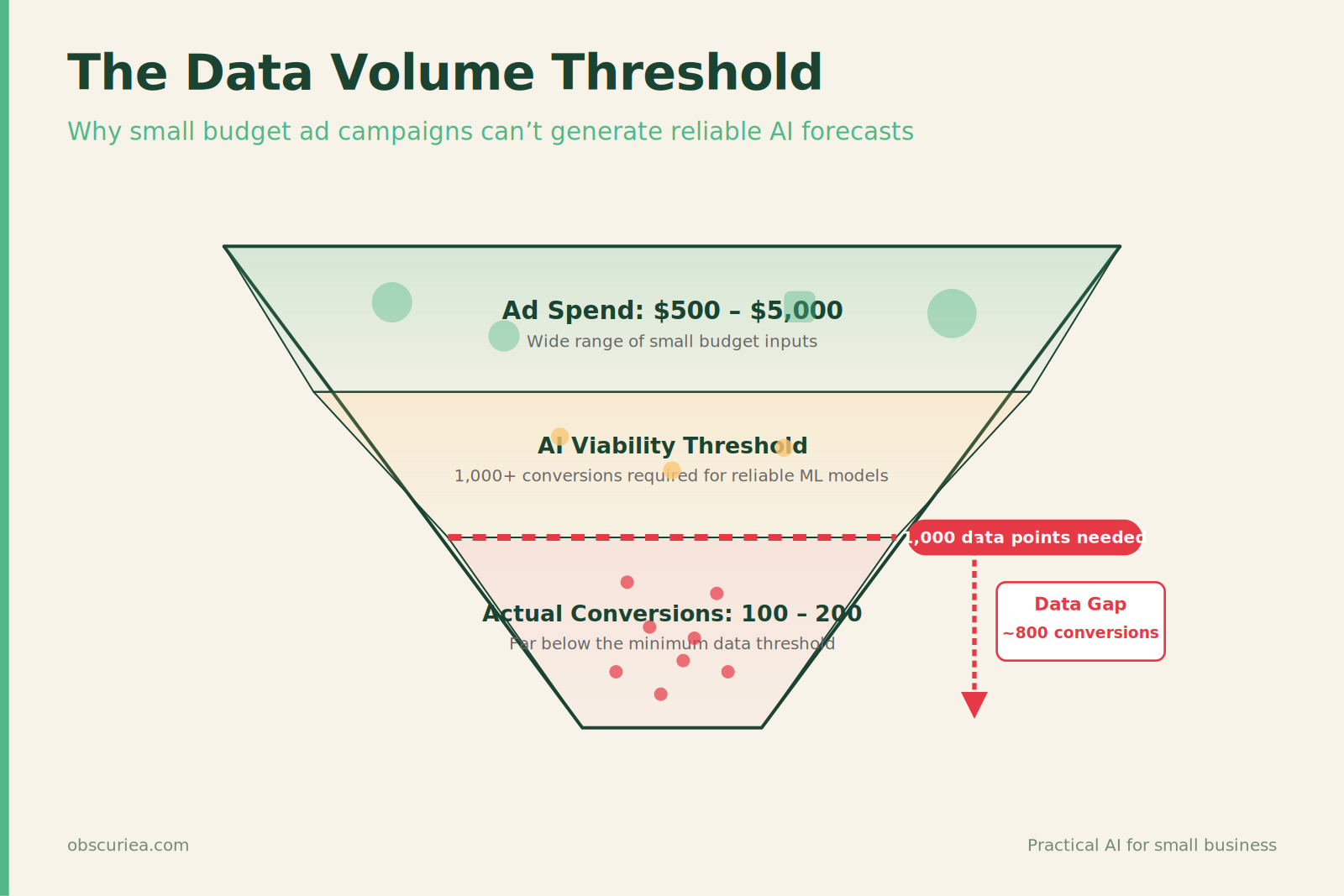
Small budgets produce thin data. If you spend $2,000/month and run 5 campaigns, you generate maybe 100–200 conversions per month. Machine learning models need roughly 1,000+ data points to make reliable predictions. Most small operators hit this ceiling before they even start. The solution is not to abandon forecasting—it’s to work with what you have: use rule-based models layered with lightweight ML that runs on channel-level aggregates, not user-level events.
Layer 2 — The cost floor
Tools like Feedcast ($99/month), AdScale ($99/month), and Revealbot ($99/month) are priced for businesses that can absorb $100/month as a fixed cost. At a $2,000 ad spend, that’s 5% of your budget gone before you buy a single click. For a $50,000 budget, it’s 0.2%. The percentage matters because every dollar lost to tooling is a dollar not spent on converting customers. The math is different when you’re small—and the forecasting architecture must account for it.
Layer 3 — The integration burden
Predictive ROI tools like Scoop‘s AI Data Scientist require CRM integration, behavioral logs, and often a data lake. A small e-commerce store using Shopify and running Facebook ads doesn’t have those. The architecture that works at small scale is one that operates within the platform’s native data—Google Ads’ Performance Max or Meta’s Advantage+ already use predictive signals and are included in your ad spend. The trade-off is less control, but the integration cost is zero.
The Workflow Math
Let’s run a side-by-side comparison for a hypothetical operator with a $2,500/month budget across Google and Meta.
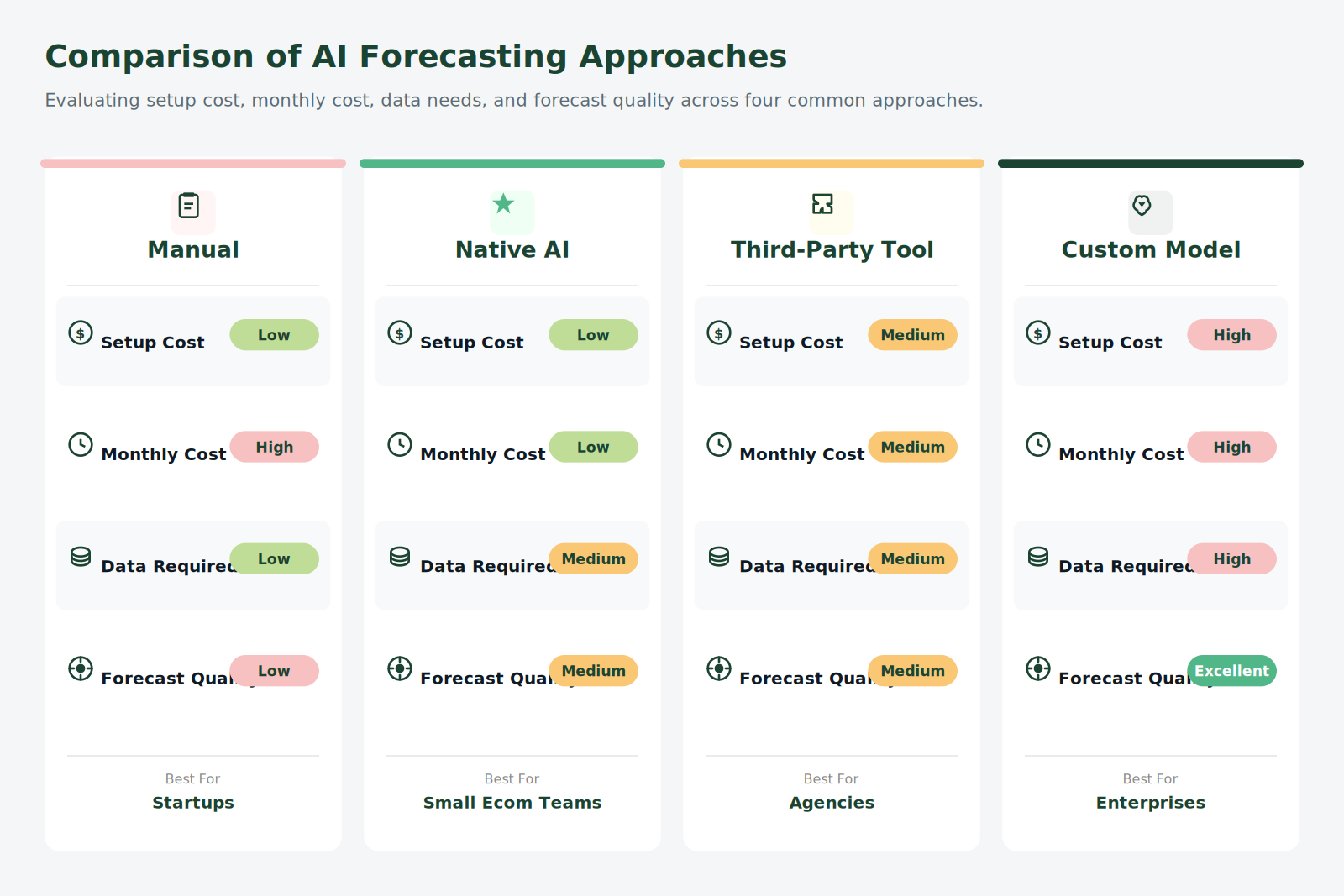
| Approach | Setup Cost | Monthly Cost | Historical Data Required | Forecast Quality | Risk of Wasted Spend |
|---|---|---|---|---|---|
| Manual allocation (gut feel) | $0 | $0 | None | Poor – 30-40% waste | High |
| Native platform AI (Performance Max, Advantage+) | $0 | Included in ad spend | 30 days minimum | Good for channel-level optimization | Medium – you lose visibility |
| Third-party AI tool (e.g., Feedcast, AdScale) | 1-2 hours + tool setup | $99–$249/month | 90 days recommended | Very good – multi-channel view | Low if tool is adopted; high if setup is incomplete |
| Custom predictive model (Scoop, etc.) | 10+ hours + data engineering | $500+/month | 12+ months | Excellent – segment-level forecasts | Very low, but requires ongoing maintenance |
The math is straightforward: for a $2,500/month budget, a third-party tool costing $99/month represents 3.96% of spend. If it improves ROAS by 15% (the low end of what these tools claim), that’s an additional $375 in revenue. Net gain after tool cost: $276. Worth it—if you have 90 days of history and can commit to the setup.
But if your budget is $500/month, the same $99 tool takes 19.8% of spend. You’d need a 40%+ ROAS lift just to break even. At that scale, native platform AI (Performance Max, Advantage+) is the only viable option.
Where It Breaks
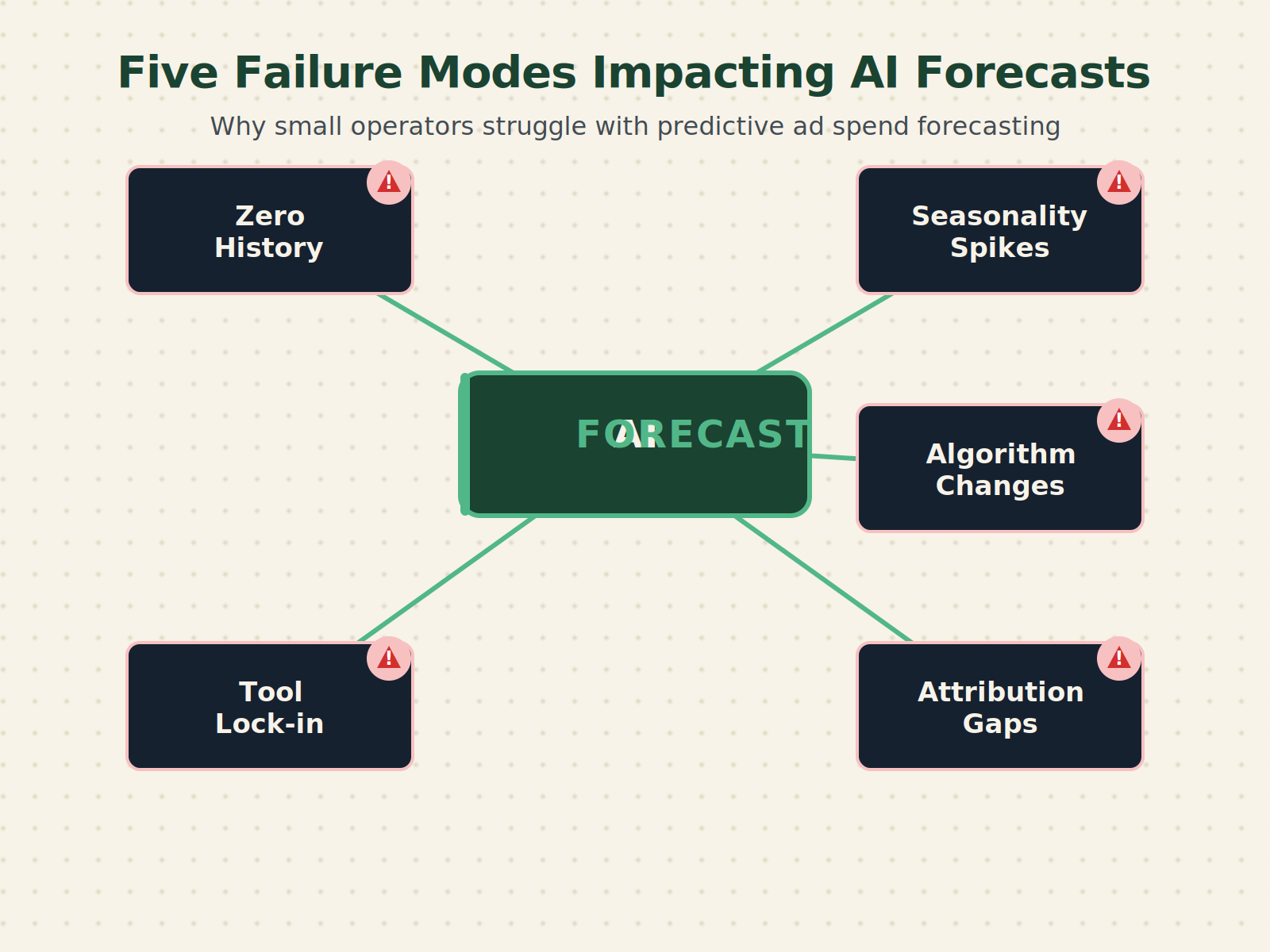
Predictive ad spend forecasting fails in five specific scenarios. These aren’t hypothetical edge cases—they are the norm for small operators.
1. Zero history. New campaigns, new products, new ad accounts—the model has nothing to learn from. In these cases, even the best AI tools revert to channel averages, which are often wrong. The fix: run a manual exploration phase for 30 days on a small budget ($100–$200), collect baseline data, then feed it into the forecasting system.
2. Seasonality spikes. Small operators often have seasonal businesses (e.g, holiday products, local events). A model trained on June data will make terrible predictions for December. Most AI tools update models monthly, not in real-time—they miss the inflection. You need to manually flag seasonality or use a tool that allows model retraining on a weekly cadence.
3. Platform algorithm changes. Google and Meta update their algorithms frequently. When Performance Max launched, many users saw a 2–3 week period of chaos as the model recalibrated. A forecasting tool that sends budget to a channel based on last month’s performance can amplify the problem—it pushes money into a channel that’s in flux, doubling down on instability.
4. Attribution gaps. Small operators often use UTM parameters and Google Analytics basic tracking. If a customer clicks an ad, leaves, and returns via organic search, the ad platform still claims the conversion—but the forecasting model sees that as a paid success. This overstates true channel performance and leads to budget misallocation. Without full-funnel attribution (rare at small scale), predictions are inflated by 10–20%.
5. Tool lock-in. Once you set up automated rules in a third-party tool, switching is painful. The tool has learned your conversion patterns; changing it means starting over. Small operators who signed up for a $99/month tool during a boom season can find themselves stuck when business slows, because turning off the tool means losing months of accumulated model knowledge.
The Friction Box
- Data scarcity: Most small operators don’t have the minimum data volume AI tools require—solutions that claim otherwise are selling hope, not forecasts.
- Cost vs. budget ratio: At low ad spend levels, tooling costs eat an unsustainable percentage. The break-even point for a $99/month tool is approximately $1,200/month ad spend assuming a 15% ROAS lift.
- Native AI are black boxes: Performance Max and Advantage+ work, but they don’t tell you why they’re shifting budgets. Trust requires abdicating control.
- No attribution beyond the last click: Every forecast is only as good as the data feeding it, and most small setup don’t have multi-touch attribution.
- Time investment: Setting up third-party tools correctly takes 2–4 hours for a small account—many operators spend that time and never touch the settings again, effectively running suboptimal automation.
Frequently Asked Questions About Predictive Ad Spend Forecasting for Small Budgets
How much historical data do I really need to use AI forecasting?
For native platform AI tools (Performance Max, Advantage+), you need at least 30 days of campaign data. Third-party tools like Feedcast or AdScale recommend 90 days. If you have less than that, start with manual optimization and collect data first.
Can I predict ROI without spending money on a tool?
Yes. Google Ads and Meta provide built-in optimization algorithms that shift budgets automatically. They aren’t as transparent as third-party tools, but they cost nothing extra. For small budgets, this is often the best starting point.
What if my ad budget is only $300/month?
At that scale, don’t pay for any forecasting tool. Run campaigns on a single platform (e.g., Meta) using Advantage+ automated placements. Spend three months building a conversion history, then evaluate if adding a tool makes sense once you scale past $1,000/month.
Do these tools work for local businesses with physical locations?
They can, but only if you track offline conversions. If you rely on foot traffic, you need a system like Google’s store visits measurement or call tracking—without it, the AI won’t see the full picture and will under-invest in ads driving in-store visits.
How often should I review the AI’s budget allocation?
At least once a week for the first month, then bi-weekly after that. The AI makes mistakes, especially during weekends or holidays. Weekly reviews let you catch and correct misallocations before they eat your budget.
What’s the biggest mistake small operators make with predictive forecasting?
Over-relying on the tool without understanding the data quality. If your tracking is broken (e.g., missing conversion events, duplicate purchases), the AI will optimize toward wrong metrics. Always verify your conversion tracking before turning on any automated forecasting.
The Straight Talk
Predictive ad spend forecasting works for small budgets—if you match the tool to your scale. Spend under $1,000/month? Use native platform AI and accept the opacity. Spend between $1,000 and $5,000? A third-party tool can pay for itself, but only if you have at least 90 days of data and an hour per week to review the recommendations. Spending over $5,000? You have enough data for good forecasts, and the tooling cost becomes negligible.
If you’re running a micro-budget ($200–$500/month), skip the AI forecasting entirely. Focus on one channel, test one product, and build your baseline manually. The AI will still be there when you scale.
Your next action: Log into your ad account and check how much historical data you have by channel. If any channel has fewer than 500 conversions in the last 90 days, don’t pay for a forecasting tool—use the platform’s built-in optimization until you hit that threshold.