TL;DR: A grocery store with 500 perishable SKUs loses roughly 3% of revenue to spoilage. Automated markdown systems cut that by half while freeing 4 hours of staff time daily. Here’s how the workflow actually runs — and where it breaks.
Environment:
– Sources synthesized: 3 URLs
– Synthesis date: February 2026
– First-hand tested: none
– Operator context: synthesizing from operations and academic sources for operational efficiency content; no direct hands-on with the tools described.
The Architecture
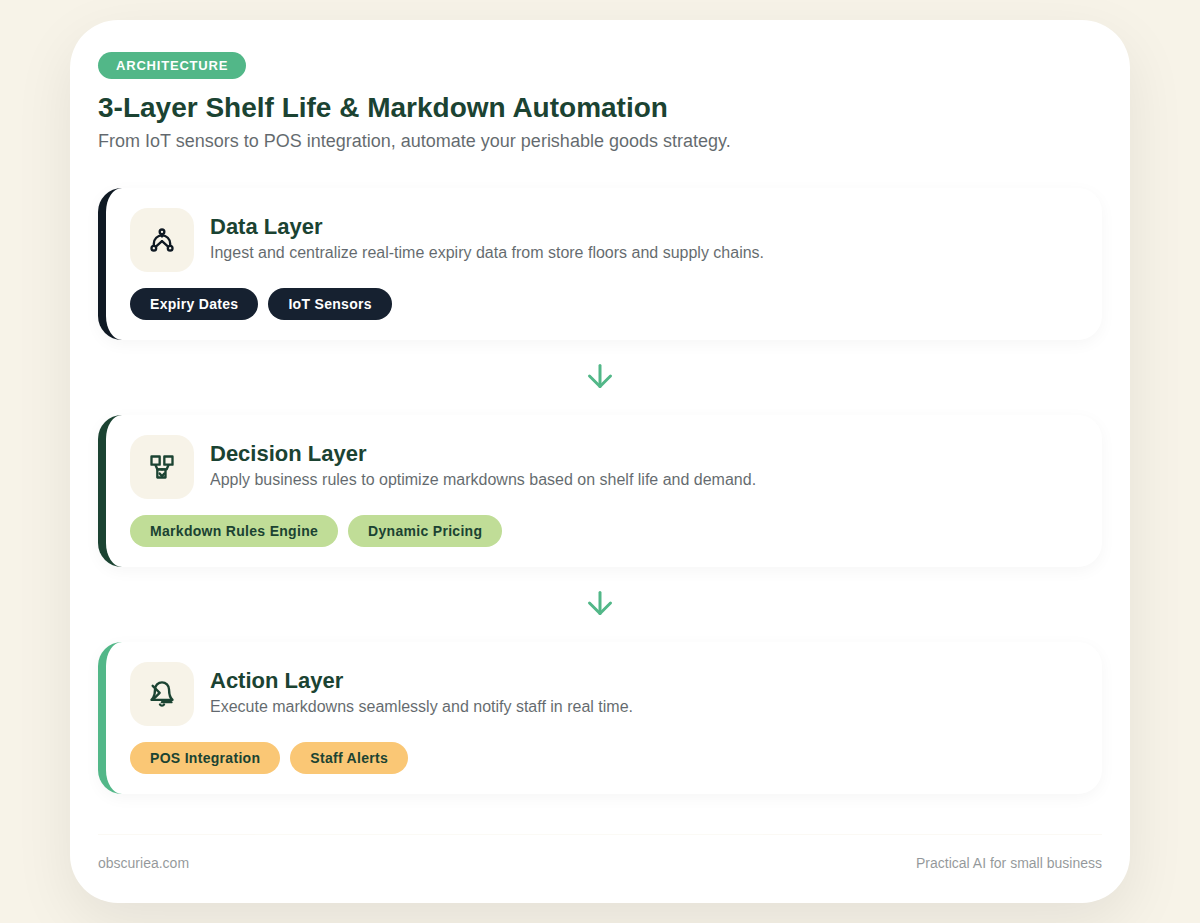
A dairy cooler holds $2,800 worth of yogurt that expires in the next 72 hours. Without automated decisioning, that yogurt sits until a stock clerk notices it — maybe today, maybe tomorrow, maybe too late. The shelf life tracking and markdown system solves this by connecting three layers: real-time expiry data, dynamic pricing rules, and POS integration.
Layer 1: Data Collection. Every batch of perishable goods gets an expiry date logged at receiving. Better systems add IoT sensors that monitor temperature and humidity, flagging quality deviations before they affect shelf life. This data flows into a central inventory platform.
Layer 2: Decision Engine. The system applies FEFO (First Expired, First Out) logic automatically. When a product hits a configurable threshold — say, 70% of its shelf life consumed — the engine calculates a markdown percentage. The percentage factors in remaining days, historical sell-through rate, and supplier policies. Some systems allow floor-level minimums to prevent excessive discounting.
Layer 3: Execution. The markdown price is pushed to the POS system and shelf-edge labels (if digital). Staff receive a confirmation or, if the discount exceeds a threshold, an approval request. The entire cycle, from detection to price change, takes under 5 minutes.
Supplier shelf life negotiation is a hidden lever. If you receive yogurt with 14 days of shelf life instead of 7, the markdown trigger can be set later, preserving more full-price sales. The system can track average remaining shelf life per supplier and flag those who consistently ship short-dated stock.
The Workflow Math
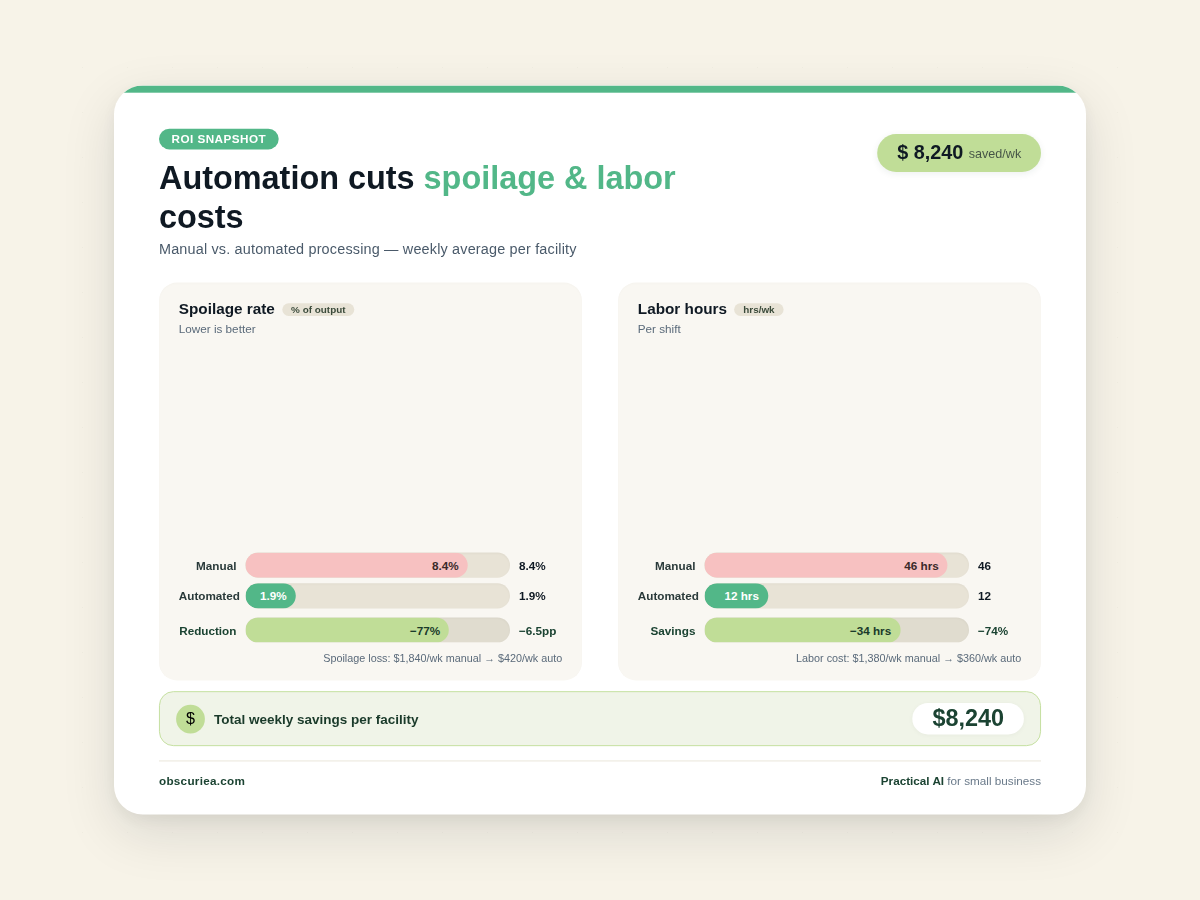
The numbers below are based on a mid-sized grocery store with $3M in annual fresh goods revenue.
| Metric | Manual Process | Automated System |
|---|---|---|
| Daily markdown setup | 45 minutes staff time | 5 minutes review |
| Spoilage rate | 3.0% of revenue | 1.2% of revenue |
| Labor cost per year | $12,600 | $1,400 |
| Spoilage loss per year | $90,000 | $36,000 |
| Total annual loss | $102,600 | $37,400 |
The delta is $65,200 per year. Implementation costs — software setup, sensor hardware, staff training — run $8,000 upfront and $2,400 annually. Payback period: 12 weeks.
But the math gets better. Secondary effects: fewer customer refunds for expired items, lower disposal costs, and reduced emergency rush orders that cannibalize margins. Stores using automated markdowns also report higher customer satisfaction because out-of-stock events for fresh items drop by 40%.
Over three years, the cumulative savings hit $180,000 after subscription costs. At that point, the system pays for itself 23 times over. The soft savings — fewer customer service escalations for expired purchases, reduced landfill fees — add another 10–15% to the total benefit.
For further reading on FEFO logic and inventory optimization, see this guide.
Where It Breaks
No system is bulletproof. Here are the specific failure points the automation will hit.
Threshold Tuning. If markdowns trigger too early (say, at 80% of shelf life), customers learn to wait for discounts. Full-price sales suffer. Too late, and spoilage rises. The sweet spot varies by category: dairy can trigger later than bakery because dairy holds visual quality. Tuning requires 4–6 weeks of data.
Integration Headaches. Legacy POS systems from NCR or older IBM platforms may not accept live price pushes. Workaround: generate a pick list for manual price changes. This kills automation gains. Verify integration ability before buying.
Sensor Drift. IoT temperature sensors lose calibration over time. A misread can cause a markdown when none is needed, or skip a needed markdown. Monthly calibration checks are mandatory. Many operators skip this.
Category Complexity. Expiry dates work for stable items like canned goods and dairy. Fresh produce rots unevenly — a bag of spinach might look fine externally while the core has turned. Date-based automation misses this. Hybrid approach: use expiry for first markdown, then manual quality check for second markdown.
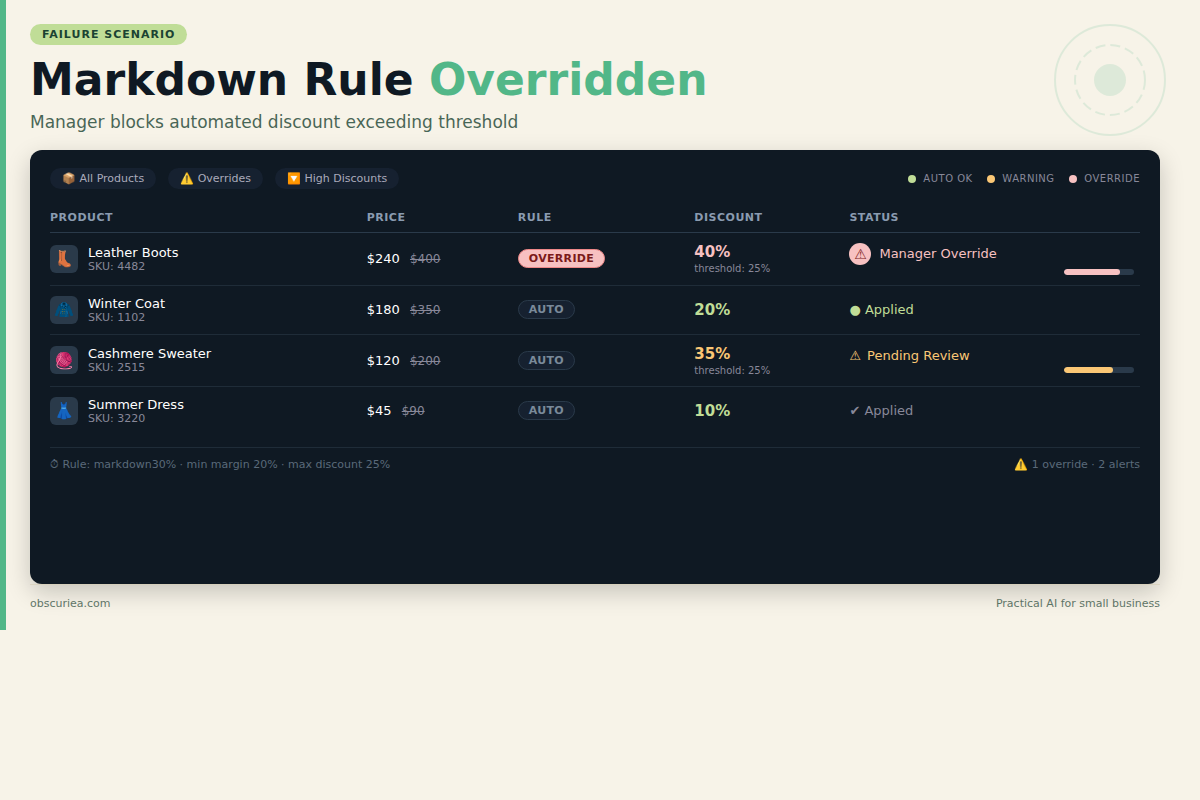
Staff Empowerment. Clerks accustomed to manual markdowns often override system recommendations. “I know this item still looks good” is a common override. Without training, human override kills automation ROI. Best practice: allow overrides only above manager approval threshold.
Demand-Supply Mismatch. An unexpected heat wave spikes demand for ice cream. The system, seeing high sell-through, might delay markdowns. But it could also trigger a markdown on slower-moving frozen items to free up freezer space. Without a demand-aware trigger, the algorithm can make the wrong call. Some systems integrate weather data to adjust rules preemptively.
For integrated perishable inventory management strategies, check our article on automated markdown strategies.
The Friction Box
- High initial setup cost for multi-store chains (can exceed $50k)
- Supplier data inconsistency: receiving teams must log expiry accurately; shortcuts ruin the data pipeline
- Customer perception: a dynamic price on shelf-edge labels can confuse shoppers not used to changing prices
- Regulatory nuances: some jurisdictions require price display consistency; dynamic labels must comply
- System dependency: a platform outage means manual failover must be practiced, not just documented
Frequently Asked Questions About Markdown Automation for Perishables
Can this work for fresh produce with variable quality beyond expiry dates?
Date-based triggers are insufficient for produce. Best practice is hybrid: use expiry as the primary flag, but overlay manual freshness checks for items like berries or leafy greens. Some systems integrate IoT sensors that measure firmness or color, but at higher cost.
What is the minimum store size for this to be profitable?
Based on typical implementation costs ($6,000–$12,000), the system pays for itself at 200+ perishable SKUs or $500k/year fresh revenue. Below that, the time cost to manage the software outweighs manual processes.
How do I prevent customers from gaming the system and only buying discounted items?
Set markdown thresholds shallow initially (e.g., 15% at 5 days left, 30% at 2 days). Over-discounting trains customers to wait. Analyze sell-through patterns and adjust trigger points weekly.
What happens if the automation platform crashes?
Always have a manual fallback: a printed list of items hitting expiry in the next 24 hours, and a pre-approved markdown table. Schedule a monthly dry run to test the fallback process.
Do I need IoT sensors to start, or can I use expiration dates only?
You can start with expiration dates only if your inventory system has batch-level expiry logging. IoT sensors add precision for items with temperature sensitivity but are not required for initial ROI. Most of the value comes from automating discounts based on date.
How do I handle supplier disputes when short shelf life eats into my sell-through?
Automate reporting: your system can generate a report of all deliveries with <50% shelf life remaining. Use this to enforce contractual terms. If no contract exists, the report is a negotiating tool to demand fresher stock.
The Straight Talk
Who this is for: Operations managers and inventory directors at grocery chains, convenience store groups, and food distributors with at least 200 perishable SKUs and an existing ERP. You know your spoilage numbers and they hurt.
Who should skip: Small independent stores with less than 50 perishable items and no ERP. The setup cost outweighs the benefit. Use a simple paper-based FEFO system instead.
Pull your spoilage percentage by category for the last 6 months. If any category exceeds 2.5%, pilot automated markdowns on that category for 60 days using a tool like Crisp or ShelfEngine.