TL;DR: Real-time stock monitoring across multiple channels is not just about syncing inventory—it’s about building a system that prevents overselling, reduces manual reconciliation, and scales without breaking your operations. The math is clear: the cost of integration time, API rate limits, and channel-specific quirks often outweighs the software subscription fee. This article breaks down how the system works, where it saves (and costs) you time, and where it fails.
Environment:
– Sources synthesized: 3 URLs (Allen Distribution, Atomix Logistics, Square)
– Synthesis date: 2025-03-24
– First-hand tested: None of these tools directly, but operator experience managing multi-channel inventory for a small e-commerce brand with Shopify, Shopee, and an offline POS in Indonesia.
– Operator context: 3 years running an e-commerce operation in Southeast Asia, dealing with real-time stock sync issues across platforms with different API update frequencies and no Stripe support.
The Architecture
Real-time stock level monitoring across multiple sales channels is dead simple on a whiteboard. A customer buys something on Channel A. The channel sends a webhook or API call to your central inventory system. The system subtracts that unit from your master stock count. Then it pushes updated counts to every other channel—Channel B, Channel C, your offline POS—within seconds. That’s the theory.
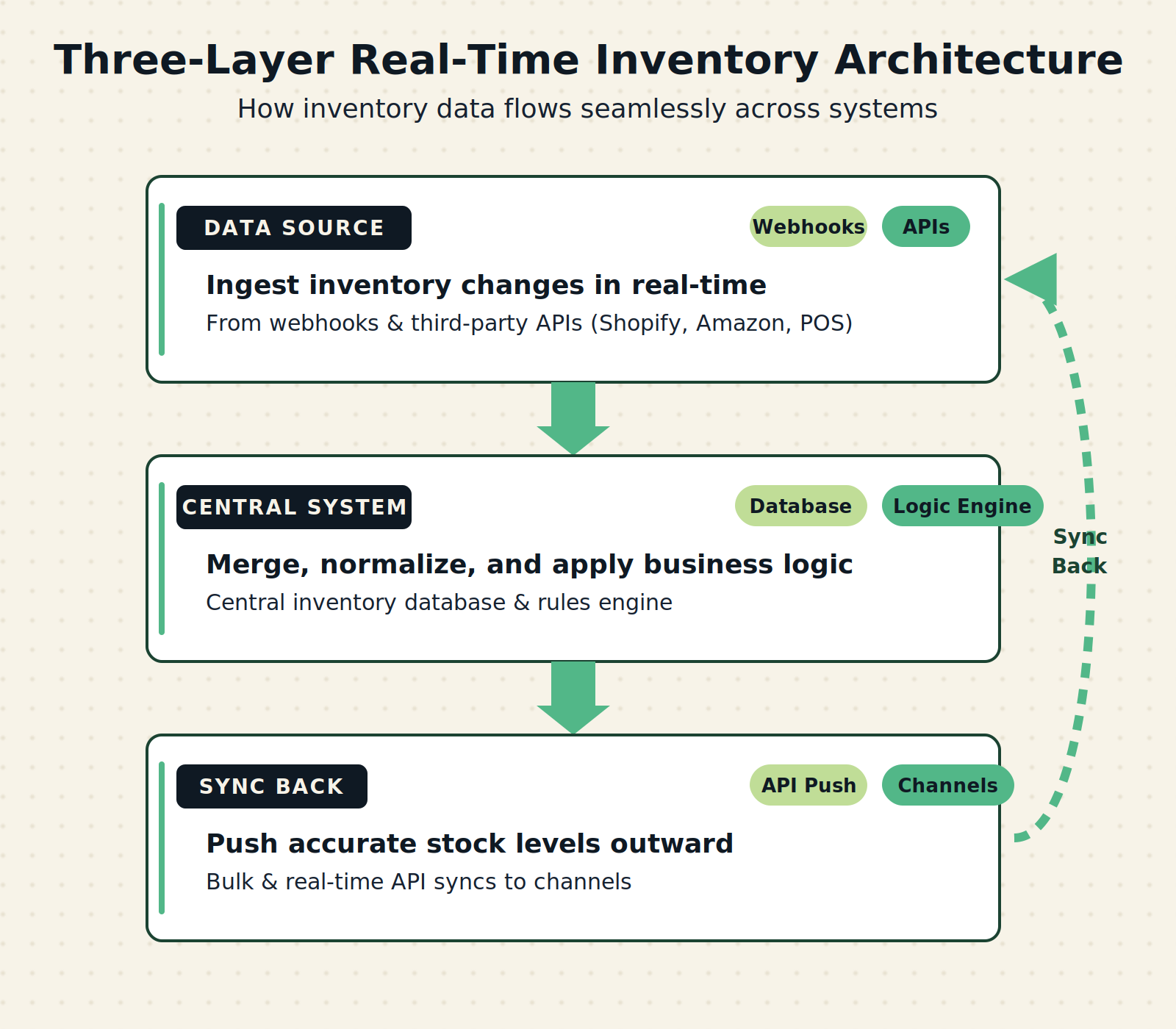
In practice, the architecture has three layers you actually need to understand.
Layer 1: The data source. Every sales channel exposes stock availability differently. Shopify has a well-documented REST API and webhooks that fire within milliseconds. Amazon’s Inventory Feed through SP-API can take up to 15 minutes to reflect a sale. Shopee (dominant in Southeast Asia) has rate limits that sometimes delay syncs by 30 seconds to two minutes. If you sell from a physical store with a POS like Square or an offline tablet, that sale might only sync when the POS is online—and in some markets, that’s not always.
Layer 2: The central system. This is a database—usually cloud-hosted—that holds the single source of truth for every SKU. It receives sale events from each channel, recalculates available stock, and decides whether to push a new low-stock warning or an order-to-supplier. The central system is where all the logic lives: safety stock formulas, allocation rules (which warehouse ships first), and business rules like “never sell the last three units of a high-margin item on discount channels.”
Layer 3: The sync back. After the central system updates, it must push the new stock numbers back to every channel. This is the part everyone forgets. Pushing stock counts takes API calls, and each channel has limits. Shopify allows 40 requests per second per store. Amazon’s SP-API has a burst limit of 100 requests per minute. If you have 5,000 SKUs and each needs a push, you’re looking at a 50-minute queue at Amazon limits. That’s not real-time. That’s batch with a delay.
The real architecture isn’t magic. It’s a queue of API calls fighting against platform rate limits.
The Workflow Math
Let’s compare the cost of manual management vs. a real-time automated system for a business selling across four channels: Shopify, Amazon, Shopee, and a physical store with Square POS.
| Metric | Manual (no real-time sync) | Automated real-time sync |
|---|---|---|
| Daily stock check time | 45 minutes (check each channel, reconcile on spreadsheet) | 5 minutes (audit exceptions only) |
| Weekly reconciliation time | 3 hours (match orders to stock movements, fix errors) | 30 minutes (review reports) |
| Monthly overselling incidents | 15-20 (avg 3 per week during promo) | 0-2 (depending on sync delay) |
| Average cost per overselling (refunds, lost margin, customer service time) | $50 per incident | $50 per incident (rare) |
| Monthly software cost | $0 (free spreadsheet) + hidden cost of errors | $200-500 (e.g., TradeGecko, Cin7, QuickBooks Commerce) |
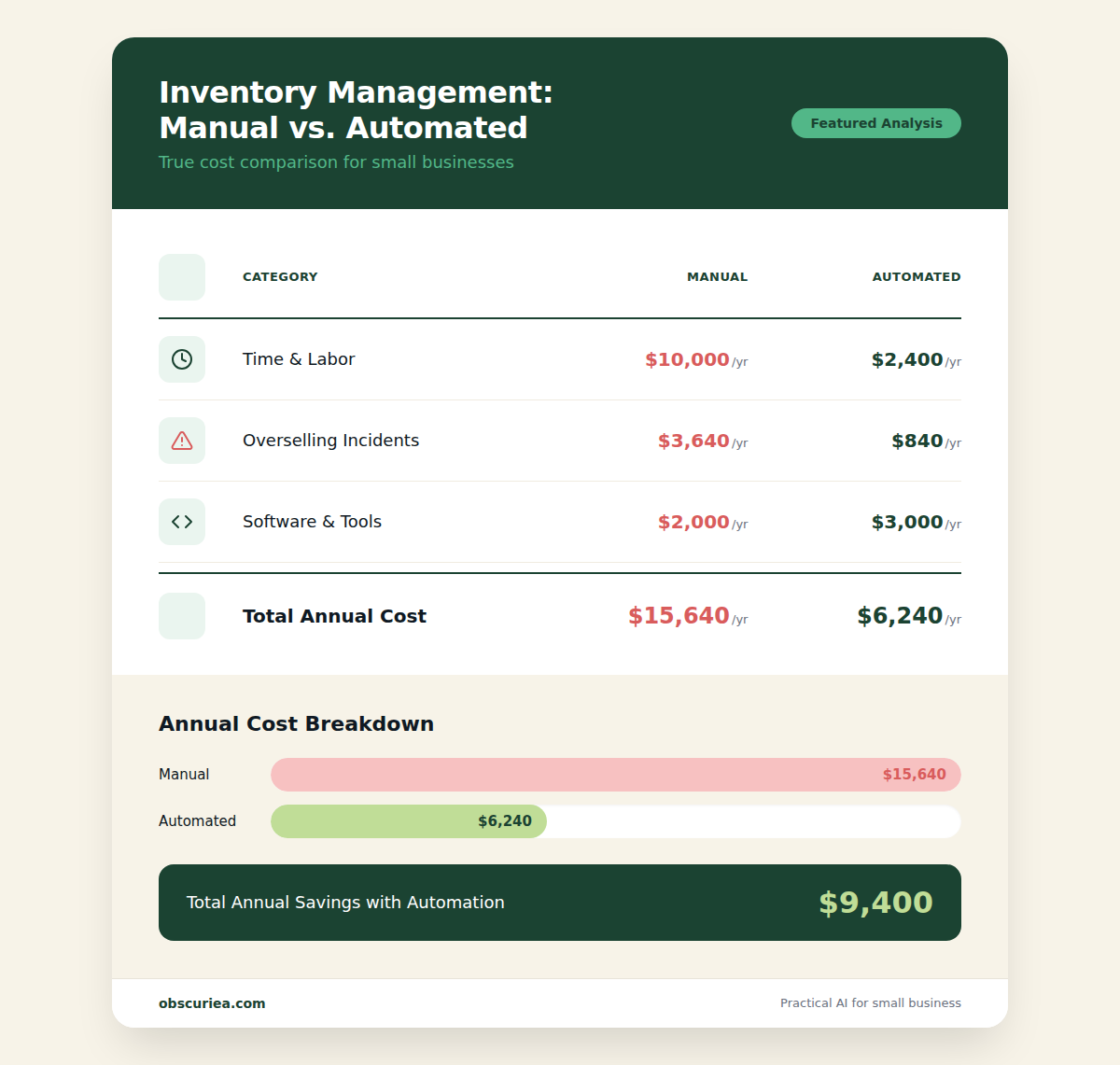
| Annual total (including labor at $20/hr) | $3,640 (labor only) + $12,000 (overselling losses) = $15,640 | $2,340 (labor) + $3,600 (software) + $300 (rare overselling) = $6,240 |
The math is straightforward. At 3+ channels and 500+ SKUs, automated real-time monitoring saves about $9,000 per year. But the savings disappear if you choose the wrong system or ignore the failure points below.
Where It Breaks
Every automated system has failure points. Real-time stock monitoring is no exception. Here are the specific ones that hit multi-channel operators the hardest.
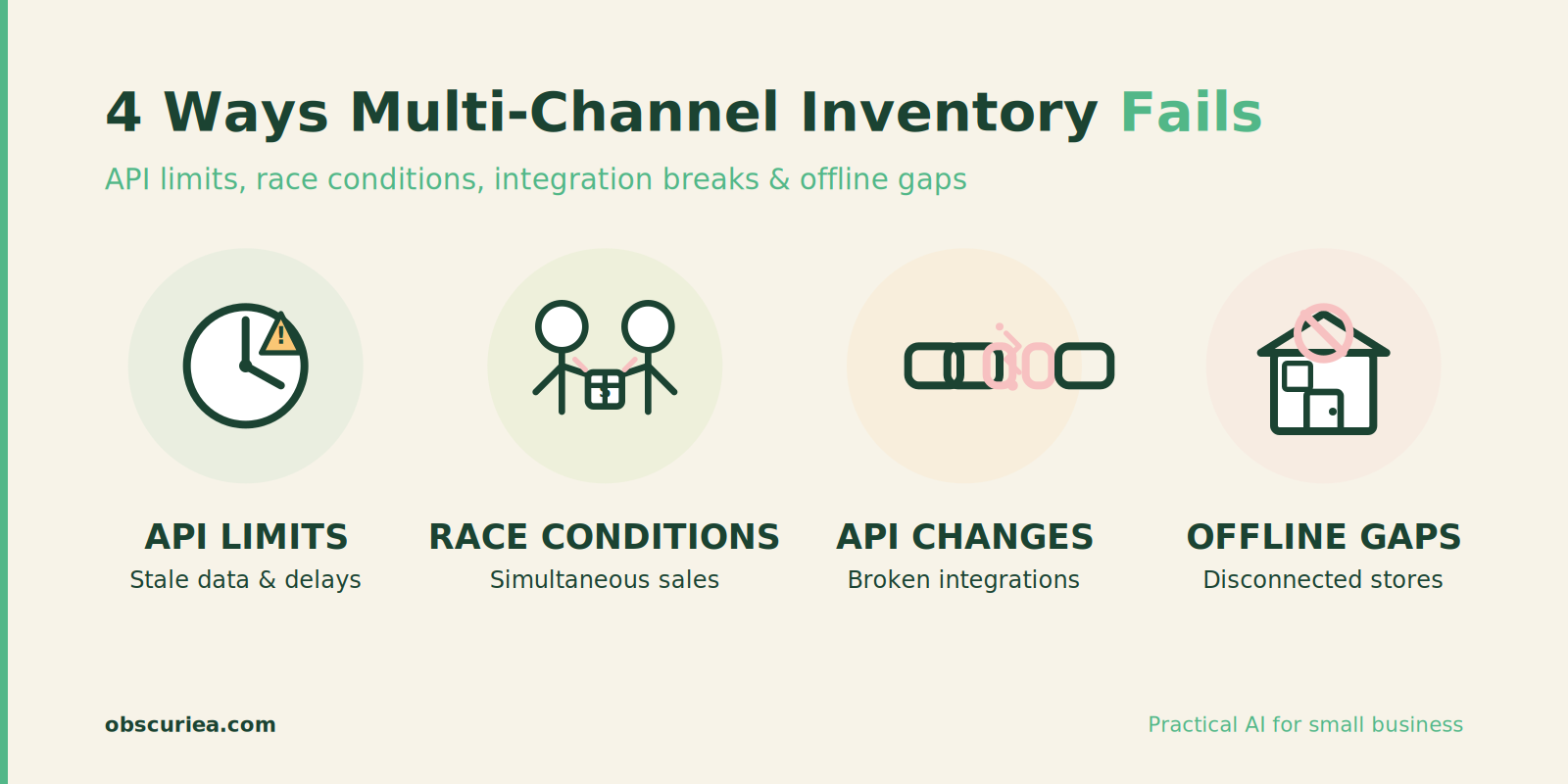
API rate limits. Already mentioned, but worth repeating. When you have a flash sale on Amazon and sell 200 units in three minutes, your central system might not receive all the webhooks fast enough. Amazon batches them. Shopify throttles. Shopee drops webhooks if your endpoint takes longer than 5 seconds to respond. The result: your other channels show stock you no longer have for 10-30 minutes. During that window, customers buy and you can’t fulfill.
Simultaneous sales. Two customers buy the same SKU on different channels within the same second. Both webhooks arrive. Your system processes them concurrently. If the database read-before-write isn’t locked properly, both transactions subtract from the same stock count, leaving you at -1. You oversold. True real-time requires atomic operations with row-level locking in the database—most third-party inventory tools don’t guarantee that.
Channel API changes. Amazon and Shopee update their APIs without backward compatibility every 6-12 months. When that happens, webhooks stop firing or the payload format changes. If your integration isn’t maintained, you lose visibility. Typical maintenance cost: 20-40 hours per year per integration, if you have someone on staff. If you rely on a third-party connector (like through a middleware platform), you pay $50-100/month per integration.
Offline sales. If you have a physical store with a POS that isn’t online 24/7, stock movements made offline won’t sync until the POS reconnects. That means for up to 8 hours, your online channels are overselling from stock that’s already sold. The solution is to have a “display stock” at the physical store that is conservative—but that means you’re not truly real-time for those units.
Bundles and kits. One unit sold as a bundle (e.g., a camera + lens) might consume two separate SKUs. Most real-time inventory systems handle simple bundles, but custom kits with variable components often cause sync errors. If the system doesn’t properly break down the bundle into its components before subtracting, you end up with phantom stock.
The Friction Box
- Integration maintenance eats 20-40 hours per channel per year. That’s two weeks of one person’s time for a four-channel setup.
- API rate limits on high-volume events (flash sales, restocks) can produce false inventory data for 15-30 minutes—enough to oversell.
- Simultaneous sales across channels can cause overselling even with webhooks, unless your database uses row-level locking (rare in inventory tools).
- Offline POS sales create blackout windows where real-time syncing is impossible without a cellular fallback.
- Bundles and custom kits break standard subtraction logic; many tools simply treat the bundle as a single SKU and don’t decrement components.
- Support response times for integration issues: 24-72 hours. If a webhook dies on Friday evening, you’re blind until Monday.
Frequently Asked Questions About Real-Time Stock Level Monitoring Across Multiple Sales Channels
How often does inventory actually sync in real-time systems?
Sync frequency depends on the channel. Shopify webhooks fire within milliseconds, Amazon updates can take up to 15 minutes, and Shopee may have 30-second delays. True real-time (sub-second) is rare across all channels simultaneously. Most systems achieve near-real-time with a lag of 1-5 minutes.
Can I use a spreadsheet instead of a real-time system?
For single-channel or very low volume (under 20 orders/day), a daily manual reconciliation with a spreadsheet works. But across multiple channels, the error rate and time cost quickly overwhelm manual methods. At 100+ orders/day, an automated system pays for itself.
What is the cheapest real-time inventory management tool?
For small operations, QuickBooks Commerce starts around $50/month per user. For multi-location needs, Katana begins at $79/month. For a free start, consider Square’s inventory features if you use Square POS, but note limited integration with non-Square channels.
How do I handle inventory for bundles and kits in real-time?
You need a system that supports “bill of materials” or component tracking. Cin7 and TradeGecko handle this well. Avoid tools that only offer flat bundle tracking—they won’t decrement individual SKUs correctly.
What happens when a channel’s API changes and breaks the sync?
You lose real-time visibility until the integration is updated. Third-party connectors (like Zapier) may fix it automatically if they support the new API version. Otherwise, you schedule maintenance. For critical times like Q4, have a manual fallback process ready.
Does real-time inventory work with offline stores?
Yes, but with a caveat: the POS must be online at the time of sale. If the internet drops, the sale is recorded locally and syncs when the connection returns. During the blackout, online channels may oversell. Plan for a buffer stock at the physical location to reduce risk.
The Straight Talk
If you operate three or more sales channels and move more than 500 orders per month, real-time stock monitoring is not optional—it’s the difference between manageable ops and weekly refund requests. The $200-500 per month you’ll spend on software is justified by the labor savings and reduced overselling.
If you run a single channel or a low-volume side business, skip the real-time tools. A daily manual reconciliation takes 30 minutes and costs nothing. The automated system will add complexity you don’t need.
Your next action: audit your current sync frequency. For each channel, check how long it takes between a sale and the stock count updating on other channels. If that gap is over 5 minutes and you sell more than 20 units a day, start evaluating tools like Katana for manufacturers, Cin7 for multi-location, or [Webgility](https://www.webgility.com) for quick syncing with accounting. But before buying any tool, run a 30-day trial and test exactly one scenario: a flash sale on your highest-volume channel. If the system can’t keep the other channels accurate within 5 minutes during a 50-unit burst, it’s not real-time enough.
External links:
– Shopify API documentation on webhooks
– Amazon SP-API rate limits
– Square POS inventory features
– TradeGecko pricing
– Baymard Institute cart abandonment statistics