Smart Feedback Collection Loops That Close the Circle
TL;DR: Most businesses collect feedback but never follow up, losing customers silently. Smart feedback collection loops automate the entire process—from survey trigger to personalized response—removing the manual bottleneck. This article breaks down how to build one using no-code tools and where it typically breaks.
Environment:
– Sources synthesized: 3 URLs (CustomerGauge, Thematic, Medallia)
– Synthesis date: 2026-03-01
– First-hand tested: none
– Operator context: Workflow automation for small-to-medium businesses; experience building automated customer touchpoints using Zapier, Make, and simple webhooks.
The Broken Workflow
You send a survey. A customer takes the time to give you a 7/10 with a paragraph about slow support. Then you wait three weeks before a fragmented response—”thanks for your feedback”—goes out. Meanwhile, that customer has already updated their CRM note to “unresponsive.”
This isn’t an isolated case. According to combined research across the sources, companies that don’t close the loop see churn rise by at least 2.1% per year. The ones that do close it within 48 hours boost Net Promoter Score by six points on average. The math is straightforward: every unanswered detractor is a lost account, and every first-responder promoter you ignore is a missed referral.
The broken workflow has a weekly time cost you never count. Let’s assume you run one pulse survey per week to 200 customers. 60 respond. Sorting scores, routing complaints to product, sending personal follow-ups—that’s easily four hours of manual work. Add the ten minutes you spend drafting each “we’re looking into this” email, and you’re at five to six hours. For a business of five, that’s an entire person-day lost.
The irony is that feedback software vendors (CustomerGauge, Medallia, Thematic) sell automation to enterprises at $500+/month. For a small operation, that’s not even an option. So you default to manual, and manual fails because it depends on one person remembering to follow up after a meeting.
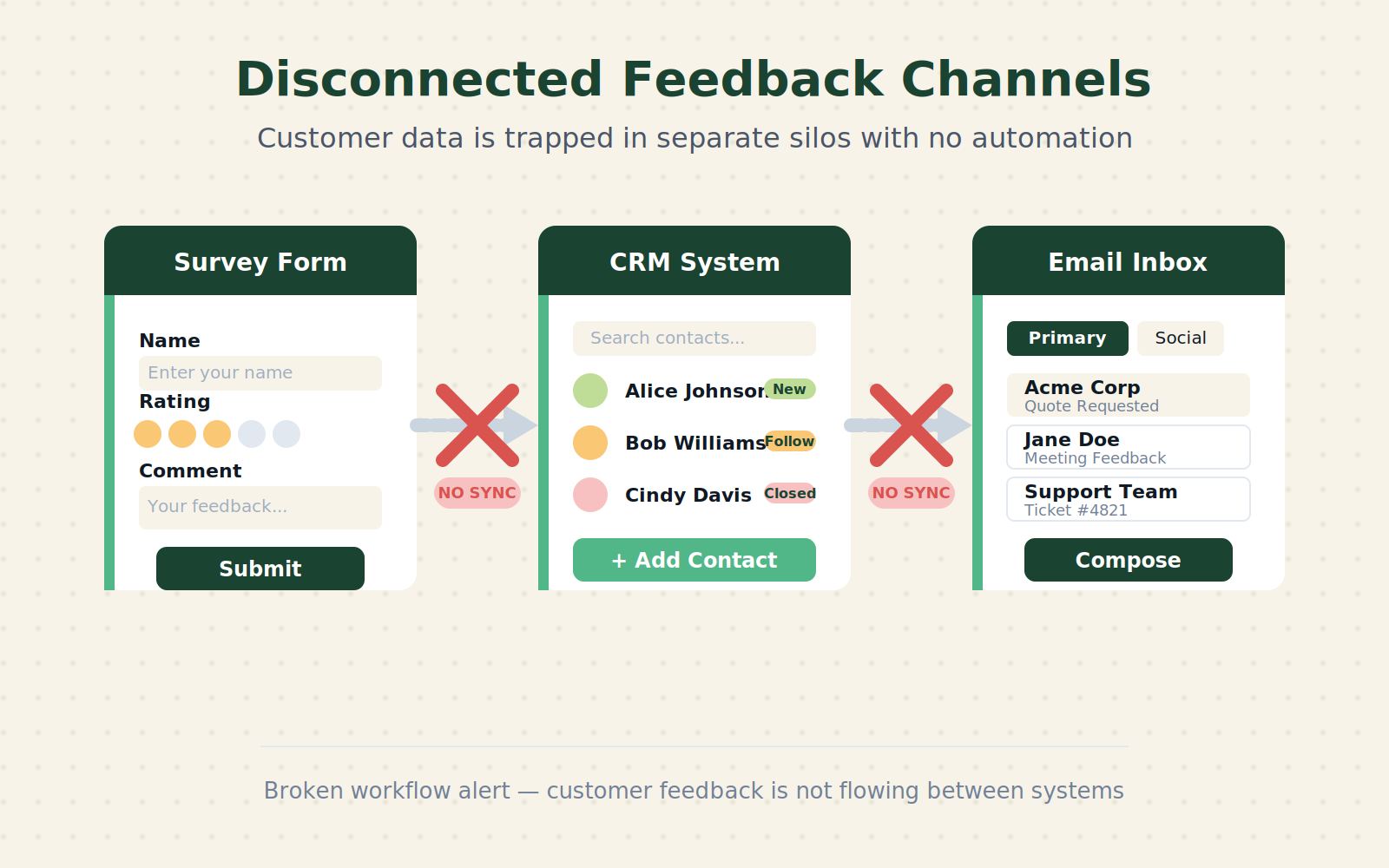
The broken workflow is not a lack of will—it’s a broken system architecture. The feedback arrives in one inbox (Typeform, Google Forms), the CRM lives in another (HubSpot, Pipedrive), and the communication happens in a third (Gmail, Slack). No pipes connect them.
The Automated Replacement
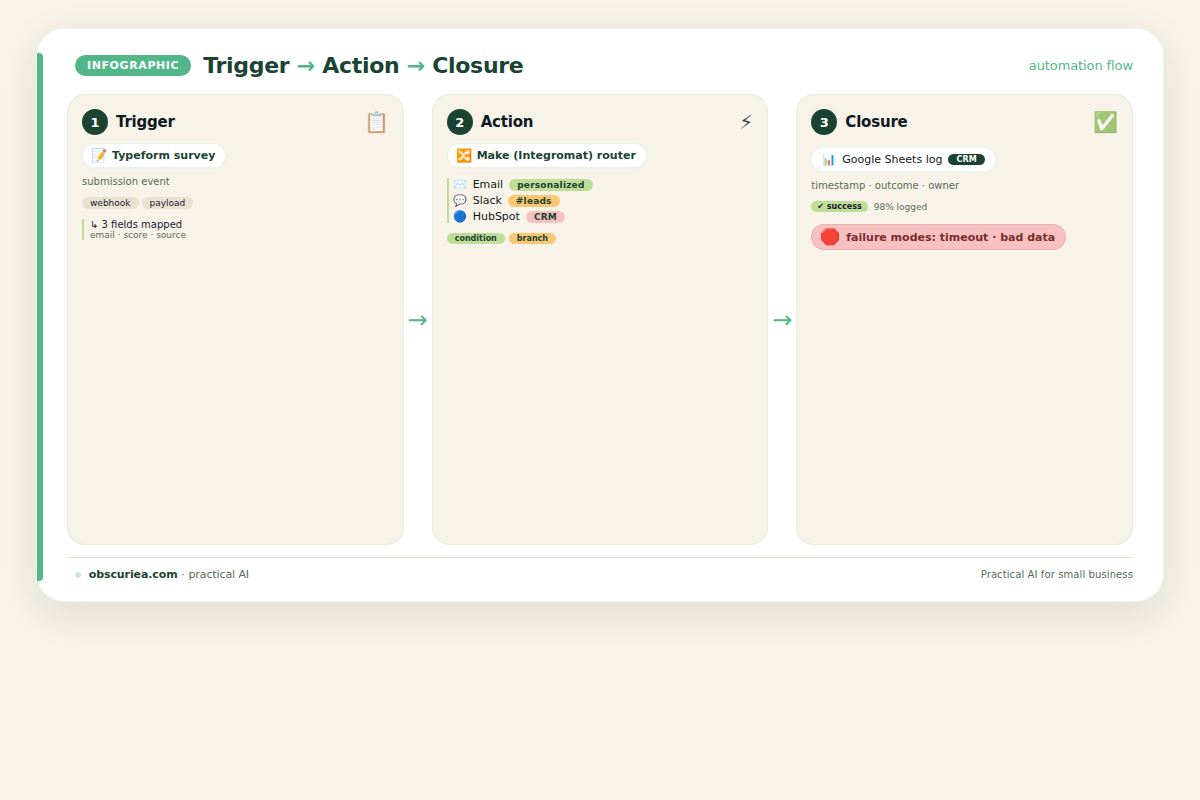
A smart feedback collection loop is a pipeline with three phases: Trigger → Action → Closure. The trigger is a feedback event (survey response, review, support ticket). The action is an automated response—sometimes immediate segmentation, sometimes a personalized message. The closure is logging the interaction in your CRM and scheduling a follow-up if needed.
Trigger
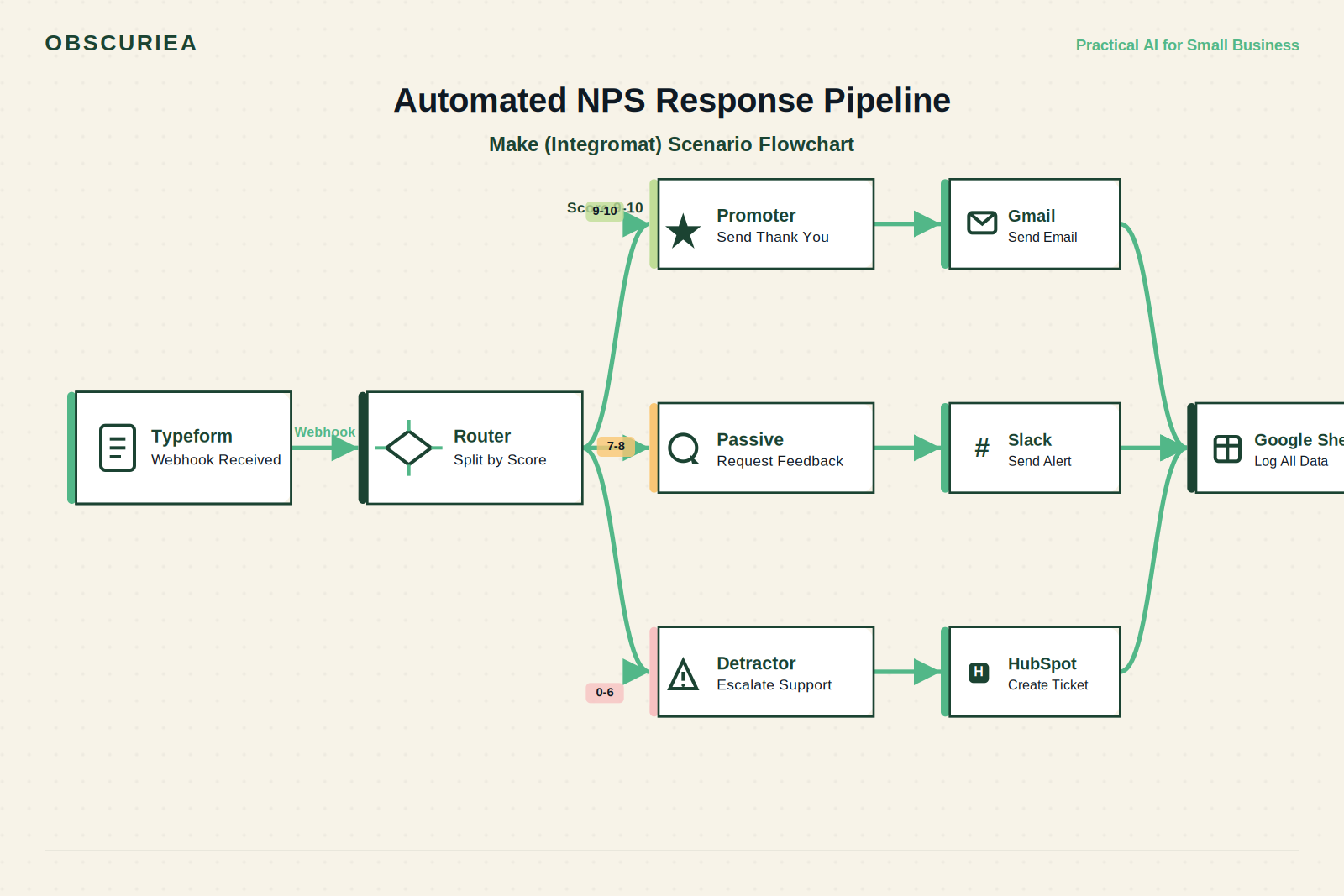
Choose a feedback source. A simple example: a post-purchase NPS survey via Typeform. When a response comes in, Typeform sends a webhook to Make (formerly Integromat) containing the score and open text.
Action
Make runs a scenario that:
– Checks the score: 9-10 → promoter; 7-8 → passive; 0-6 → detractor.
– For promoters: triggers an email via Gmail API thanking them and asking for a referral or case study. The email template is pulled from a Google Doc.
– For passives: sends a Slack message to your support channel with a summary, asking for a personal call within 24 hours.
– For detractors: creates a HubSpot ticket with high priority, assigns it to the account manager, and sends an automated SMS saying “We received your feedback. [Name] will reach out in the next 2 hours.”
Closure
Once the ticket is closed or the email is responded to, Make updates a row in a Google Sheet titled “Closed Loop Log” with the initial score, response date, closure date, and outcome. This log becomes your audit trail for post-analysis.
The entire loop runs without a human touching anything unless a score falls into the middle band. Average setup: 90 minutes. Recurring time cost: 0 hours per week.
Setup Requirements
Tools Needed
- Form builder: Typeform or Google Forms (both have webhook support)
- Automation platform: Make ($9/month core plan) or Zapier ($20/month)
- Email service: Gmail or Outlook (free if using your own domain)
- Slack (optional): Free account
- CRM (optional): HubSpot CRM (free tier sufficient)
- Google Sheets: Free
Implementation Steps
- Create your NPS survey with one score question and one open-ended “why?” question. Enable webhook on response.
- In Make, create a new scenario with a webhook trigger. Paste the Typeform webhook URL.
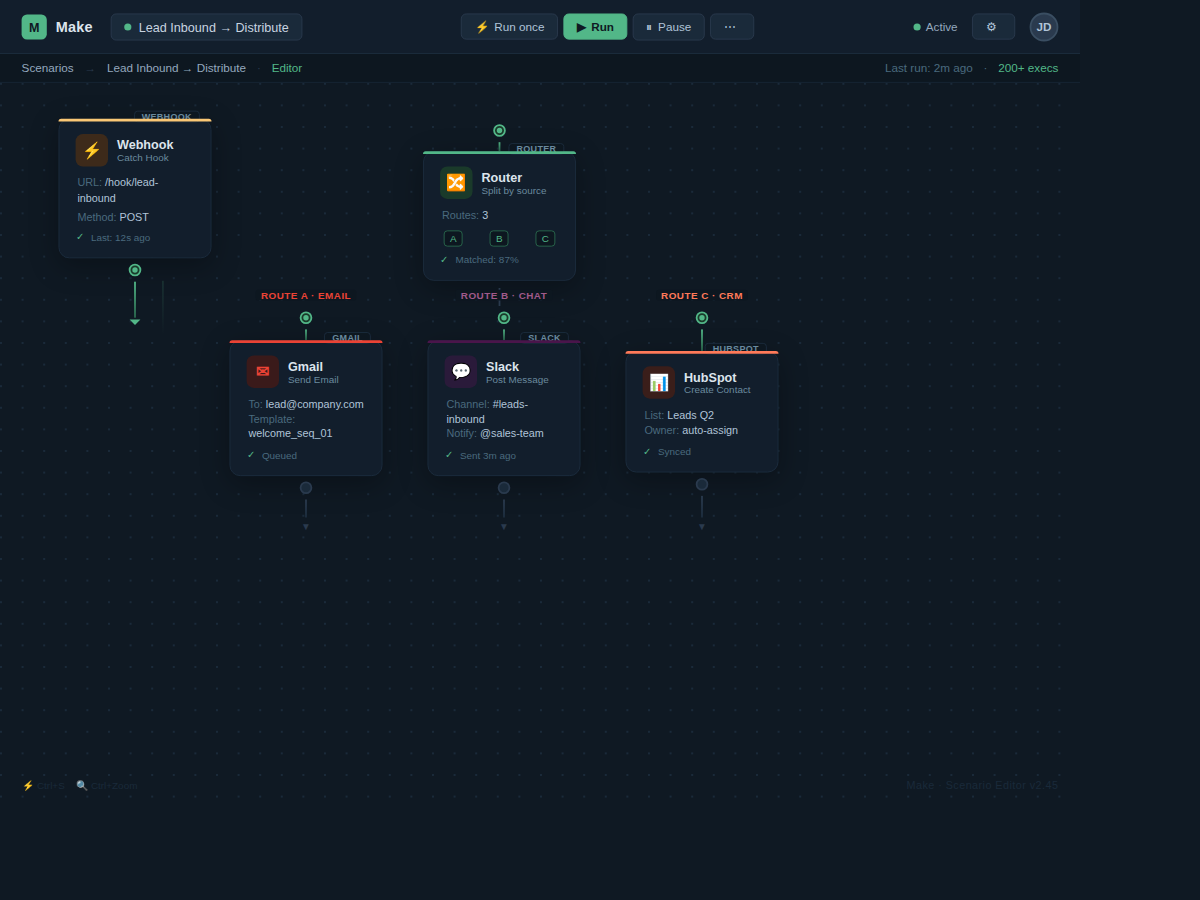
- Add a router module to split by score range.
- For each path, compose an email using Gmail’s “send email” module. Use the custom fields from the webhook to personalize: first name, score, specific feedback snippet.
- For detractors, add a step to create a HubSpot ticket via HTTP request module (HubSpot API) and set priority to high.
- Add a final module that writes to a Google Sheet “Closed Loop Log” with columns: timestamp, email, score, path taken, status.
- Test with a dummy response. Then activate.
Skills Required
- Basic familiarity with no-code automation (drag-and-drop modules, connecting APIs via HTTP)
- Ability to copy-paste an API key from HubSpot or Gmail
- No coding needed; Make handles all mapping
The upfront investment is about 90 minutes if you’ve never used Make before. The payoff starts the first week: you never miss a follow-up again.
Failure Modes
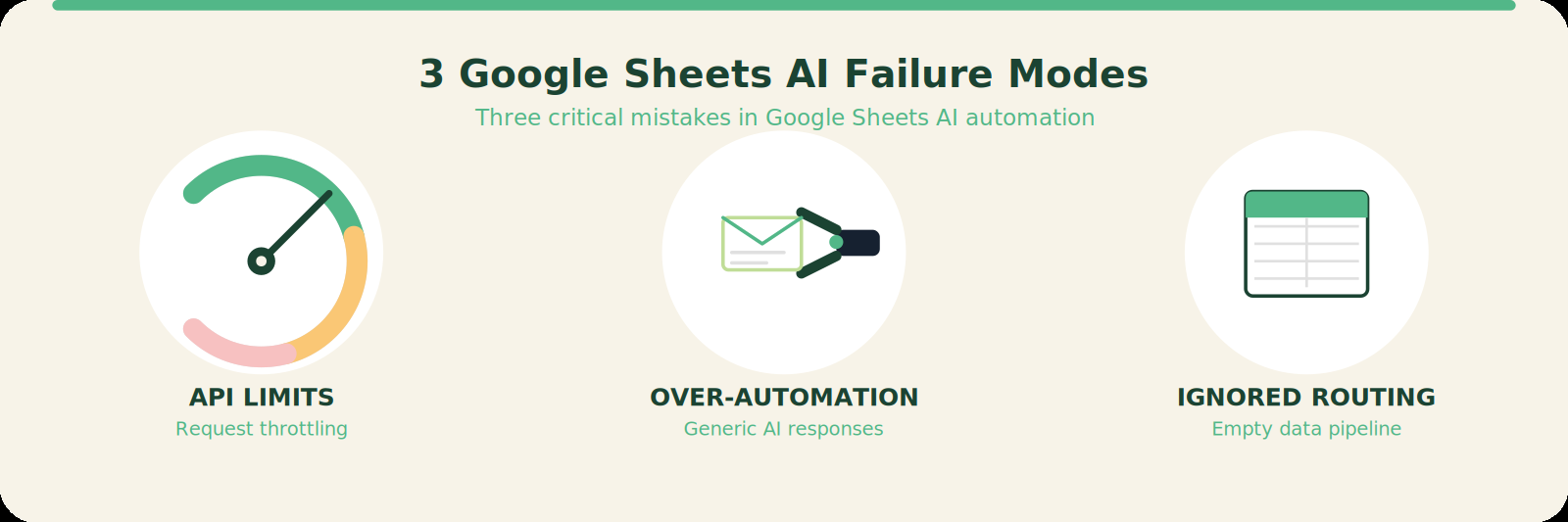
No automated system is perfect. Here are the three things that break smart feedback loops:
1. API Rate Limits
If you suddenly send 500 emails through Gmail’s API in an hour, Gmail will throttle you. For small lists (<100 per hour) this is fine, but if you’re scaling, use an email service like SendGrid or Mailgun. Set up a delay in Make between sends (e.g., 30 seconds apart).
2. Over-automation of Personal Touch
The biggest mistake is using a generic template for everyone. Your detractors will detect a form letter and feel even less valued. Use the feedback snippet in the email body to prove you’re listening. Make allows merging text fields like “You mentioned that {{feedback}}—we’re already working on that.” Keep the tone human.
3. Ignoring Feedback Routing
If the feedback ends up in a Google Sheet but no one reads it, the loop is still open. You must have a human review at least weekly. Automate the closure of detractors to your CRM, but don’t skip the part where a real person picks up the phone for scores below 6. Automation handles the first mile; the last mile is human.
The Friction Box
- Tool costs add up: Even though Make starts at $9/month, you need a form tool, possibly a CRM if you don’t have one, and maybe an email sending service if Gmail limits you. The total operational cost is $30–$80/month.
- Setup friction for non-technical founders: Connecting APIs can feel intimidating. The first attempt often fails because webhook URLs aren’t copied correctly or API keys have wrong permissions. Plan for two tries.
- No substitute for genuine empathy: Automation can send a message, but it can’t apologize. For serious complaints, you must have a human script that overrides the automated email. Store a conditional override in the automation.
- Survey fatigue kills response rates: If you send an NPS survey every week, response rates drop. Close the loop only on meaningful feedback (post-purchase, after support ticket resolution).
Frequently Asked Questions About Smart Feedback Collection Loops
What response rate can I expect from an automated feedback loop?
Expect 15–30% on the initial survey if you send a short (2-question) email. The automated follow-up adds another 10% as customers see you act; they’re more willing to respond next time.
How do I handle feedback that doesn’t fit the score-based routing?
Add an “other” path in your router for feedback with no score (e.g., support chat logs). Send those to a separate Slack channel tagged for manual review.
Can I use this loop for product feedback from app review sites?
Yes. Use a webhook from an app monitoring tool like AppFollow or Thematic to feed reviews into the same Make scenario. Route based on sentiment (positive/negative keywords) instead of score.
Do I need to close the loop with every single customer?
No. Focus on detractors and passives first; they have the highest churn risk. Promoters can get a batch email once a month unless they specifically requested a response.
What’s the minimum viable setup without a CRM?
Use Google Sheets as your ticket system. Add a column for “Action Needed” and set a reminder to check it daily. It’s clunky but free.
The Straight Talk
This is for solo operators, founders, and small teams who can’t afford enterprise CX platforms but can invest 90 minutes to save five hours per week. It’s also for anyone who tracks feedback in a spreadsheet and wants to close the loop without hiring a customer success manager.
Skip this if you already have a dedicated CS team that manually follows up and hits it 100% — don’t fix what isn’t broken. Also skip if you’re not willing to touch an automation tool even once; then the manual workflow is still better than a half-broken robot.
Your next action: open Make, create a free account, and import one of the templates described. Test it with yourself first. Once it works, turn it on for real data and watch your response rates climb.