TL;DR: You can now deploy a custom-trained chatbot without writing a single line of code—either through a visual drag-and-drop builder or by prompting an AI to generate the entire system. This article breaks down the operational math for both routes, revealing which one actually saves time and money for a small business operator in Southeast Asia, and where each approach breaks at scale.
Environment
- Sources synthesized: 2 URLs (QuickChat buyer’s guide, Growwstacks AI assistant tutorial)
- Synthesis date: 2025-12-14
- First-hand tested: none on the specific platforms mentioned
- Operator context: Managing customer service for 4 e-commerce stores in Indonesia; experience with WhatsApp Business API, Tokopedia chat, and manual FAQ handling.
The Architecture
Two distinct routes exist for building a custom-trained chatbot without writing code. They are not interchangeable. Understanding the architecture of each is the prerequisite to choosing correctly.
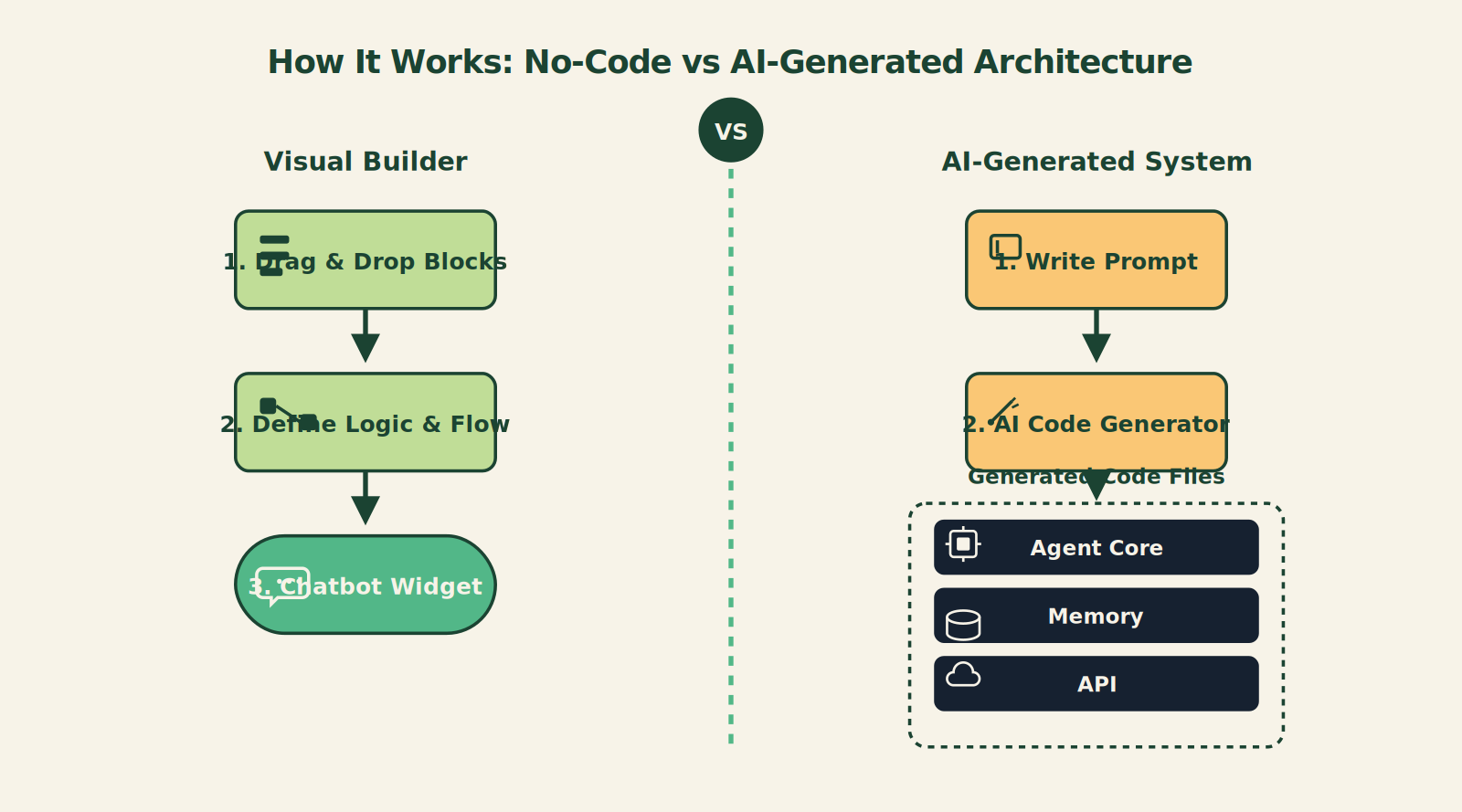
Route 1: The No-Code Visual Builder. Platforms like QuickChat, Tidio, or ManyChat give you a drag-and-drop interface where you assemble conversation flows from pre-built blocks. You upload your FAQ as a CSV or scrape your website, pick a template, and publish a JavaScript snippet. The platform handles hosting, NLP, and LLM integration behind the scenes. Your role is traffic controller, not programmer.
Route 2: The AI-Generated Code System. Tools like Claude Code with guided prompting let you describe your assistant in a single strategic prompt. The AI researches latest docs, asks clarifying questions, then autonomously generates 40+ files—agent core, memory system, API integrations, front-end UI—all in under 15 minutes. You never touch the code, but you are making architecture decisions: which tech stack, which memory tier, which integrations. Your role shifts from coder to strategist.
The key operational difference: Route 1 gives you a managed service with ongoing subscription costs; Route 2 gives you a self-hosted codebase you own (but must maintain). The math depends on your scale and technical comfort.
The Workflow Math
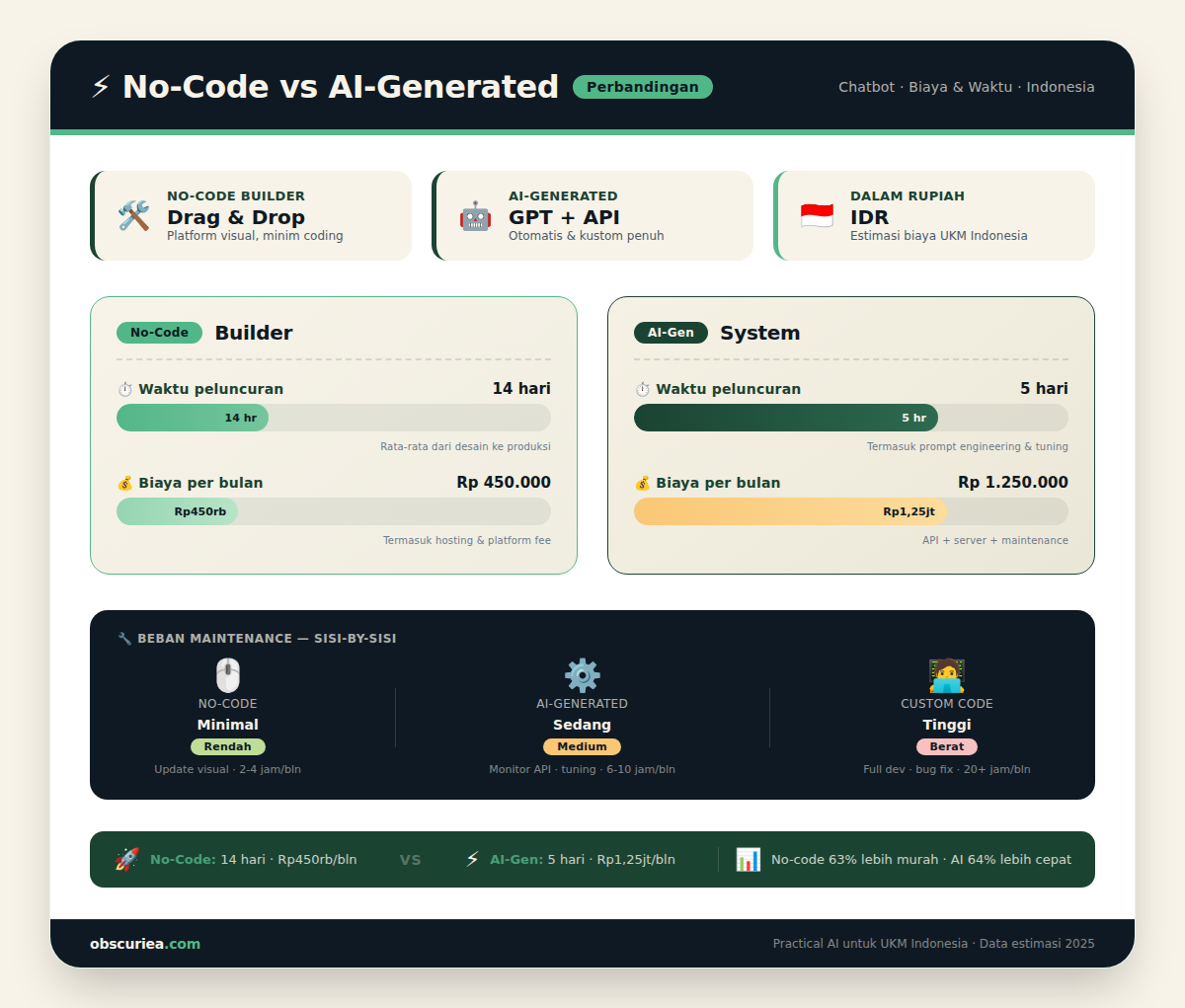
Let’s compare the two routes against three metrics: time to first launch, monthly cost at 1,000 conversations, and maintenance burden per month. Assumes a store handling 1,000 customer chats per month in Indonesian/English bilingual environment.
| Metric | No-Code Visual Builder | AI-Generated System |
|---|---|---|
| Time to first launch | 30 min (template + CSV upload) | 2 hours (prompt crafting + planning + review) |
| Monthly cost (1k convos@IDR) | Rp 500,000–1,200,000 (mid-tier plan) | Rp 0–200,000 (hosting + API tokens) |
| Maintenance burden | Platform handles updates; you tweak flows monthly | You verify new releases, update dependencies, monitor API changes |
| Custom training data capacity | Usually limited to FAQ CSV or website scrape | Full vector store; unlimited documents via API |
| Integration options | Pre-built (Shopify, WhatsApp, email) | Any API; requires initial config but unlimited |
The math here is straightforward. For a typical Indonesian micro-business (under 200 chats/month), the no-code builder’s simplicity wins—you pay a little more but avoid the maintenance tax. At 500+ chats/month, the cost advantage shifts to the generated system, but only if you have someone comfortable reading a package.json once a month.
Where It Breaks
Both routes fail in specific, predictable ways. Knowing these before you start prevents a week of frustration.
No-Code Builder Failures:
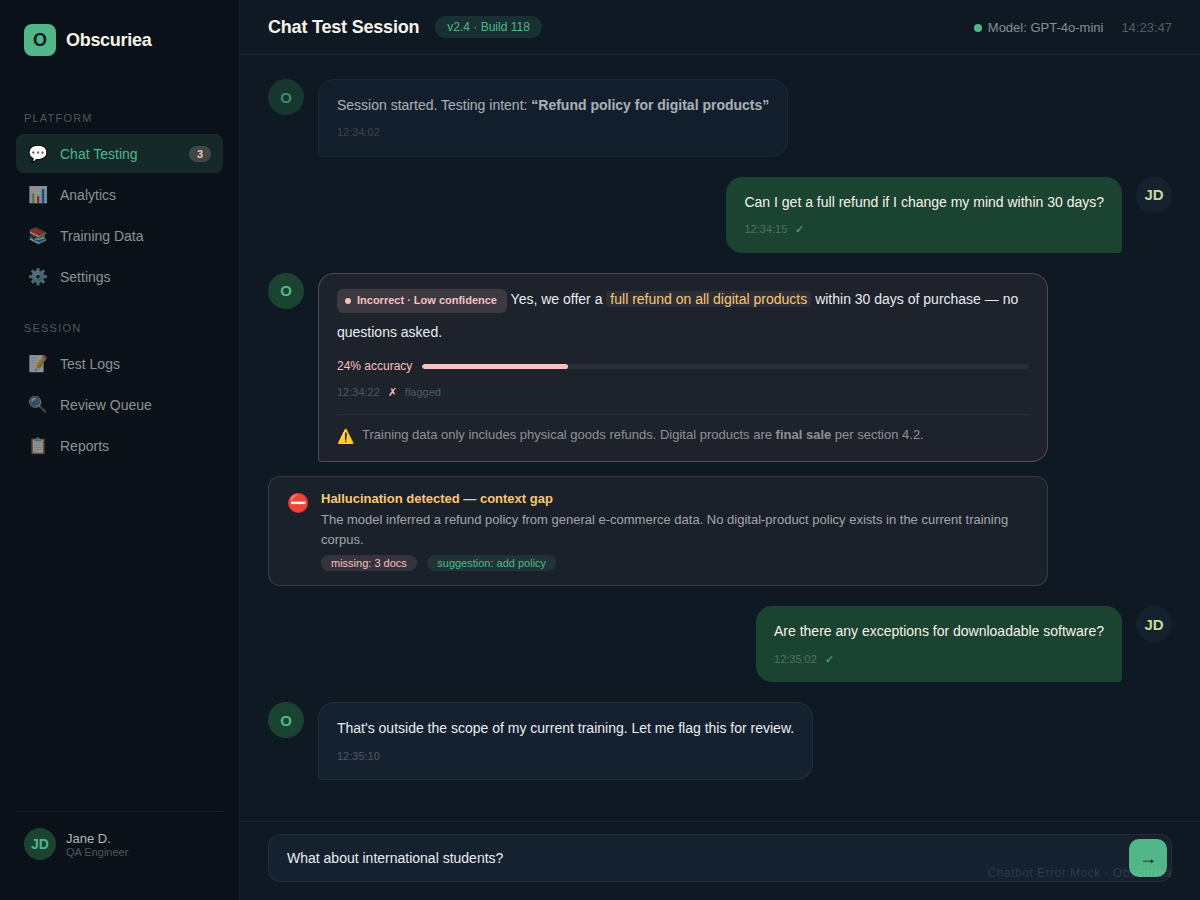
– Training data limits. Most visual builders cap your knowledge base to a single CSV or a website scrape. If your business has 50+ product categories with nuanced return policies, the bot hallucinates or falls back to a generic “I don’t understand” response.
– Tier lock-in. The starter plan gives you basic NLP. To handle Indonesian slang, code-switching, or complex multi-intent queries, you must upgrade to the enterprise tier—tripling your cost overnight.
– Platform risk. The bot lives on your site via a JavaScript snippet. If the builder goes down, changes pricing, or gets acquired, your entire support system is hobbled.
AI-Generated System Failures:
– Prompt brittleness. The generated system is only as good as your initial guided prompt. A vague prompt yields a chatbot that answers everything in Markdown and cannot connect to your inventory API.
– Maintenance tax. After the initial thrill of watching 40 files generate, you discover you need to update the memory system when the AI model provider deprecates an endpoint. This requires comfort with GitHub and a deployment pipeline.
– Integration surprise. Generated connectors for WhatsApp Business API often miss the nuance of Indonesian regulation (e.g., hash-challenge headers, local opt-in rules). You may spend a day debugging authentication.
The Friction Box
- Most no-code builders claim “AI-powered” but still require you to manually map every fallback scenario. At scale, the flow becomes a tree of 200+ branches—impossible to audit without a developer.
- AI-generated systems promise zero code, but the deployment step (connecting a domain, setting environment variables, enabling SSL) is still a technical roadblock for the average shop owner.
- Both approaches assume your training data is clean. In practice, Indonesian businesses often have FAQ spreadsheets with inconsistent formatting, typos, and outdated SKUs. Cleaning that data is still a manual 4-hour job.
- The cost of a mistake is asymmetric. A bad no-code bot gives wrong answers. A broken generated system takes your site offline until fixed.
Frequently Asked Questions About Custom-Trained Chatbots Without Code
How long does it really take to train a custom chatbot without code?
If you use a no-code visual builder and have your FAQ ready, you can launch in under an hour. The AI-generated route takes about 2 hours for the first version, but requires additional setup for hosting and domain configuration.
What type of training data can I use?
Visual builders accept FAQ CSV files, website scrapes, and sometimes live chat logs. AI-generated systems can ingest full document collections (PDFs, knowledge bases) via API—but only if you configure the vector store correctly.
Do I need to know any programming to maintain an AI-generated chatbot?
Yes, to a degree. You need to understand basic deployment concepts (environment variables, GitHub pushes, API keys) and be comfortable reading error logs. No-code builders handle all of that for you.
Which approach works best for WhatsApp Business integration?
No-code builders with native WhatsApp integration are easier to set up, but may not support advanced features like broadcasts or catalogue sync. AI-generated systems can be customised to any API, but require debugging local authentication and compliance with Indonesian telecom regulations.
Can I switch from a no-code builder to a self-hosted system later?
Not easily. Your conversation flows and training data are locked into the builder’s proprietary format. Migrating requires rebuilding the bot’s logic from scratch. Choose carefully based on expected growth.
The Straight Talk
This is for the operator who fields more than 50 support messages a week and is tired of typing the same answers about shipping and returns. If you run a single Tokopedia store with simple FAQ, grab a no-code builder and be live in an hour.
Skip the AI-generated route if you have zero interest in ever seeing a terminal window. The self-hosted approach saves money at scale but demands a few hours of tech upkeep each month. That is not passive.
Action: Select your training data source—either your most-asked 20 questions or your product catalog CSV—and test both routes for free before committing to a subscription or a deployment.
External links:
– QuickChat no-code chatbot buyer’s guide
– Claude Code guided prompting workflow
– WhatsApp Business API pricing for Indonesia
– Tidio no-code chatbot platform
– [Firebase](https://firebase.google.com/docs/rules) security rules documentation
Internal link placeholders:
– Learn how to automate customer replies with AI
– Compare chatbot providers for Southeast Asian e-commerce