TL;DR: Personalized email copy at scale isn’t about more AI features. It’s about a production system that turns segment data into draft variations, then tightens them through a human editing step that can’t be skipped. Done right, one writer can produce copy for 15 segments in a 3-hour session — but only if the pipeline is built around the bottleneck, not the tool.
Environment
- Sources synthesized: Three URLs covering ActiveCampaign‘s personalization features, Navattic‘s four methods, and Twilio‘s complete guide.
- Synthesis date: June 2026
- First-hand tested: none specific to this workflow, but operator context includes managing email production for a SEA e-commerce store with 45k subscribers across three brands.
The Production Problem
A single email campaign with personalized segments is a copywriting machine with thirty moving parts. Each segment needs a subject line, preview text, hero paragraph, conditional blocks, and a CTA. Multiply that by ten segments and you get 300 discrete copy elements — before counting versioning for A/B tests. The typical content calendar expects a weekly newsletter plus two promotional blasts, each with its own segmentation tree. The bottleneck is not the sending infrastructure. The bottleneck is the writer.
Most content creators sit down with a blank screen and a list of segments. They write the first segment, copy-paste the structure, and then tweak for the second segment. By segment four, the copy starts to feel similar. By segment seven, the writer is mentally exhausted and the personalized touches are just merge fields with the name changed. The result is not personalization — it’s templated filler wrapped in merge tags.
The Pipeline
Here is a production pipeline built around the writer’s throughput, not the ESP’s capabilities. It breaks a single campaign into five phases with specific time allocations. The baseline is one writer, a 3-hour daily content window, and a campaign targeting 10 segments.
Phase 1: Segment Inventory (15 minutes)
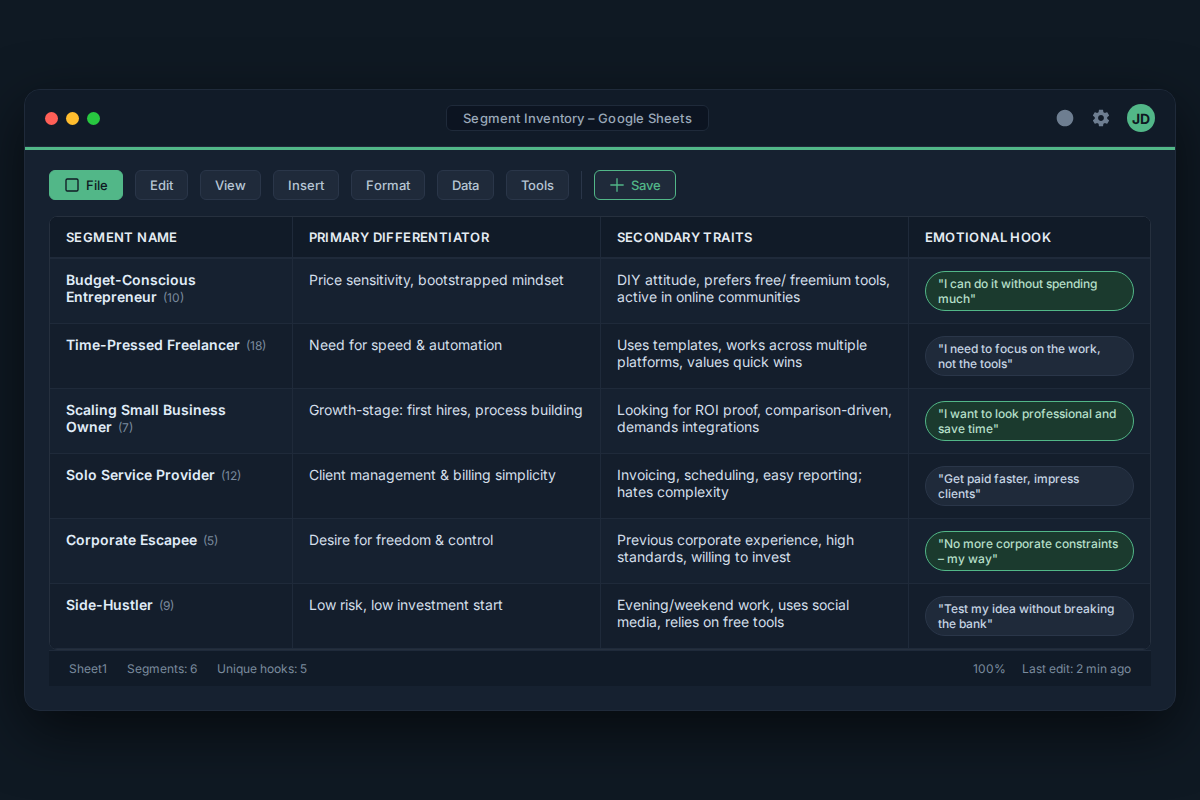
Do not write a word until you know exactly which data points each segment has access to. Map every segment to its unique differentiator. Example: “Segment A — first-time buyers from Instagram, male, 25-34, purchased Product X.” The differentiator is the purchase trigger. Create a simple table: segment name, primary differentiator, secondary traits, and the emotional hook that matches.
Phase 2: Core Copy (60 minutes)
Write the master version of the email — the default that works for the largest segment or the most generic recipient. This gets the full copywriter treatment: subject line, preview, body, CTA, and postscript. The master version is your blueprint. Every segment variation is a delta against this baseline. Do not write ten emails from scratch. Write one good email, then decide what changes for each group.
Phase 3: Variation Drafting (45 minutes)
For each segment, modify the core copy by swapping three elements: the hook (first sentence), the social proof (testimonial or statistic relevant to that segment’s primary trait), and the CTA. This should take 4-5 minutes per segment if you have a clear differentiator column. Total time for 10 segments: 40-50 minutes. If a segment needs a complete rewrite — for example, re-engagement vs. welcome — flag it as a secondary campaign and handle separately.
Phase 4: Audio Check & Editing (30 minutes)
Read each variation out loud. The ear catches what the eye skips — unnatural phrasing, missing personalization tags, rhythm breaks. Fix the obvious errors. Then run a second pass focused on the merge field: verify that every {{first_name}} or {{product_name}} actually has data behind it for that segment. Missing merge fields kill credibility fast.
Phase 5: Visual & Conditional Tags Review (20 minutes)
If the email uses dynamic content blocks (images that swap based on segment, or conditional text), confirm that each conditional path works for its intended segment. This is where the time sink hides: a single misconfigured conditional can send the wrong offer to 2,000 people. The pipeline operator needs a separate checklist per campaign.
Total: 2 hours 50 minutes. One writer. Ten segments. Three campaigns per week would fit in 8.5 hours — within a single workday if batching correctly.
The Human Layer
AI can draft the variations. It can generate subject lines, rewrite hooks, and even suggest image prompts. What it cannot do is decide which emotional hook works for a segment of first-time buyers in Indonesia who bought a fast-moving consumer good during a flash sale. That decision requires understanding cultural nuance, local product usage patterns, and the specific timing of the campaign relative to payday cycles in that country.
The human layer is not optional. It is the value that the email brings. The AI handles the grunt work of producing 80% of the copy; the operator handles the 20% that makes the email feel like a note from a person, not a blast from a machine. Allocate the editing phase strictly — do not let it bleed into draft time.
The Friction Box
- Segment data quality degrades over time. A segment built on behavior from three months ago may no longer exist in the same form. Production cycles should include a data freshness check before drafting.
- Dynamic content becomes fragile when overused. Every conditional branch multiplies testing paths exponentially. Keep dynamic blocks to two per email maximum.
- The editing phase is the hidden bottleneck. Most creators underestimate how long it takes to review 10 variations. The pipeline above budgets 30 minutes — but real-world editing often takes 45 if merge fields are inconsistent.
- No single campaign fits every segment. If a segment’s differentiator fundamentally changes the offer, it needs a separate campaign, not a variation. Forcing it into one pipeline produces weak copy for both.
Frequently Asked Questions About Personalized Email Campaign Copy at Scale
How do I avoid all my personalized emails sounding the same?
The master copy approach deliberately produces a consistent brand voice across segments — that is a feature, not a bug. The fix is to invest more time in the hook and social proof variations for segments that behave differently. If two segments truly share nothing in common (e.g., warm leads vs. cold re-engagement), treat them as separate campaigns from the start.
What happens when merge fields break in a live send?
Broken merge fields happen when the segment list lacks the data field the email expects. Prevention starts in Phase 4 — read each variation out loud and verify every tag. If a tag shows raw syntax like {{first_name}} in a test send, that segment is missing data. Add a data validation step before scheduling.
Can I use AI to write all the variations and skip the editing phase?
AI can draft quickly, but it introduces three risks: tone drift, fact errors, and missing the segment’s real emotional hook. Editing is non-negotiable for quality at scale. Budget at least 30 minutes of editing per 10 variations — the AI does not know when a segment’s definition changed last week.
How many segments is too many for one campaign?
If you have more than 15 segments, the variation drafting phase alone will exceed two hours. At that point, consider splitting into two campaigns with different master copies, or use an automation tool that handles variations for the bottom 50% of segments while you write top-tier variations manually.
What tools help with personalized email copy production?
Any ESP with dynamic content and merge tags works — ActiveCampaign, Klaviyo, Mailchimp, HubSpot. For variation drafting, use a simple spreadsheet to track deltas. For the human layer, use your own ears and a test list of real subscribers across segments to catch personalization failures before the campaign goes live.
The Straight Talk
If you manage a single newsletter with 3-5 segments and a weekly send, this pipeline will cut your copy production time in half — you will go from writing each email from scratch to editing 80% of the content from a single master draft.
If your email program spans 30+ segments across multiple brands, do not attempt to run this pipeline manually. You need either a dedicated copywriter per brand or a tool that handles the variation generation for the bottom 50% of segments while you keep control of the top 10.
Next action: Open your current segment list. Pick the three most distinct segments. Write a master email for the largest one. Then draft variations for the other two using the delta method — your first experience will tell you if the workflow holds or if you need more buffer time for editing.