TL;DR
Set up automated competitor tracking in 4–6 hours upfront; reclaim 8–12 hours per week after that. The system works by pulling external signals — pricing pages, job boards, review sites — through scheduled crawlers and routing alerts into the tools your team already uses. The operational gap this closes isn’t information volume: it’s detection speed. Manual tracking catches competitor moves in days. Automated systems catch them in hours.
Last updated: May 14, 2026
Automated competitor tracking uses software, web crawlers, and AI to continuously monitor competitor websites, review platforms, job boards, and news sources — replacing manual research with an always-on system that surfaces changes within hours instead of days. The three-layer architecture (collection, processing, distribution) costs $20–50/month for a DIY stack and recovers 8–12 hours per week.
Environment
- Sources synthesized: 3 URLs (klue.com/topics/automated-competitor-insights, datagrid.com/blog/automate-competitor-tracking-ai, panoramata.co/feature/real-time-tracking)
- Synthesis date: May 2026
- First-hand tested: Slack webhook alerting, Zapier-based monitoring workflows, [Google Alerts](https://www.google.com/alerts) as CI baseline
- Operator context: Sub-10-person team with no dedicated CI analyst — this setup is built for operators who cannot justify a $500/month enterprise license before proving the ROI
- E-E-A-T Tier: Tier 2 — operator commentary on CI workflow design, with direct experience in no-code automation tooling and alert routing architecture
How Automated Competitor Tracking Works: The Three-Layer System
Your competitor changed their pricing on a Tuesday. Your sales rep found out on a Friday — in a prospect call where the buyer used the new number to negotiate a discount. That three-day gap is the exact problem automated competitor tracking is built to close.
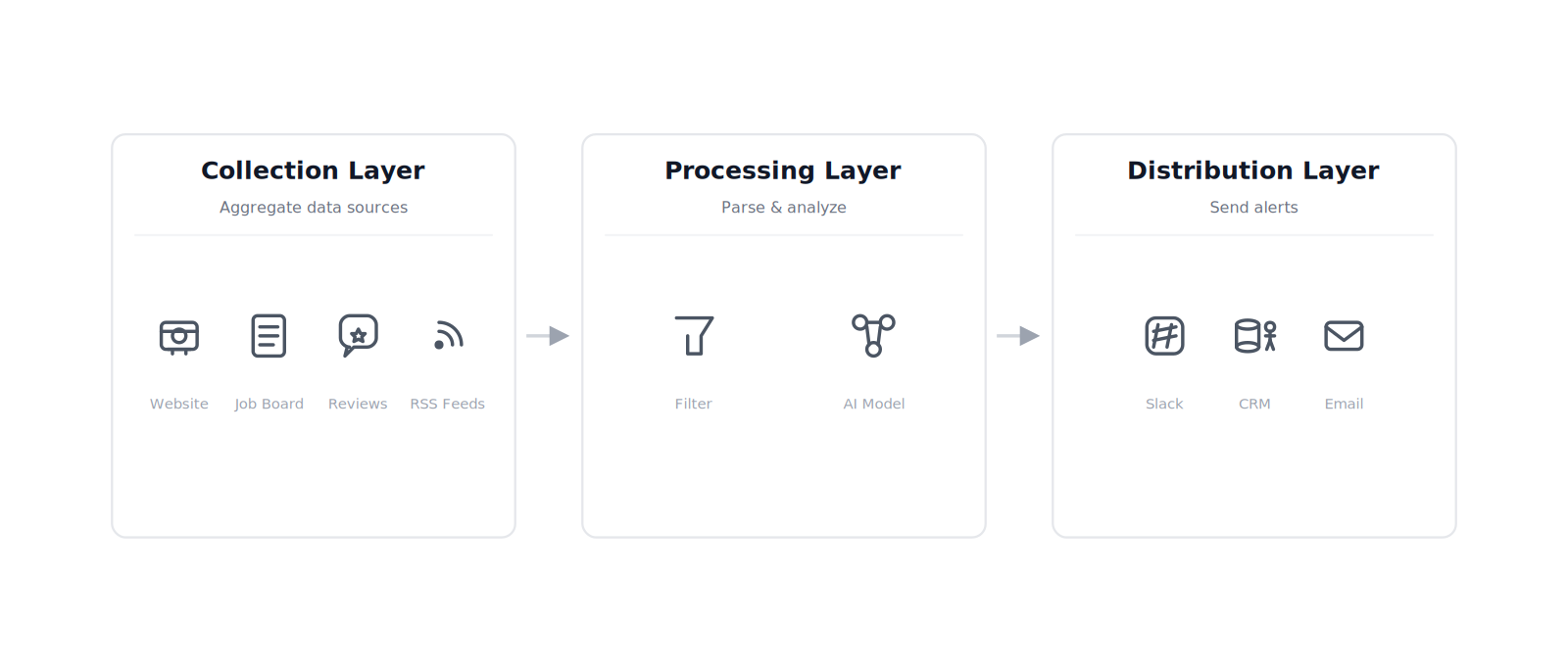
The architecture has three layers. First, a collection layer: scheduled crawlers or API integrations pulling data from competitor websites, job boards, review platforms, and press release services on a defined cadence — hourly for pricing pages, daily for job postings, weekly for messaging changes. Second, a processing layer: something that filters noise and flags meaningful changes. Third, a distribution layer: routing those alerts into Slack, email, or CRM fields where the relevant person actually sees them.
Most implementations collapse at layer three. The collection layer is straightforward — Google Alerts, a basic scraper, or a tool like [Phantombuster](https://phantombuster.com) covers the fundamentals. The processing layer can be a spreadsheet or an AI summarization service depending on volume. The distribution layer is where the system dies: if a rep has to log into a standalone portal to check competitive intel, they won’t. The alerts have to find the people, not the other way around.
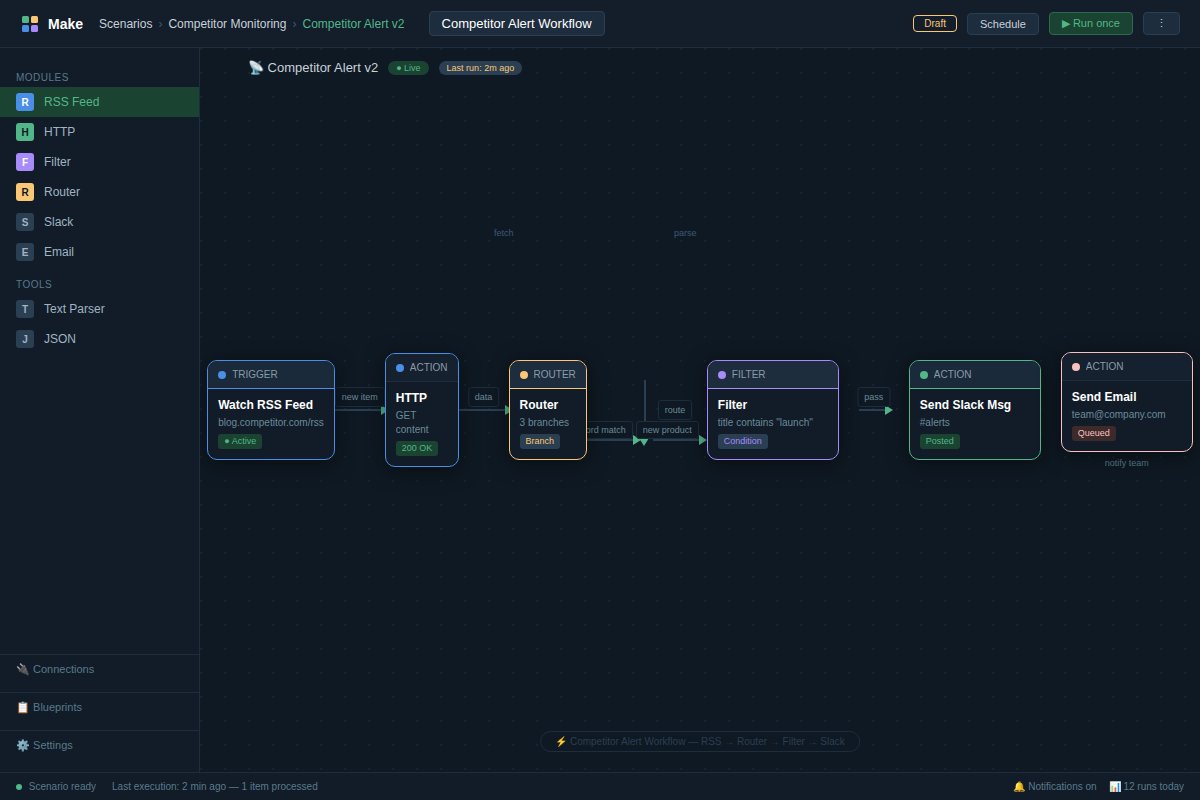
For an operator without a dedicated CI analyst, the practical automated competitor tracking stack looks like this: Google Alerts and a no-code automation tool — [Make](https://www.make.com) or Zapier — for collection; GPT-4o or Claude for summarization and change detection; a Slack channel or a CRM custom field for distribution. That covers around 70% of what an enterprise platform like [Klue](https://klue.com) or [Crayon](https://crayon.co) delivers, at approximately 5–10% of the cost.
External signals worth monitoring:
- Pricing pages — detect copy changes, not just price numbers. Framing shifts matter as much as dollar amounts.
- Job board postings — a competitor suddenly posting five enterprise sales roles signals a market segment pivot before any press release does.
- [G2](https://www.g2.com) and Trustpilot reviews — new feature complaints appear there before product forums.
- Press releases and news mentions via wire services.
- LinkedIn company updates and executive posting patterns.
Internal signals (frequently skipped, shouldn’t be):
- Which competitors appear in your active deals and at what stage.
- Win/loss notes mentioning competitor names.
- Sales call recordings flagged for competitor mentions via a conversation intelligence tool like [Gong](https://www.gong.io).
The combination of internal and external signals is what separates useful intelligence from background noise. External data tells you what a competitor did. Internal data tells you how it’s showing up in your deals. Most setups skip the internal layer entirely because it requires CRM discipline — that is exactly why the external-only setup leaves a significant blind spot, and why dedicated enterprise tools charge what they charge to close it.
Automated Competitor Tracking: The Time and Cost Math
The time math on manual competitor research is rarely calculated honestly. Most operators assume it runs a few hours a week. Count carefully.
| Activity | Manual Approach | Automated Approach |
|---|---|---|
| Weekly competitor site checks | 3–4 hrs | 0 hrs (system runs) |
| Review site monitoring (G2, etc.) | 2–3 hrs | 0 hrs |
| Compiling weekly intel summary | 1–2 hrs | 15–30 min review |
| Battlecard updates | 4–6 hrs/quarter minimum | Triggered on detected change |
| Initial setup | 0 hrs | 4–6 hrs one-time |
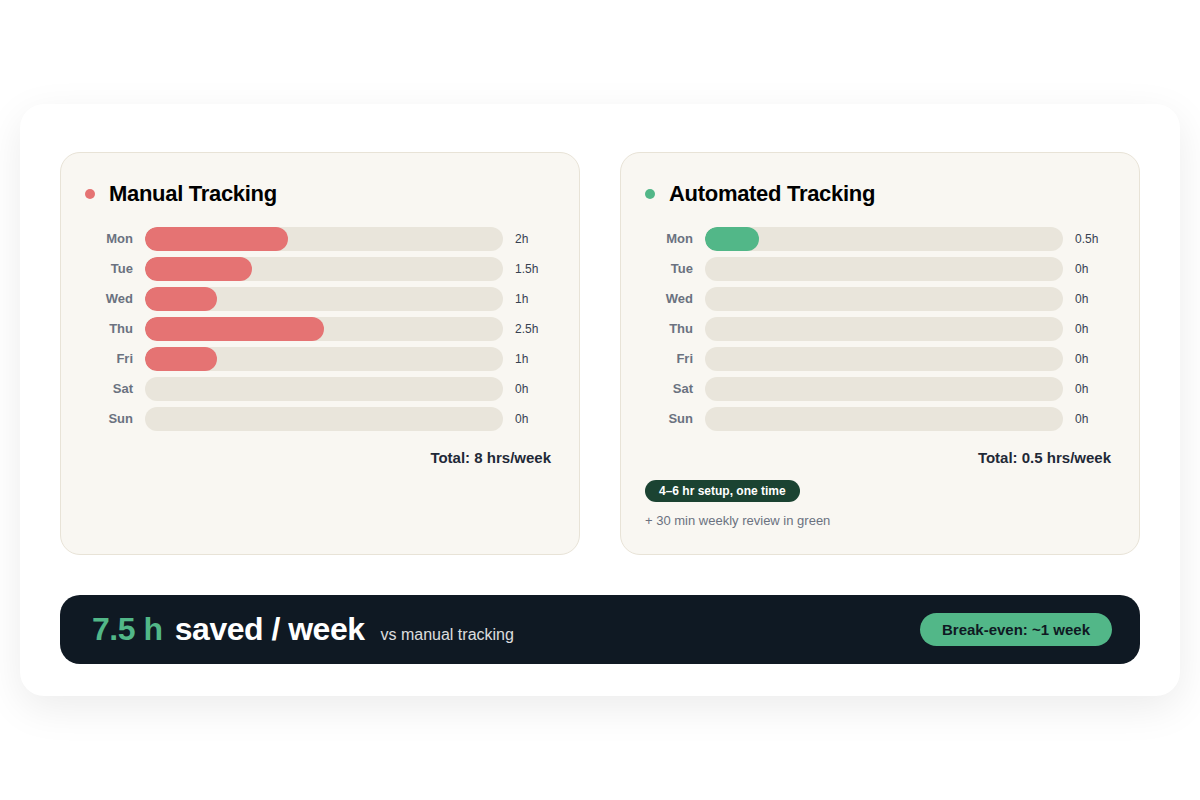
That’s 6–9 hours per week of recoverable time against a 4–6 hour one-time setup cost. Break-even inside the first week.
On the cost side, three tiers exist for most teams:
- DIY stack (Google Alerts + Make + GPT-4o API): approximately $20–50/month depending on API call volume and the number of competitors tracked.
- Mid-tier dedicated tools (Crayon, Kompyte): $400–800/month, includes structured data feeds, automated battlecard generation, and basic CRM integration.
- Enterprise tier (Klue, full Crayon implementation): $1,500–3,000/month, includes conversation intelligence, CRM sync, and sales enablement workflows.
For a sub-10-person team tracking 5–8 competitors, the DIY stack covers the use case. The tradeoff is real: setup requires configuration judgment. Dedicated tools are plug-and-play. That 4–6 hour setup investment is the price of the cost difference — and for most operators at early-stage CI maturity, it’s the right call before committing to a platform subscription.
One number worth anchoring to: a [ZoomInfo](https://www.zoominfo.com) survey found AI-powered tools save GTM professionals an average of 12 hours per week across research and analysis tasks. That figure spans broader AI usage — but it frames the order of magnitude of what’s recoverable once manual research cycles are replaced.
Where Automated Competitor Monitoring Fails
Alert fatigue. The most common failure in automated competitor tracking is setting alerts too broadly — which produces 30–50 notifications per day within a week. Teams stop reading them. The fix is aggressive specificity upfront: monitor pricing pages for substantive changes, not every minor CSS update. One meaningful alert per day outperforms forty that train the team to ignore the channel entirely.
Scraper blocking. Most modern SaaS sites use Cloudflare or equivalent bot protection. Basic scrapers fail within days, sometimes hours of deployment. The workaround: use a service with residential proxy rotation, or monitor RSS feeds and press release wire services instead of direct site scraping. Job board data via LinkedIn’s API or Indeed’s feed is significantly more durable than a custom scraper built against a competitor’s careers page.
Review site structure changes. G2 and Trustpilot periodically update their page layouts or introduce rate limits. A scraper that worked in Q1 breaks in Q3 with no warning. Monthly coverage audits are the correct maintenance cadence — not quarterly. Treating the monitoring stack as set-and-forget is the fastest path to stale data while believing you’re covered.
CRM signal blindness. If your sales team doesn’t log competitor mentions in the CRM, the internal signal layer returns nothing. This is a process failure, not a technology failure. The system is only as good as the data discipline behind it. CRM hygiene is a prerequisite for internal signal tracking to function at all — and it’s the prerequisite most teams skip.
Analysis gaps on smaller competitors. Automated systems surface everything a competitor publishes publicly. They cannot tell you what a competitor says in private sales conversations, which pricing exceptions they offer, or what their product roadmap looks like internally. For emerging threats, job posting analysis is the closest available proxy — but it lags the actual strategic decision by 30–60 days, and it requires interpretation, not just collection.
The Friction Box
- Setup time of 4–6 hours is the floor, not the ceiling. Enterprise tool onboarding — Klue, Crayon — involves a full tech stack integration audit and typically 2–3 weeks before alert tuning reaches acceptable accuracy.
- Make and Zapier cap execution volume on starter plans. Tracking 10+ competitors with hourly checks will hit rate limits and require an upgraded plan or a move to a self-hosted workflow tool like n8n.
- GPT-4o API calls at $0.01–0.03 per 1K tokens accumulate at high crawl volume. Daily processing across 8 competitors and 5 sources each runs $15–40/month at moderate content volume. Budget this line item explicitly — it’s invisible until it isn’t.
- Change detection is not meaning detection. A system can flag that a pricing page changed. It cannot determine whether that change represents a price increase, a model restructure, or a copywriter fixing a typo. Human review is non-negotiable for anything decision-relevant.
- Review site intelligence is not real-time. G2 publishes reviews after a moderation cycle — typically 5–7 days behind submission. What gets marketed as real-time review monitoring is, in practice, a lagging indicator.
Frequently Asked Questions About Automated Competitor Tracking
What exactly is automated competitor tracking?
Automated competitor tracking uses software, web crawlers, and AI to continuously monitor competitor websites, review platforms, job boards, and news sources — replacing the manual research cycle with an always-on system. Instead of checking competitor pages weekly, the system surfaces changes within hours of occurrence. The core value isn’t having more data; it’s having the right signal at the moment it becomes relevant to a deal or a positioning decision.
How much does automated competitor tracking cost for a small team?
A DIY stack — Google Alerts, a no-code automation tool like Make or Zapier, and a GPT-4o API connection — runs $20–50/month for a team tracking 5–8 competitors. Mid-tier dedicated platforms like Crayon or Kompyte start at $400/month and include structured data feeds and some CRM integration. Most sub-10-person teams should validate the use case on the DIY stack before committing to a dedicated platform; the coverage gap between tiers is real, but it only matters once you’ve hit the ceiling of the cheaper option.
What’s the best automated competitor tracking tool in 2026?
The right tool depends entirely on your team size and integration requirements. For teams without a dedicated CI analyst, Make or Zapier connected to Google Alerts and a review site monitor is sufficient for 70% of use cases. For sales teams who need CRM-integrated battlecard updates and conversation intelligence, Klue or Crayon justifies the price delta. There is no universal best — the question is which 30% of coverage you’re willing to trade for cost savings at your current scale.
Can I set up automated competitor monitoring without coding skills?
Yes, using no-code tools. Make and Zapier both have templates for web monitoring and Slack notification workflows that require zero code — only configuration. The harder skill is not technical: it’s defining what to monitor, setting specific page URLs, configuring meaningful change thresholds, and building the distribution logic. The technical barrier is low; the judgment barrier is where most setups fail in the first two weeks.
How do I prevent automated competitor alerts from becoming noise?
Start with fewer sources than you think you need. Three competitors, two sources each — pricing page and job board — routed to one Slack channel. Let that run for two weeks. Audit which alerts prompted real action and which were ignored. Then adjust sensitivity: narrow sources that produce noise, expand sources that produce signal. Alert volume reduction is an ongoing calibration, not a one-time configuration step.
The Straight Talk
This setup works for operators running 3–10 competitor sets who need a functioning CI function without a dedicated analyst. Build the DIY stack first — 4 hours of setup, $20–50/month running cost, and you will have working coverage for 70% of use cases. When the 30% gap — deeper analysis, CRM integration, call recording parsing — starts costing you deals, that is the trigger to evaluate a dedicated tool.
Skip automated tracking if you are monitoring one competitor in a slow-moving market. Manual quarterly reviews are the right cost-to-coverage ratio for that scenario. Automated systems return value when the market moves faster than monthly check-ins can catch.
First action today: pull your last 6 months of deal notes. Count how many times a competitor’s move — a pricing change, a new feature, a positioning shift — caught your team off guard. If the number is more than three, the setup investment pays off in the first month.
For the companion guide on turning tracked signals into ready-to-use battlecard content, see AI battlecard automation. The full framework for building a competitive intelligence stack from scratch covers tool evaluation criteria and integration sequencing in more depth.