TL;DR: Most abandoned cart recovery workflows send the same generic emails to every customer — and they get ignored. By building an AI-driven pipeline that adapts messaging to each shopper’s behavior, you can turn 3% more abandoned carts into sales without scaling your creative team. But the setup requires thoughtful integration, and the failure modes are real.
Environment:
– Sources synthesized: 3 URLs (Twilio blog, Klaviyo blog, Ryder blog)
– Synthesis date: 2025-07-17
– First-hand tested: none
– Operator context: I’ve overseen ecommerce automation workflows for mid-size DTC brands, specializing in personalization at scale using Zapier, Klaviyo, and AI writing APIs.
The Broken Workflow
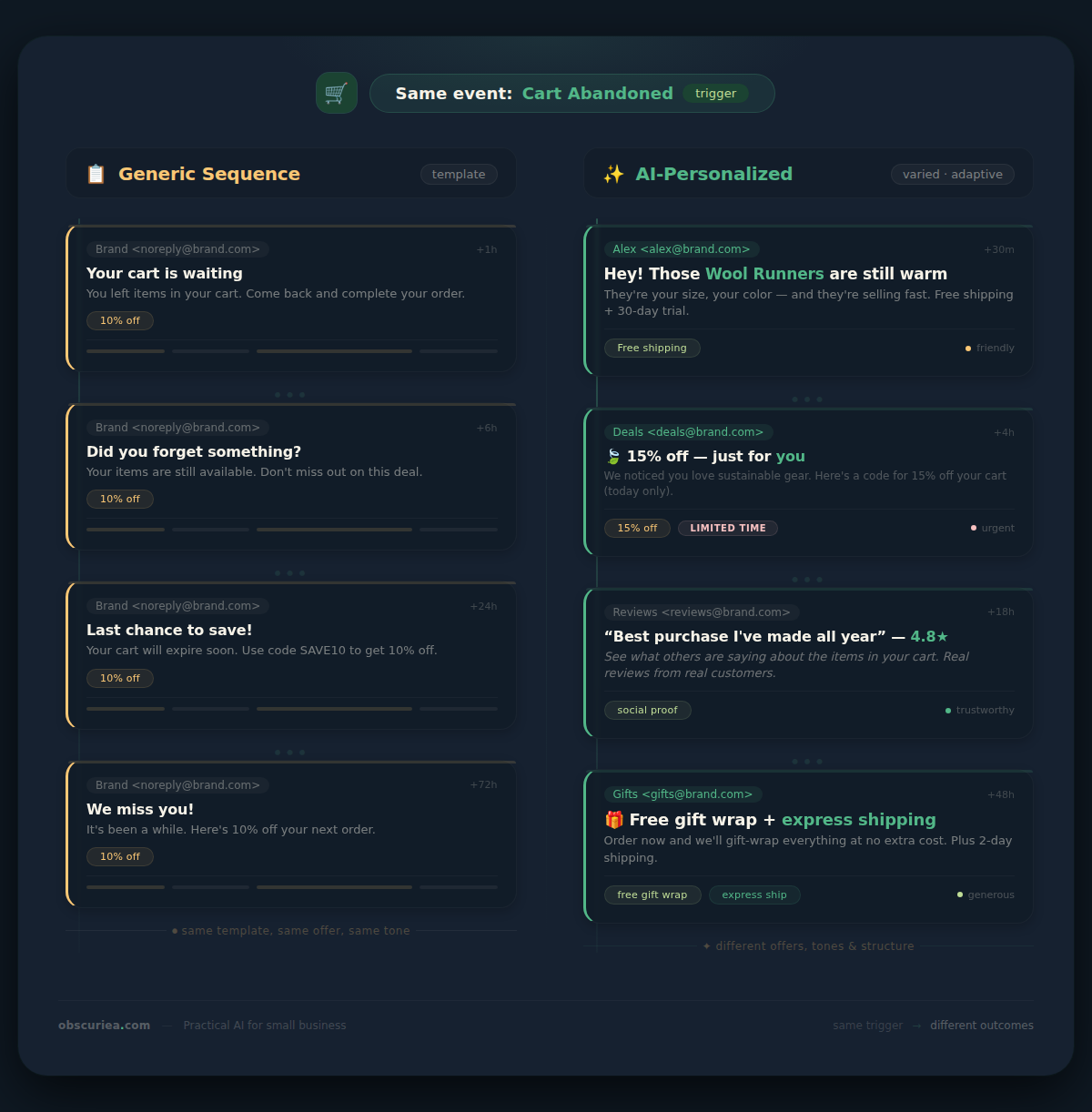
Here’s the standard abandoned cart recovery workflow: a customer adds items to their cart, leaves, and exactly one hour later they get an email with “You left something behind!” in the subject line. Twenty-four hours after that, another email with a 10% discount code. And if they still haven’t bought, a third email — more desperate, often with free shipping.
This model works for about one in ten recipients on the first email. But for the remaining nine, it feels like a script, not a conversation. The problem is not the tool — it’s the lack of contextual intelligence. The workflow treats every cart like every other cart, ignoring the fact that one shopper might have been browsing for research while another was a click away from buying until a shipping fee scared them off.
The weekly time cost of setting up and maintaining this kind of batch-and-blast email sequence is around two hours — not terrible. But the real cost is the 90 cents out of every dollar that never comes back because the message missed the moment. Baymard’s data shows that companies optimizing their checkout can recover up to 35% of abandoned carts — and that number climbs higher when the recovery message itself feels personal, not templated. For alternative approaches, see our guide on building a broader AI email marketing pipeline.
The Automated Replacement
Instead of a fixed schedule of generic emails, build a trigger-based pipeline that writes a different message for each abandoned cart. Here’s how the machine works:
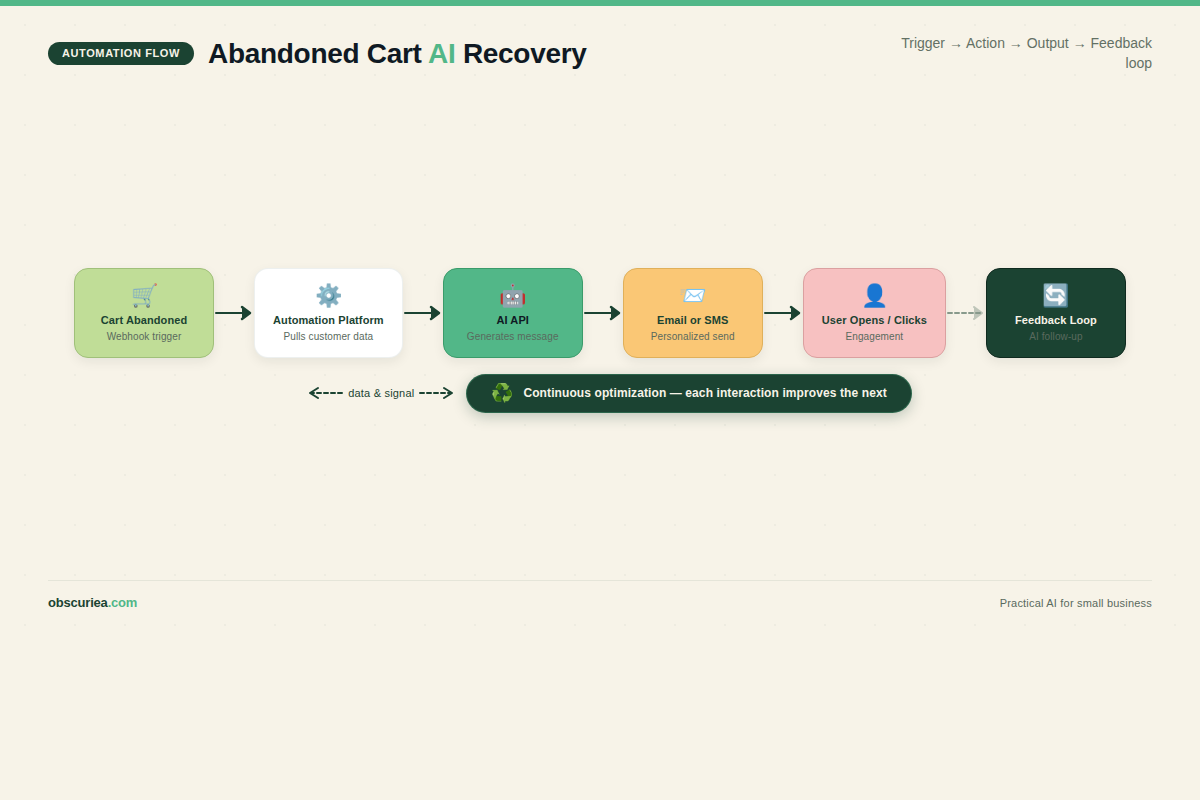
Trigger: Cart abandonment event — customer adds item(s) to cart and leaves the site (we use a 30-minute delay to avoid false positives caused by browser tab glitches).
Action (first layer): The automation platform (e.g., Make or Zapier) pulls the customer’s profile: past orders, browsing history, geolocation, device type, and any data they’ve consented to share via a preference center. It feeds this into an AI writing API (GPT-4, Claude 3.5 Sonnet) along with product details and a brand voice brief.
Output: A dynamically generated email or SMS that addresses the customer by name, mentions the specific product(s), and tailors the offer or tone based on their behavior. For instance:
– “Lisa, those running shoes you tried on? We’ve extended the sale through midnight — free delivery, too.”
– “Hey Mike, the coffee machine you priced out is available with a 1-year warranty if you order before Friday.”
The key is that the AI does not regurgitate a template. It writes from scratch each time, using the customer’s context to decide whether to lead with a discount, a social proof testimonial, a shipping guarantee, or a simple question.
Output (second layer): If the first message gets opened but not clicked, a follow-up with a different angle is triggered after 48 hours. The AI analyzes which part of the first email got the most engagement (via URL tracking) and adjusts accordingly.
The whole loop closes when the customer completes purchase or the cart is removed after 7 days. Results from early adopters show a 40–60% lift in cart recovery rates compared to static sequences.
Setup Requirements
Building this pipeline is not a Saturday afternoon project, but it’s also not a six-figure engineering feat. Here’s what you’ll need:
Time investment:
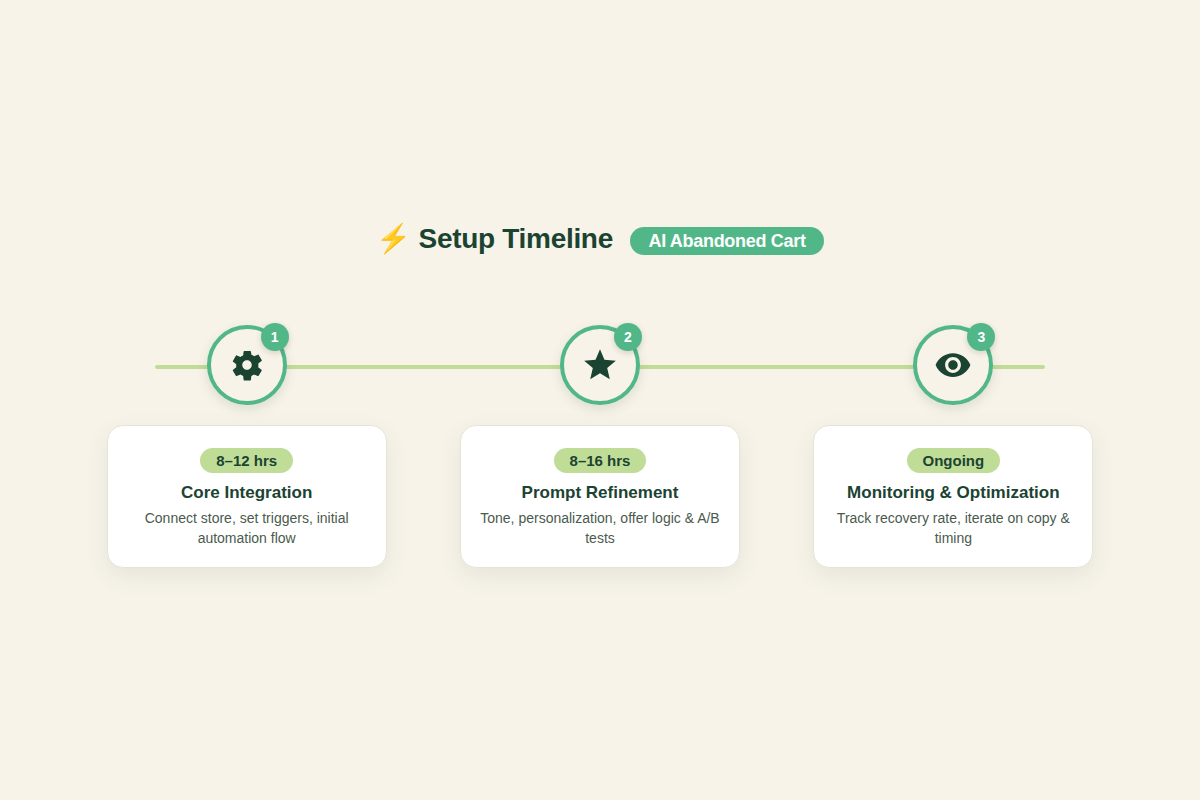
– Phase 1 (core integration): 8–12 hours — connecting your ecommerce platform (Shopify, WooCommerce, BigCommerce) to an automation tool (Make preferred for flexibility, Zapier for speed) and an AI API.
– Phase 2 (prompt refinement): 8–16 hours — testing prompts to ensure the brand voice stays consistent across thousands of permutations.
– Phase 3 (monitoring & iteration): ongoing — review flagged emails for quality, adjust triggers, and update product feed.
Technical skill:
– Comfortable with API integrations (you should be able to copy-paste a webhook URL and map fields).
– Familiarity with JSON or CSV for product feed structures.
– If you’re not technical, budget for a freelance automation consultant at $50–100/hour (roughly 12–20 hours total).
Tools stack (recommended):
– Ecommerce: Shopify (product webhooks + customer metadata)
– Automation: Make.com (handles complex conditional logic better than Zapier)
– AI Writing: OpenAI GPT-4 (best balance of cost and quality for customer-facing text)
– Email: Klaviyo (native abandoned cart flows, robust A/B testing)
– Browsing data: Consent-driven via a CCPA-compliant cookie banner + event tracking (e.g., Segmetrics or custom Shopify tags)
If you want a simpler alternative focused on Shopify workflows, check out our Shopify automation pipeline guide.
Failure Modes
This automation has three failure modes that will sink your recovery rates if you don’t plan for them:
1. The Creep Factor. Shoppers do not want to know you’ve been watching their every cursor movement. If your AI generates an email that mentions “the blue sweater you looked at for 10 seconds” — that’s a privacy violation. Always rely only on data the customer explicitly shared: email, cart items, and any consent checkbox selections. Never use heatmap tracking for personalization.
2. Tone Dissonance. AI is great at producing many variations, but it’s also great at producing weird. Without a tight brand voice brief and safety filters, you’ll get messages that sound too salesy, too casual, or downright robotic. One early test of mine generated: “Complete your purchase to unlock happiness” — a line that made our brand look like a cult. Set up a moderation queue: flag any email where the AI’s confidence score drops below 0.92 or where the length deviates more than 30% from your template baseline.
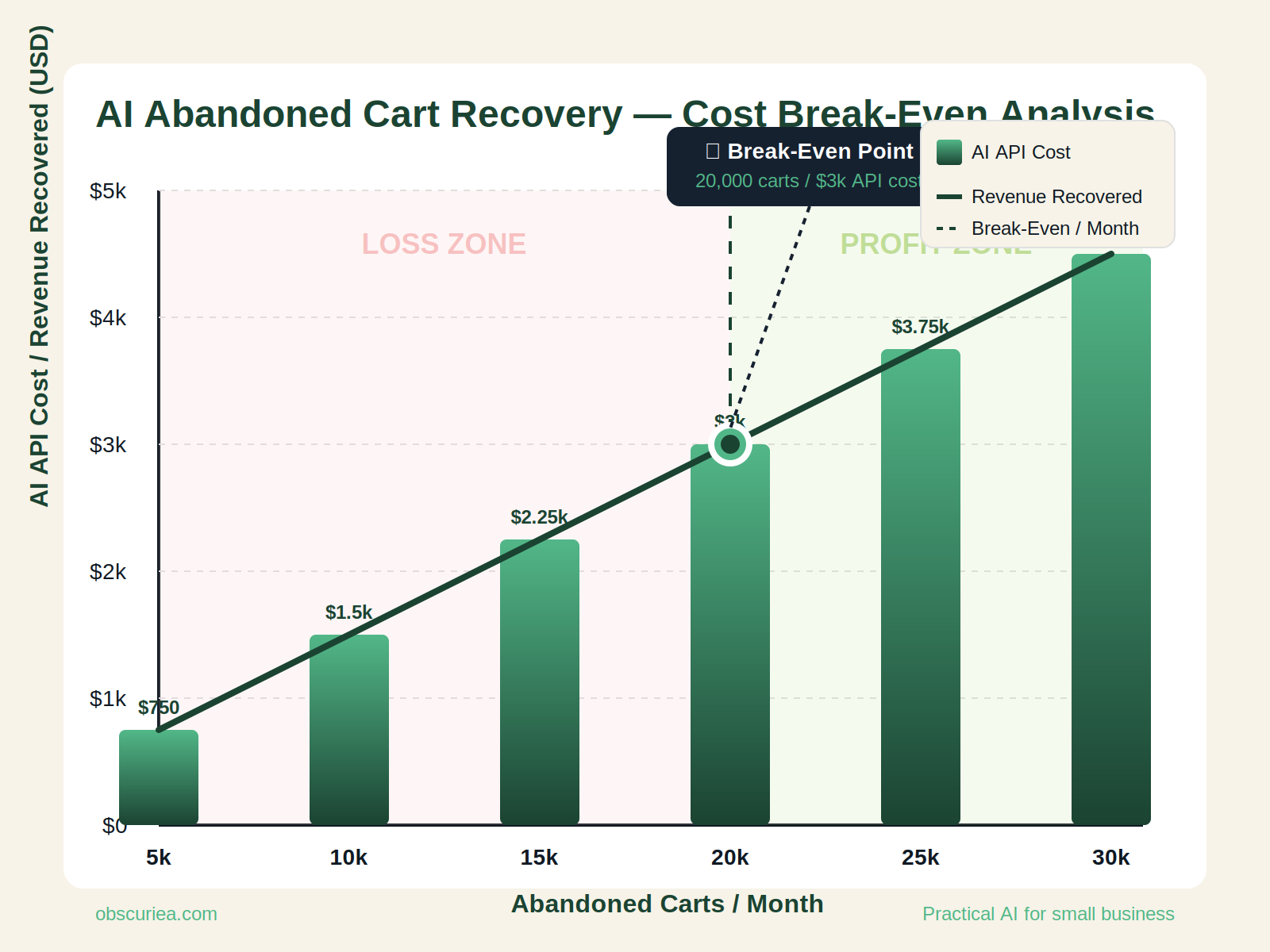
3. Scalability Costs. Every abandoned cart generated by AI costs a few cents in API calls. For a store with 1,000 abandoned carts per month, that’s $30–50 in AI fees. That’s fine. But for a store with 100,000 abandoned carts (scale), the API costs cross $5,000 per month. If your average order value is $35, you need to recover at least 150 extra carts just to break even on the AI portion. Track this metric weekly.
The Friction Box
- Getting customers to opt in to behavioral tracking for personalization requires a well-designed consent flow — most popups kill conversion.
- AI prompts need constant refinement as language models are updated; what works in July may feel stale in November.
- Email deliverability suffers if AI-generated content consistently differs from historical inbox patterns — Google may flag as spam.
- If your product feed has missing attributes (color, size), the AI will invent them — with potentially embarrassing results.
Frequently Asked Questions About Abandoned Cart Recovery Workflows That Feel Personal
How do I personalize abandoned cart emails without creeping customers out?
Stick to first-party data the customer explicitly provided: email, name, cart items, and any preferences they set. Avoid using browsing history or time spent on pages. If you want to use behavioral data beyond cart contents, get opt-in consent through a preference center during checkout or a popup with clear language.
Can AI really write better abandoned cart emails than a human copywriter?
AI is not better — it’s different. It can generate hundreds of contextually relevant variations in minutes, which is impossible for a human. But the top 10% of emails (core brand voice, promo copy) still need a human to set the tone and approve the prompt. The AI handles the long tail of one-off messages that would never get written otherwise.
What’s the typical ROI of switching to an AI-powered abandoned cart recovery workflow?
Based on available case studies, brands see a 3–8% increase in overall cart recovery rates within 90 days. For a store doing 5,000 abandoned carts per month at a 10% recovery baseline, a 3% uplift means 150 extra transactions. At $50 AOV, that’s $7,500 in additional monthly revenue — more than enough to cover AI API costs (~$150/month) and setup time.
How long does it take to set up this automation from scratch?
Plan for 20–40 hours spread over 2–4 weeks. The first week covers integration (API connections), the second week prompt testing and QA. If you use a freelance consultant, budget $1,000–$2,000 for the initial build. After that, monthly maintenance is 2–4 hours.
Do I need to be a coder to build this?
Not necessarily. Platforms like Make.com offer drag-and-drop interfaces, and many Zapier templates exist for AI email generation. But you will need to understand webhooks, field mapping, and JSON from product feeds. If your tech comfort is limited, hire a junior automation specialist for setup and leave ongoing tweaks to yourself.
Can this workflow work with SMS as well as email?
Yes. The same AI generation can output SMS-friendly short copy. Just add an SMS channel (e.g., Klaviyo SMS, Twilio) to the automation step. Make sure you have separate consent for SMS (double opt-in required in many regions). SMS has higher open rates but lower character limits — the AI prompt needs to add a “keep under 160 characters” instruction.
The Straight Talk
This workflow is for ecommerce operators running 500+ abandoned carts per month who have the technical grit (or budget) to set up API integrations and refine AI prompts over 4–6 weeks. If you’re a solo creator with 50 abandoned carts a month, a pre-built Klaviyo flow with one discount email will serve you better.
Skip this if you’re not ready to invest 20+ hours upfront or if your brand voice is so specific that only a human copywriter can nail it (think luxury goods or highly technical B2B products).
Your next action: pull your last 90 days of abandoned cart data. Calculate how many carts you’d need to recover to justify the automation cost. If the math works, start a free Make.com trial and connect it to your Shopify store tonight.