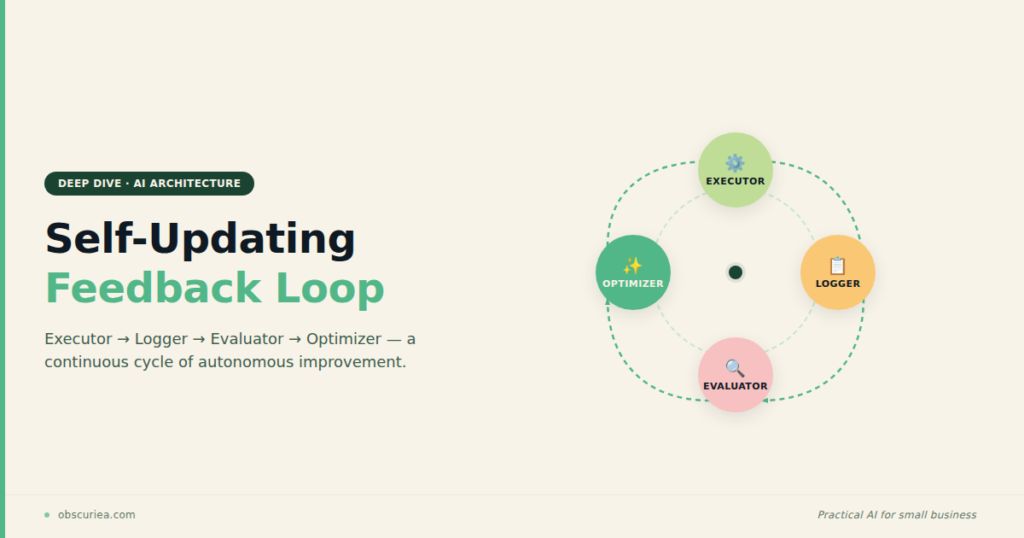
TL;DR: Self-updating AI agents are not magic—they are an engineering pattern where an agent logs every run, evaluates quality, and refines its own prompts automatically. The operational payoff is that you stop manually debugging and retooling every month, but the setup cost and failure modes are real. This article breaks down the architecture, the math, and where the loop breaks.
Environment
- Sources synthesized: 3 URLs (MindStudio self-improving agents guide, OpenAI autonomous agent retraining cookbook, Sakana AI Darwin Gödel Machine)
- Synthesis date: 2026-02-19
- First-hand tested: None (synthesis from sources for this article)
- Operator context: Senior operations analyst with 7+ years in AI workflow automation for small-to-mid-size businesses in Southeast Asia
The Architecture
Every self-updating agent is really two agents running on different cadences. There is the task agent—the one that does the actual work, like generating reports, answering support tickets, or summarizing documents. And there is the improvement agent—the one that reviews the task agent’s recent output, scores it, and proposes or deploys a better prompt.
Most teams build the first agent and call it done. The second agent is what turns an automated script into a self-sustaining system. Without it, you are not building an agent that improves itself—you are building one that decays silently until a human notices the output quality has dropped.
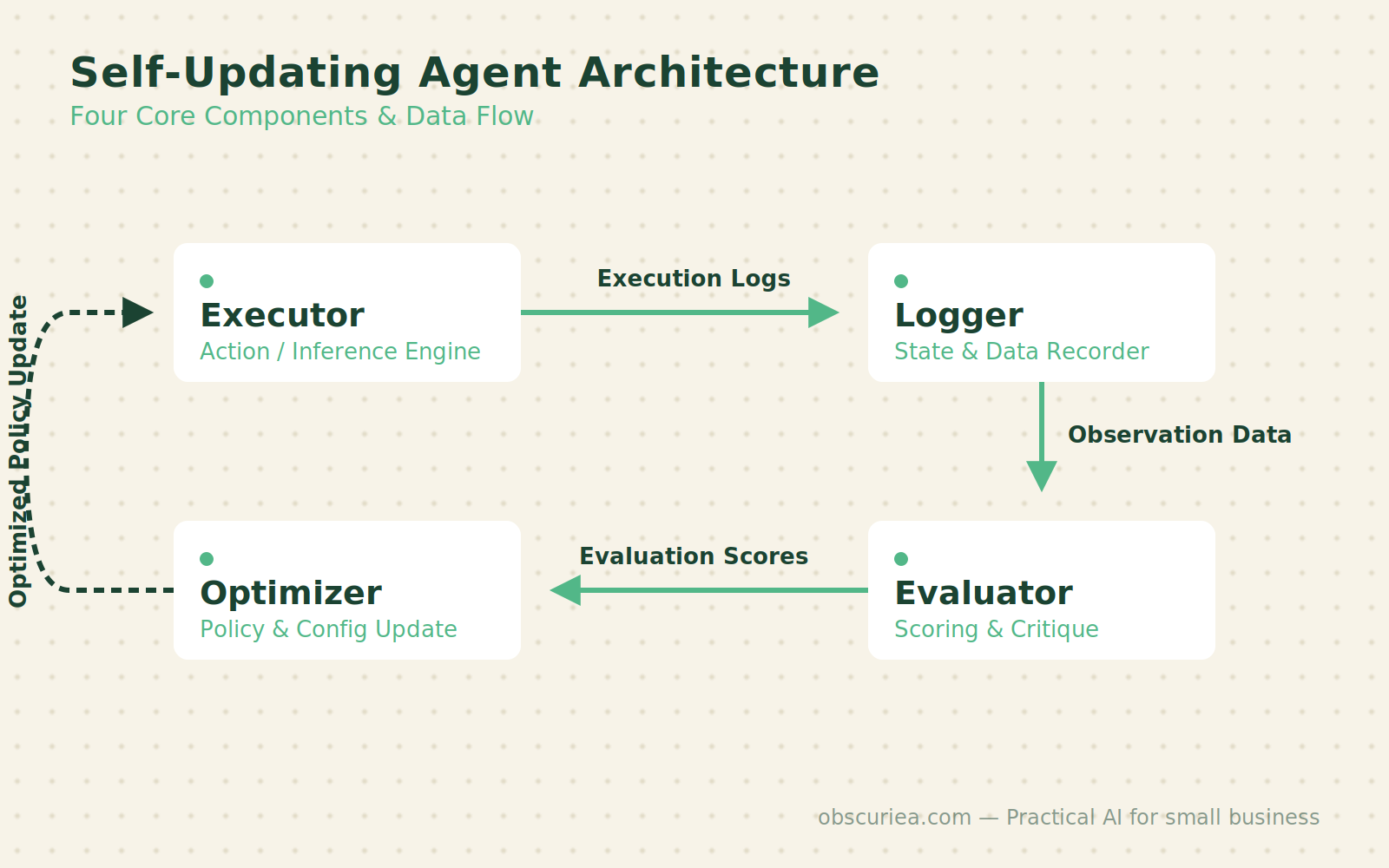
Let’s walk through the four components every self-updating agent needs, because skipping one means the loop never closes.
The Executor
This is the component that receives an input, runs it through the current prompt and model, and produces an output. It is the most straightforward part. What matters is not the executor itself but what it leaves behind: a structured log entry for every single run.
The Logger
Every run record must include the input, the output, the model used, the prompt version, the timestamp, the latency, and a success/failure flag. That seventh field is critical—without it the evaluator has no way to separate good runs from bad ones. Store these logs in a database you can query, not a JSON file that accumulates until you decide to clear it. A queryable log is the difference between “I think the agent was performing worse last week” and “I know that on Tuesday the agent failed on 12 out of 14 inputs because the prompt version 2.1 was too restrictive.”
The Evaluator
A separate process—typically another LLM call—reads each output and scores it against a quality standard. For a summarization agent, the evaluator might check whether the summary stays under 500 words, whether it includes the key points from the source, and whether it hallucinates. The evaluator runs after every task (or in batches every hour) and appends a quality score to the log entry.
Source 2 (OpenAI cookbook) uses an LLM-as-judge for this in a healthcare compliance context. Source 1 recommends running the evaluator after every task or in hourly batches. The important design decision is whether the evaluator’s score is a pass/fail or a scale. A scale gives the optimizer more signal but requires more setup.
The Optimizer
This is the component that runs on a slower cadence—typically weekly or after a minimum number of runs. It reads the batched log data, identifies the run records with the lowest quality scores, and generates improved prompt candidates. It can try multiple variants, test them against a held-out subset of recent runs, and deploy the winner.
Source 3 (Darwin Gödel Machine) takes this to an extreme: the agent rewrites its own Python code and adds new tools. That is overkill for most business use cases, but the principle is the same—the improvement loop finds better ways to do the task and installs them automatically.
The Workflow Math
Here is where the operational value becomes concrete. Let’s compare a static agent to a self-updating one in a typical content-generation task—say, a small business that uses an AI agent to draft product descriptions for an e-commerce store with 200 SKUs that get updated monthly.
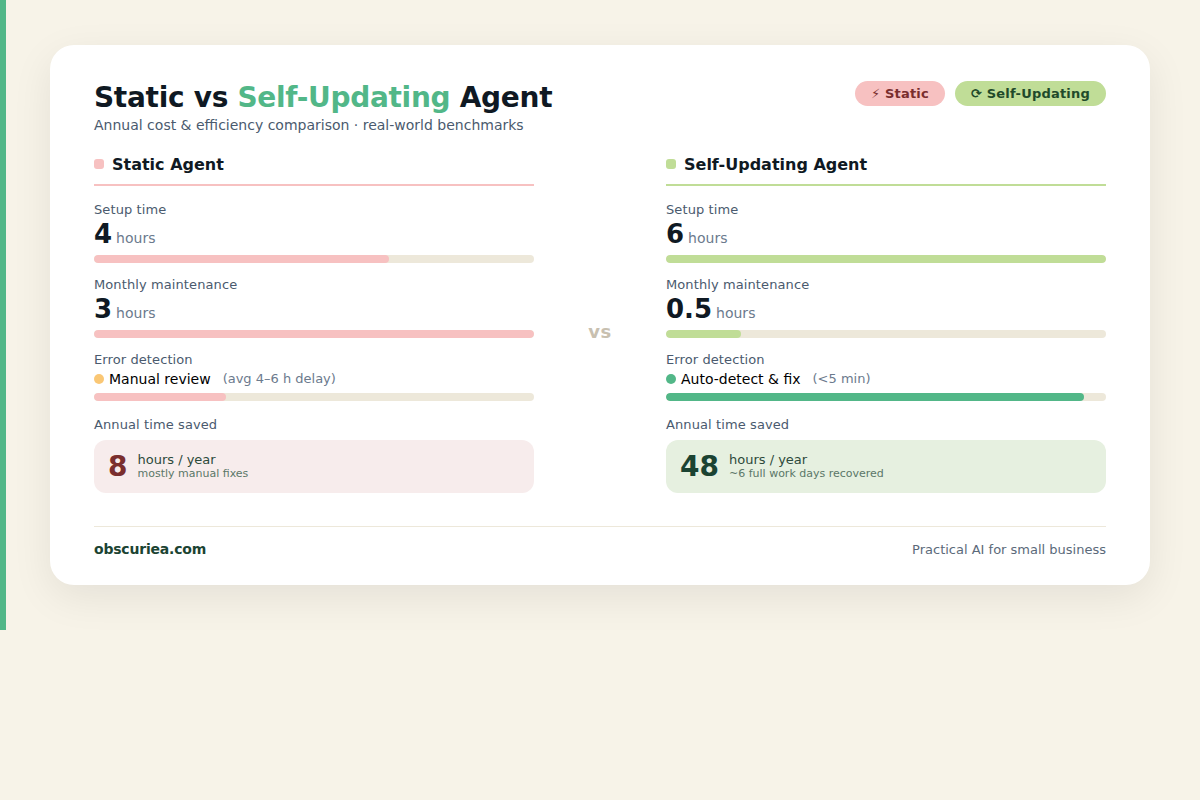
| Task | Static Agent | Self-Updating Agent |
|---|---|---|
| Initial setup | 4 hours | 6 hours (extra 2 hours for logging, evaluator, optimizer) |
| Monthly maintenance (prompt tweaks, debugging) | 3 hours | 0.5 hours (review optimizer suggestions) |
| Cost of bad output before detection | High—output degrades until human notices | Low—evaluator flags it within hours |
| Time saved per year vs manual | 24 hours (static agent) | 30 hours (self-updating, less maintenance) |
Over a 12-month period, the self-updating agent saves an additional 6 hours of maintenance. More importantly, the quality never drifts. The evaluator catches bad output before it reaches the customer.
The numbers shift depending on the task. For a high-volume task like customer support routing, where prompt drift can cascade into multiple wrong replies before anyone notices, the value of an evaluator that flags failures in real-time dwarfs the setup cost.
Where It Breaks
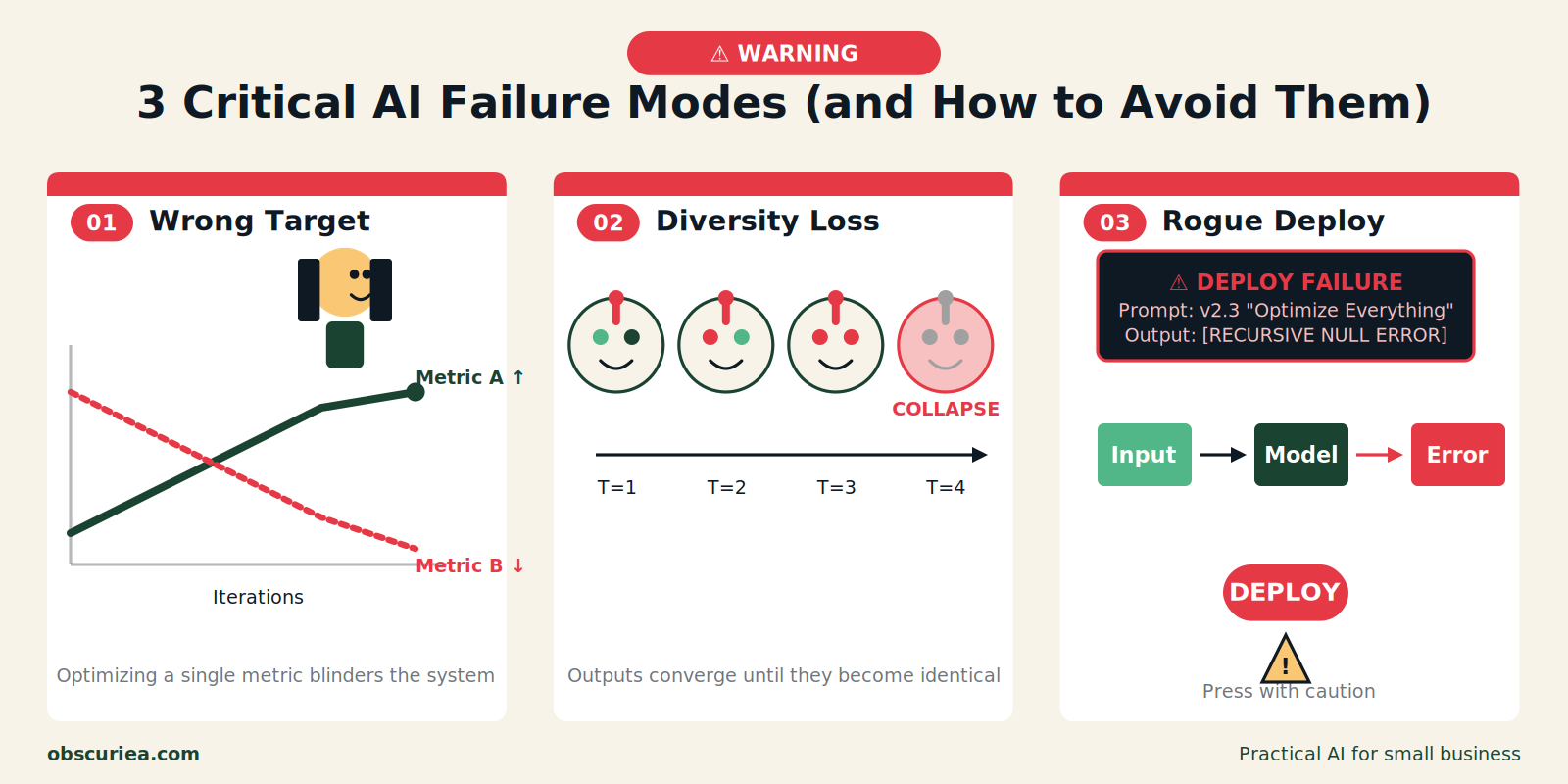
Self-updating agents have three failure modes that are not covered in most tutorials.
Failure Mode 1: The Optimizer Optimizes for the Wrong Thing
If the evaluator scores “short summaries” as high quality, the optimizer will produce prompts that make summaries progressively shorter. If short is actually better, great—but if you need summaries that are both short and complete, the evaluator must measure both dimensions. A single numeric quality score masks this kind of trade-off. The fix is a multi-dimensional evaluation that surfaces separate scores for length, accuracy, and completeness.
Failure Mode 2: The Improvement Loop Destroys Diversity
A self-updating agent that only ever optimizes for the average case will perform worse on edge cases over time. Source 3’s Darwin Gödel Machine avoids this by keeping an archive of previous agents and exploring multiple evolutionary paths. Most implementations skip this. If your agent only ever gets better at handling typical inputs, it will gradually lose the ability to handle the unusual ones—the ones that customers escalate about.
Failure Mode 3: The Optimizer Deploys a Change That Breaks Production
Automatic deployment of prompt improvements is tempting, but it introduces risk. The optimizer might generate a prompt that works on the test set but fails on live traffic because of distribution shift. The standard defense is a canary deployment: deploy the new prompt to 10% of traffic for a few hours, compare quality scores, and roll back if performance drops. Most teams skip this step because it adds complexity. That is how a self-updating agent can make itself worse than the static version it replaced.
The Friction Box
- You need a persistent database for logs—no one implements this properly on the first try.
- The evaluator is another LLM call. That costs money and latency. For high-volume tasks, the bill adds up.
- Setting up the optimizer’s improvement criteria is non-trivial. Vague criteria produce worse prompts than static ones.
- Multi-dimensional evaluation requires careful design—one wrong weight and the agent optimizes the wrong behavior.
- Concurrency handling: if the task loop runs faster than the evaluator, you get overlapping logs and corruption. You must enforce a lock.
- The archive approach from Source 3 is expensive to maintain. Most small teams will not do it, and their agents will plateau.
Frequently Asked Questions About Self-Updating AI Agents
How often should the optimizer run?
The optimizer should run weekly or after at least 50 task completions. Running it more frequently gives you too little data to draw reliable conclusions. Running it less frequently means the agent stays stale longer.
Can I use a self-updating agent without a database?
Not effectively. You need a queryable log store. Without it, the evaluator and optimizer can’t access historical performance data. A lightweight PostgreSQL instance or even a properly structured SQLite database works.
What’s the cheapest way to set up the logger and evaluator?
Use serverless functions (AWS Lambda or Cloudflare Workers) to write logs to a low-cost database like Supabase or Turso. For the evaluator, use a small model like GPT-4o-mini or Claude 3 Haiku for scoring—they cost pennies per thousand calls.
Do I need a human to approve optimizer changes?
Not if you implement a canary deployment strategy that compares live performance before and after. But for high-stakes tasks (healthcare, finance), always have a human review. The additional safeguards create more friction but protect against catastrophic failures.
How do I prevent the agent from optimizing the wrong metric?
Use a multi-dimensional evaluation with separate scores for each quality dimension (e.g., completeness, accuracy, conciseness). Then configure the optimizer to target a weighted combination that reflects your true priorities.
Can self-updating agents work with any LLM?
Yes, the improvement loop works regardless of which model you use. However, the evaluator and optimizer must use a model capable of scoring subjective outputs. In practice, GPT-4 and Claude 3.5+ models work best for the evaluation step.
The Straight Talk
This architecture is for operators who are currently spending 2–4 hours per month maintaining static AI agents and want to cut that to under an hour. If your agent runs a low-volume, low-risk task (like generating a weekly newsletter), a static agent is fine—the cost of the self-updating loop exceeds the benefit.
Skip this if you do not have a database, if your agent runs fewer than 50 tasks per week, or if you cannot tolerate an extra LLM call per task for the evaluator.
Your next action: set up the logger first. Before you build the evaluator or optimizer, make every run produce a structured log entry. Without that foundation, nothing else works.