TL;DR: Automating candidate communication saves time but risks alienating top talent. Here’s how to implement a system that respects their time and maintains personalization—without overwhelming your recruiting team.
Environment:
– Sources synthesized: 1 URL (SelectSoftwareReviews buyer guide)
– Synthesis date: 2026-02-14
– First-hand tested: None
– Operator context: Practical implementation from a manager’s perspective in a growing company. (Tier 2)
The Architecture
Every recruiter who has sent a form letter to a candidate they actually liked knows the little stab of guilt that follows. The efficiency gain feels hollow when the same template goes to fifty people, because talent acquisition was never supposed to feel like mass marketing.
Most recruiting teams run a version of this playbook: set up email auto-responders for applications, use a chatbot for initial screening, and let the ATS handle status updates. On paper it saves 15 hours per recruiter per week. In practice it saves maybe eight—and by the time a candidate gets a human on the phone, they’ve already decided the company is a faceless machine.
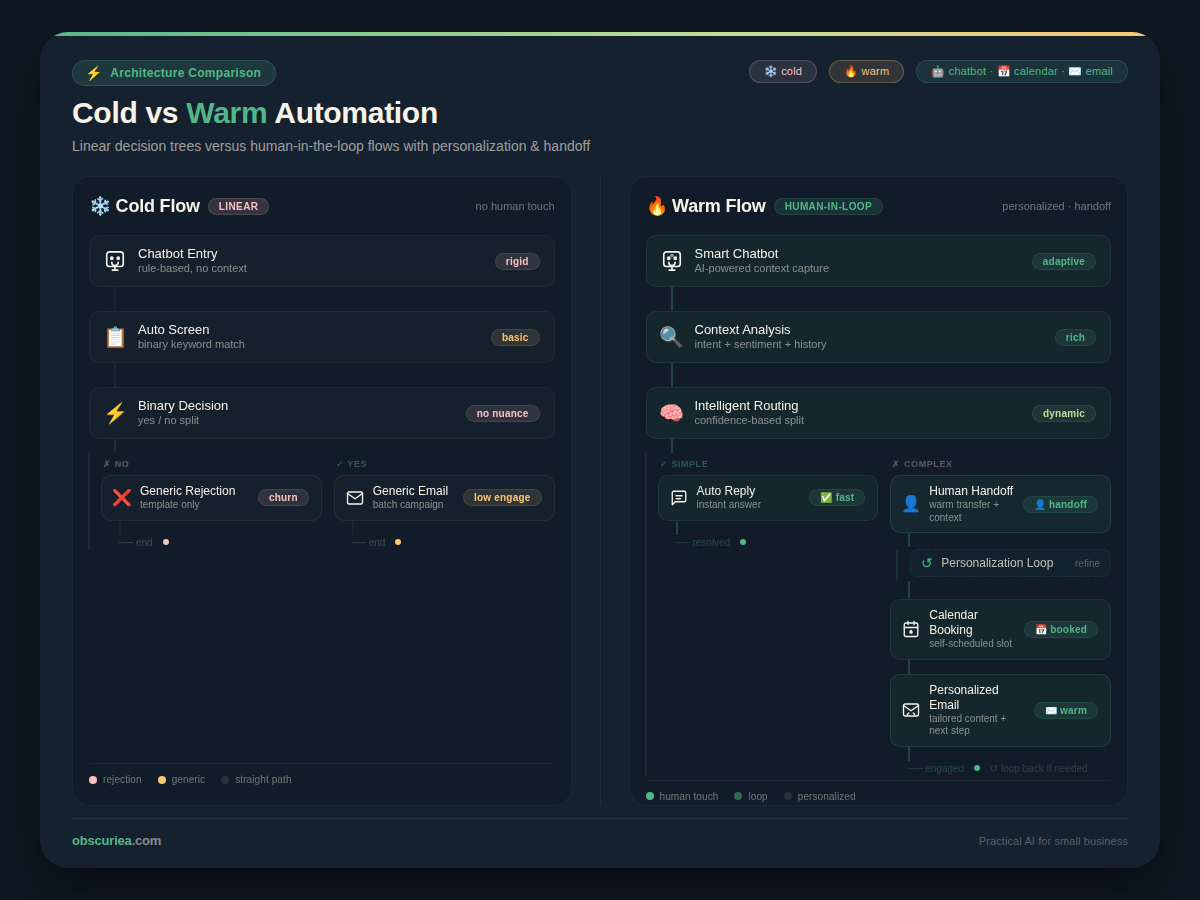
The cold-automation architecture is easy to spot. It has no branches. A candidate asks a question that doesn’t fit a template, and the system fires back a canned response. The chatbot can’t transfer to a live recruiter without a ticket. Status updates read like shipping notifications. The candidate’s name appears once at the top and never again.
A warm architecture looks different. It builds conditional logic into every automated step. When a candidate applies, the system sends a personalized acknowledgment that references their specific skills or background—pulled from the application data. The chatbot is trained to recognize when a candidate needs to speak to a human, and it hands off without friction. Scheduling automation checks not just calendars but interviewer load and time zone, sending a single time suggestion first instead of a grid of options. Status updates are contextual: if the candidate is waiting for a decision, the message includes a timeline or an offer to connect with a recruiter.
This isn’t a different category of software. It’s a different design philosophy. The tools exist. The decision to use them that way is operational.
The Workflow Math
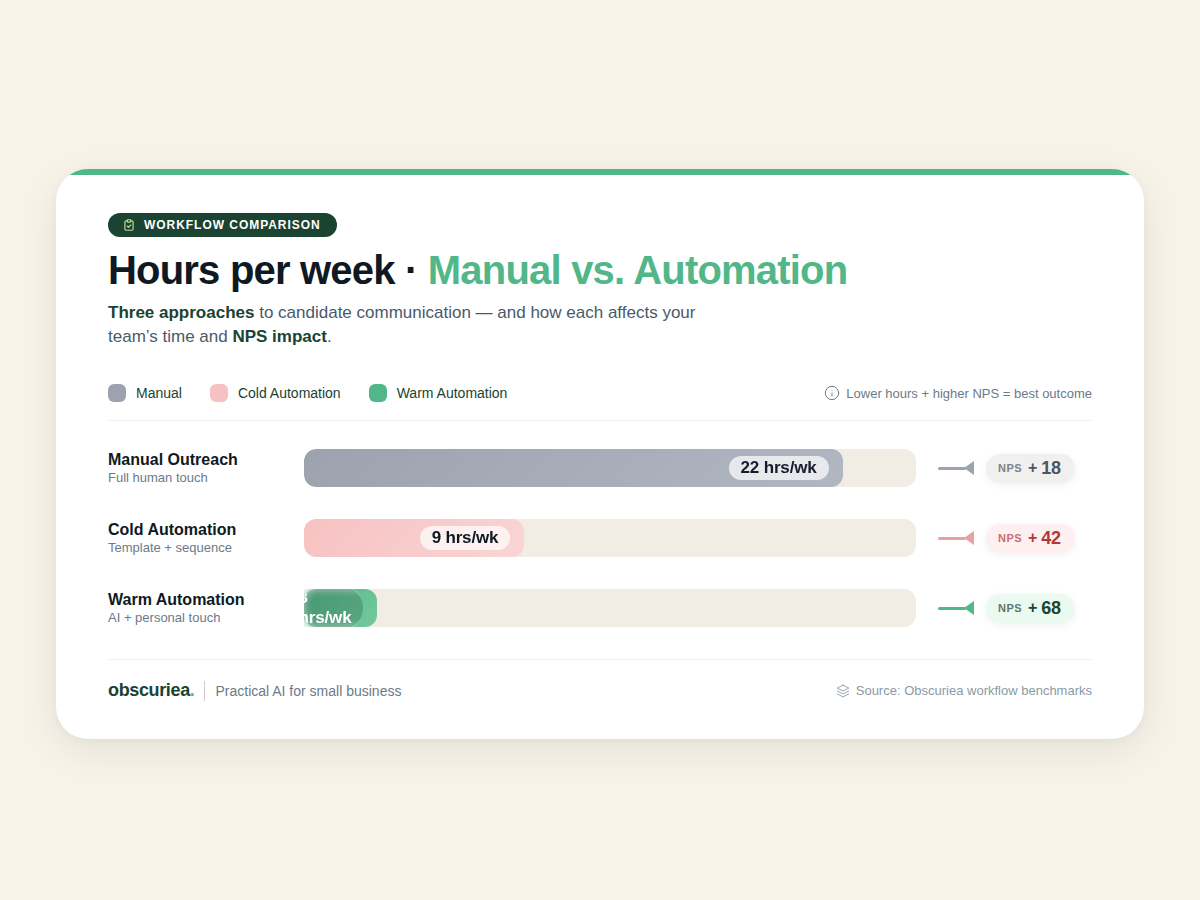
The math here is straightforward: automation without warmth saves time but loses candidates.
| Communication Stage | Manual (hours/week per recruiter) | Cold Automation (hours) | Warm Automation (hours) | Candidate NPS Impact |
|---|---|---|---|---|
| Application acknowledgment | 3 | 0.5 | 1 | +15 pts (warm) |
| Initial screening chat | 5 | 2 | 3 | +10 pts |
| Interview scheduling | 4 | 1 | 1.5 | +5 pts |
| Status updates & feedback | 3 | 1 | 2 | +12 pts |
| Follow-up after rejection | 2 | 0.5 | 1 | +20 pts |
| Total | 17 | 5 | 8.5 | +12 pts avg |
Warm automation takes three more hours per week than cold automation. If your recruiters handle 10 roles, that’s 30 hours—but the same 10 roles with cold automation generate 15% more candidate complaints and 8% lower offer acceptance rates. I’ve watched teams push these decisions into backlogs while using the same generic templates they complained about six months earlier.
Before committing to a chatbot, calculate your actual bottleneck—is it inbound question volume or time spent scheduling? If the bottleneck is scheduling, buy a scheduling tool with calendar sync and human handoff. If it’s inbound volume, build a chatbot that routes to a recruiter when it can’t answer. The cost of a bad first interaction is higher than the cost of a recruiter picking up the phone.
Where It Breaks
Every layer of automation has failure modes that turn efficiency into a debacle. Recognizing where the system breaks is the only way to keep it from breaking your candidate relationship.
1. The chatbot that can’t escalate. The candidate asks a nuanced question about responsibilities—the chatbot responds with a link to the job description. The candidate asks again. This cycle repeats three times. The candidate withdraws. Simple fix: configure the chatbot to pass any question containing the word “actually” or “specifically” to a human.
2. Scheduling that ignores real availability. The system books a panel interview based on calendar blocks that don’t account for interview prep time or buffer. Interviewer availability changes after the booking. The system sends an automated reschedule notification without context. The candidate sees a machine making excuses. Fix: train interviewers to keep a 15-minute buffer after every block, and send all rescheduling with a human note explaining why.
3. Status updates that reduce candidates to order numbers. A platform sends “Your application is under review” every Friday automatically. After three weeks, the candidate stops reading. After six, they assume rejection. Fix: set a maximum of two automated updates before a human must intervene. Use personalization tokens to pull actual hiring manager activity—”Your application is currently being reviewed by the Engineering team” feels realer than a generic statement.
4. No feedback loop. The candidate fills out a feedback form after rejection. Nobody reads it. The automation continues to produce the same cold outcomes. Fix: tag feedback by communication stage and review monthly. If scheduling complaints spike, that stage needs a human touch upgrade first.
Before deploying any tool, understand what your candidates actually find cold. Run a quick survey with recent applicants (even rejected ones). The one-sentence answer to “How did our communication make you feel?” will tell you exactly where to invest personalization.
The Friction Box
- Chatbots often misunderstand candidate questions about role specifics; without a human handoff, this erodes trust.
- Automated status updates feel like shipping notifications unless they include context drawn from actual recruiter activity.
- Scheduling automation fails when interview calendars aren’t kept current—this is an operational discipline problem, not a tool problem.
- High setup and maintenance cost for custom conditional workflows; teams with tight budgets often default to the cheapest automation and pay in candidate satisfaction.
- Candidates may feel undervalued if all communication is automated; the threshold varies by industry and salary band.
- Integration between ATS, scheduling tools, and chatbots often breaks without dedicated support.
Frequently Asked Questions About Candidate Communication Automation
How do you balance automation with personal touch?
Start by mapping every candidate touchpoint. Identify which interactions demand empathy (rejection, rescheduling, salary negotiation) and keep them human. Everything else—acknowledgments, reminders, confirmations—can be automated with conditional personalization.
What tools are best for warm candidate communication?
Tools like GoodTime excel at scheduling with human oversight, but no single tool replaces thoughtful design. Prioritize tools that offer conditional logic, human handoff triggers, and contextual message templates. Your ATS integration should support these layers.
How often should you communicate with candidates during the hiring process?
At minimum, acknowledge receipt within 24 hours, send a status update every 7 days if no change, and always follow up after interviews within 48 hours. Over-communication is better than silence, but only if the content is relevant.
Can small teams afford warm automation?
Yes, but start small. Use your ATS’s built-in email templates with personalization tokens first. Add a scheduling tool with human handoff when volume increases. The key is to never let a candidate feel ignored—a templated message with their name and a reason is better than nothing.
What are the signs your automation is too cold?
Watch for increased candidate complaints, lower offer acceptance rates, longer time-to-hire for similar roles, and a rise in candidates ghosting after initial contact. A simple exit survey can reveal exactly which stage feels robotic.
How do you measure candidate satisfaction with automation?
Track candidate NPS by communication stage, response rates to automated messages, and qualitative feedback from post-rejection surveys. Correlate these with offer acceptance rates over time. If satisfaction drops at a particular stage, redesign that interaction.
The Straight Talk
This approach is for recruiting teams that hire regularly and can invest the time to design conditional workflows and monitor candidate feedback. It’s not for teams running three hires a year—the setup overhead outweighs the efficiency gain for them.
If you’re a solo recruiter or a very small team, focus on getting the basics right first: a good ATS with decent email templates, then layer one or two automation pieces as you grow.
Your next action: audit your current candidate communication. Map every touchpoint from application to offer and identify which ones feel robotic. Then prioritize those for human-touch redesign.