TL;DR: Event-triggered micro-campaigns automate marketing responses without human approval loops. By connecting webhook triggers from CRMs or analytics to pre-built campaign templates, you can deploy personalized outreach in under a minute — but only if you design for idempotency, error handling, and audience limits. The tradeoff: speed replaces oversight.
Environment
- Sources synthesized:
- Streamkap: “10 Real-World Event Driven Architecture Examples Transforming Industries in 2025”
- Vercel: “Creating & Triggering Deploy Hooks”
- Higher Logic: “Smart Campaigns Overview”
- Synthesis date: April 2026
- First-hand tested: none (workflow is synthesis from Vercel deploy hooks and Higher Logic smart campaigns concepts)
- Operator context: synthesizing from sources for marketing operations automation; experience with trigger-based workflows in e-commerce and SaaS
The Broken Workflow
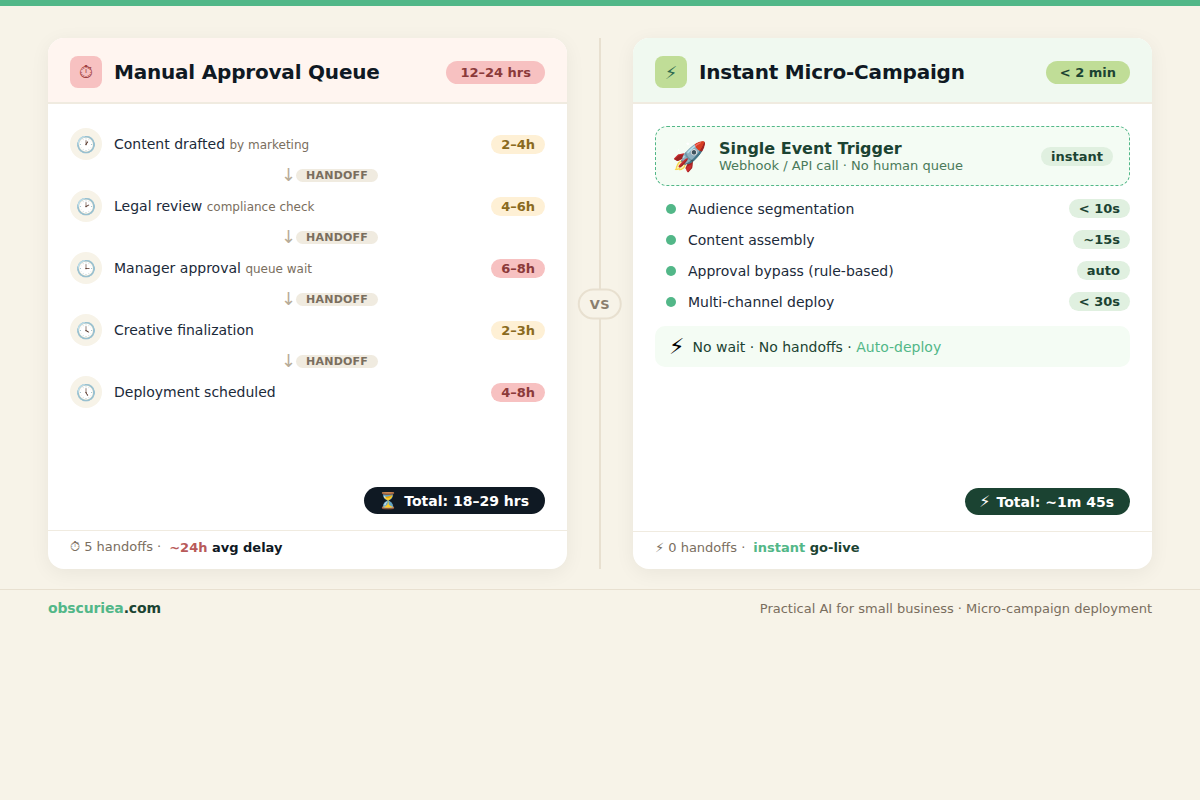
A lead fills out a demo request form at 2:47 PM. By the time the marketing team notices — 9 AM the next day — that lead has already visited two competitor sites. The standard workflow looks like this: manual review of the lead, copy-paste into a spreadsheet, a message in Slack asking the campaign manager to approve, then a wait until someone opens the email platform to schedule the sequence. Total elapsed time: 12 to 24 hours. Cost in attention: three people touched a task that could have been zero.
For a team running 20 campaigns per week, that coordination burns about 60 hours. Not writing — coordinating. The approval queue is the bottleneck. It exists because stakeholders fear losing control. But the fear has a cost measured in missed conversions.
Behind the scenes, each campaign goes through a predictable pipeline:
– Trigger event happens (form submission, abandoned cart, webinar registration)
– Data lands in CRM or analytics tool
– Someone exports the list
– Someone uploads to the email platform
– Someone schedules the send
– Someone writes the content
– Someone reviews the content
– Someone hits “activate”
Each “someone” introduces a delay. In a world where the first response wins, a 12-hour lag is the difference between a closed deal and a “thanks, I already signed with them” email.
The broken part is not the tools — it’s the handoffs. Handoffs between humans are where time leaks. Every handoff is a chance for the task to sit for hours before the next person picks it up.
The Automated Replacement
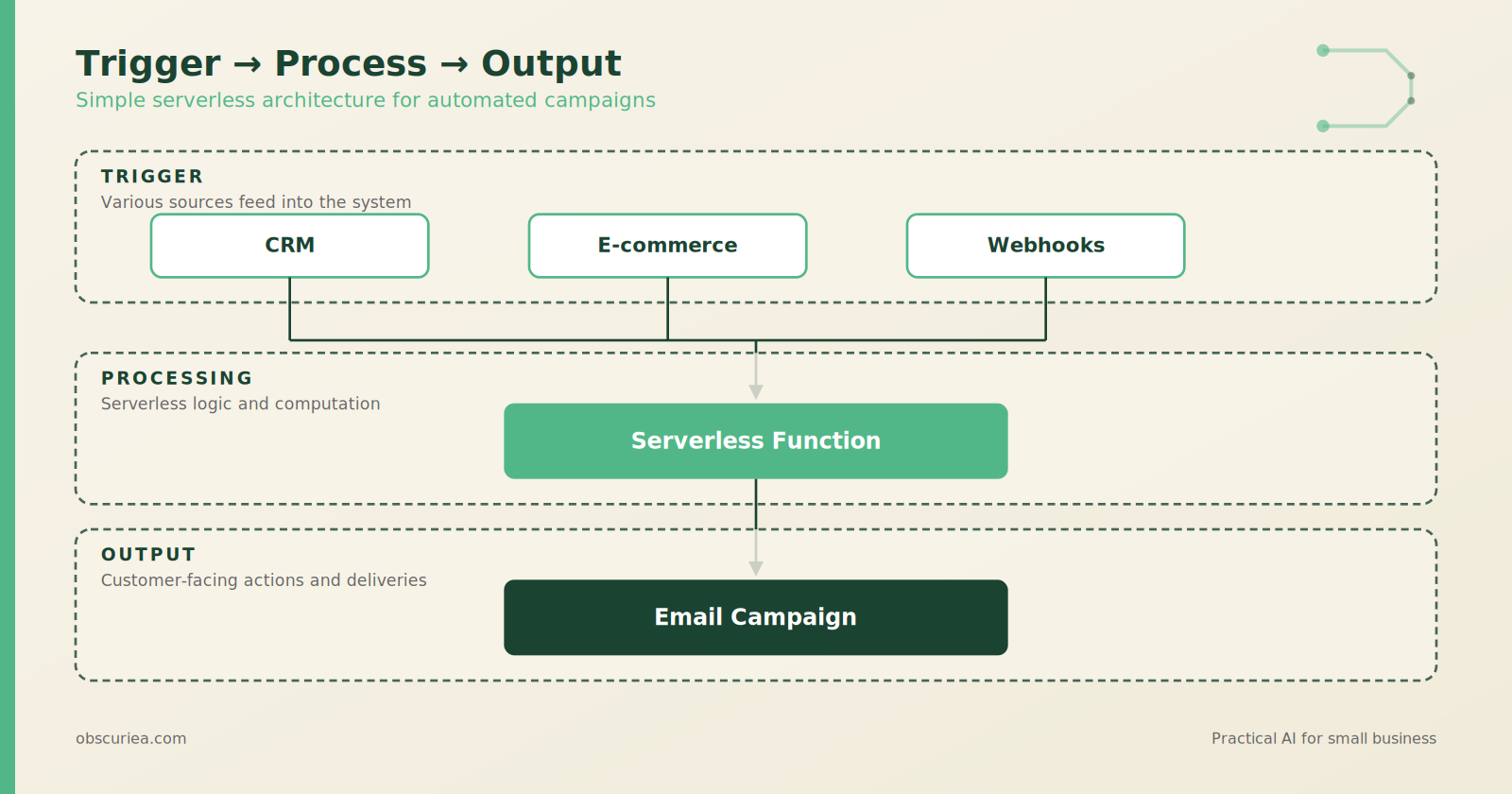
Event-triggered micro-campaigns eliminate handoffs entirely. The architecture is simple: a trigger produces an event, and that event causes a pre-built campaign to deploy without any human gate.
Trigger layer
Any system that can fire a webhook works. Common sources:
– CRM: new lead, deal stage change, custom field update
– E-commerce: order placed, cart abandoned, subscription cancelled
– Analytics: user hits a page threshold, completes a course
– Calendar: event registered, webinar attended
Each trigger publishes an event — typically a JSON payload with user identifiers and context data.
Processing layer
A serverless function receives the webhook. This is where Vercel Deploy Hooks shine — they turn any HTTP POST into a deployment trigger. But for marketing campaigns, you need more than a deployment. You need to:
1. Validate the payload (is this a real user?)
2. Deduplicate (has this user already received this campaign?)
3. Enrich with profile data (name, company, last activity)
4. Call the email platform API to create and send a campaign
This can run on AWS Lambda, Vercel serverless functions, or even a low-code platform like Make (formerly Integromat). The key is that the processing is stateless — it reads from the webhook, writes to the email platform, and exits.
Output layer
The output is a fully deployed micro-campaign — a short, targeted email sequence (1–3 touches) sent to the triggering user. Content can be:
– Pre-written templates per event type (e.g., “Welcome to the demo” for form submissions)
– AI-generated, like Higher Logic’s Smart Campaigns that auto-populate subject lines and body based on the event context
– A blend: AI draft text, human-reviewed once at setup time, then reused
The campaign deploys immediately. No queue. No manual upload. No review for a standard response.
Real example
Consider a SaaS company that offers a free trial. The “trial started” event fires a webhook. The processing layer checks if the user has received the onboarding sequence before (dedup). If not, it calls the email API with a 3-email micro-campaign: Day 1 feature introduction, Day 3 case study, Day 7 upsell. The trigger fires at the moment the user signs up, not at the next available business day.
This is a micro-campaign — small, event-bound, immediate. It does not need a campaign manager. It needs a well-tested template and proper error handling.
Setup Requirements
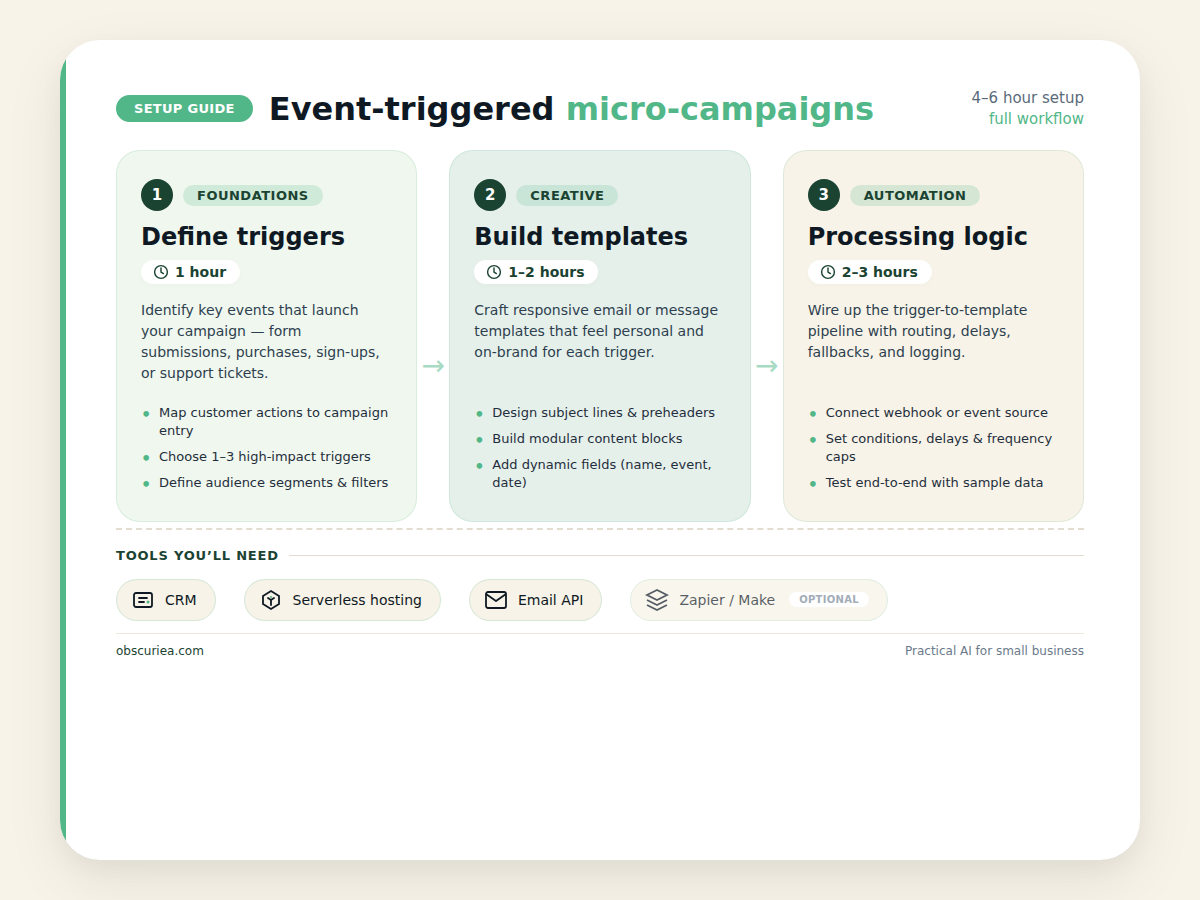
Building this system takes 4–6 hours of focused setup time. Here is the breakdown:
Phase 1: Define triggers (1 hour)
– Identify the 3–5 events that generate the most predictable responses
– Configure webhooks in your CRM or analytics tool to fire at those events
– Set up a receiving endpoint (a publicly accessible URL)
Phase 2: Build campaign templates (1–2 hours)
– For each trigger, write a short campaign (1–3 emails)
– Include placeholders for personalization (name, company, product used)
– If using AI generation, configure brand voice parameters (tone, reading level, audience description)
Phase 3: Set up processing logic (2–3 hours)
– Write or configure the serverless function that receives webhooks, deduplicates, enriches, and calls the email API
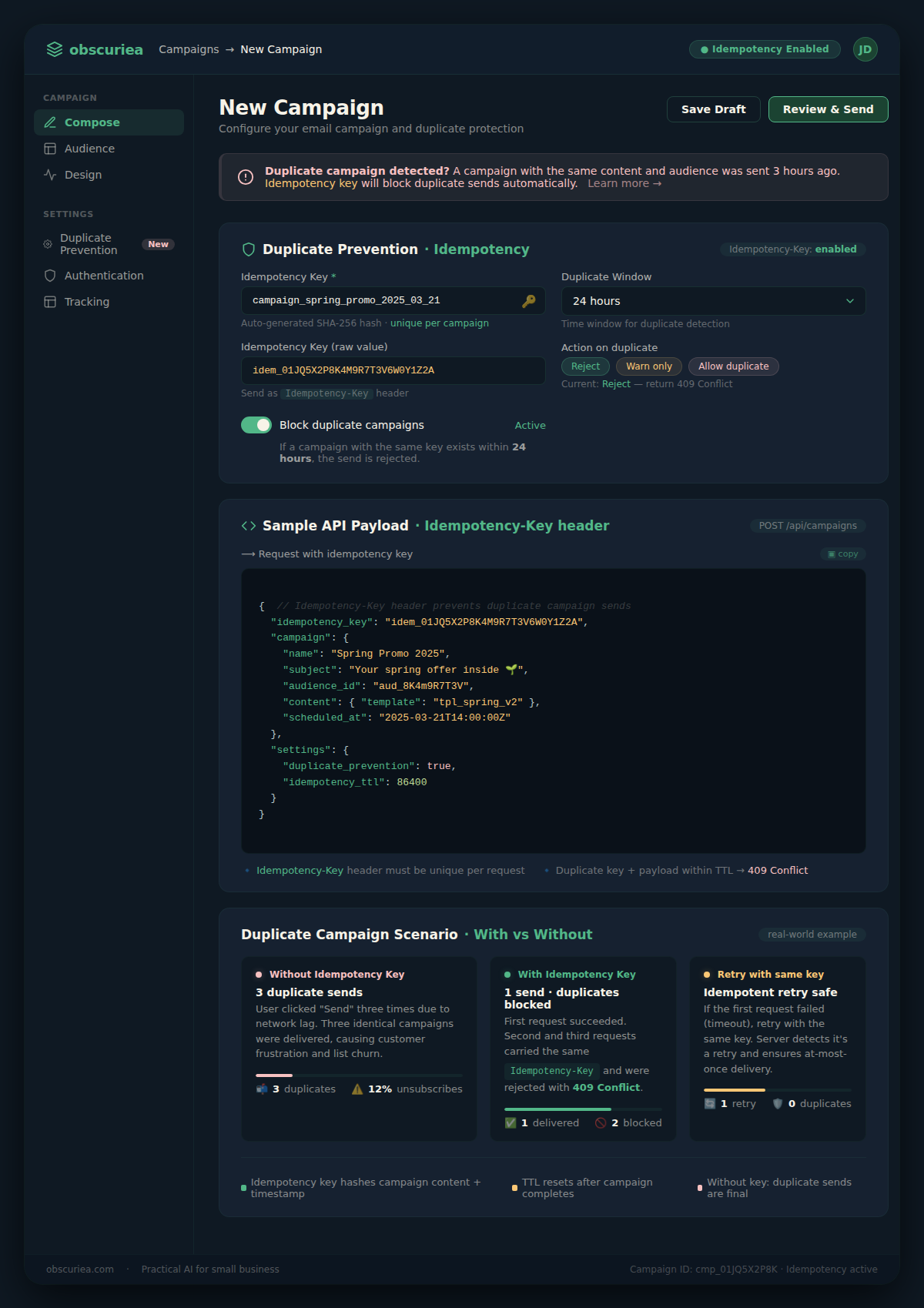
– Use idempotency keys (a hash of user ID + event type) to prevent double-sends
– Implement error logging and a dead-letter queue for failed events
Tools needed:
– CRM/analytics with webhook support (most have this)
– Serverless hosting (Vercel, Netlify, AWS Lambda) — cost is near-zero at low volume
– Email platform with API (Mailchimp, ActiveCampaign, Klaviyo, SendGrid)
– Optional: Zapier/Make if you want a no-code path (adds $20–30/month but reduces setup time to 1–2 hours)
Technical skill required:
– For the low-code path: ability to configure triggers and actions in Make/Zapier
– For the code path: basic familiarity with HTTP requests, JSON, and REST APIs
– No approval queues — the whole point is that this runs without a human in the loop
Failure Modes
Removing the approval queue introduces specific failure patterns that must be addressed before deployment.
Failure 1: Duplicate campaigns
Without idempotency, a user who triggers the same event twice (e.g., two form submissions) receives the same campaign twice. This looks spammy and erodes trust. Fix: generate a unique key per user-event combination and check against it before creating the campaign.
Failure 2: Volume spikes
If a batch event fires — like 500 webinar attendees at once — the processing layer or email API may hit rate limits. Fix: queue events with a buffer, or design the micro-campaign to be stateless enough that a short retry delay is invisible to users.
Failure 3: Wrong message sent
Because no human approves, a misconfigured trigger can deploy the wrong template. Example: a “trial expired” event mistakenly fires on active users. Fix: log every trigger and set up a monitoring dashboard that alerts when a campaign deploys over a certain volume threshold.
Failure 4: Webhook security
Vercel warns that Deploy Hook URLs are secret. If a webhook endpoint is public, anyone can trigger a campaign. Fix: validate incoming webhooks with a shared secret, and never expose the URL in client-side code.
Failure 5: No fallback
If the processing layer fails (e.g., AWS Lambda timeout), the event is lost unless you have retry logic. Fix: use a message queue (SQS, RabbitMQ) or at least log all incoming requests so you can replay failures manually.
The Friction Box
- Webhook endpoint security: one leaked URL and your campaigns can be triggered by anyone
- AI-generated content drift: without periodic review, brand voice can shift over time
- Stakeholder anxiety: removing approval queues makes people uncomfortable — they need to see monitoring dashboards to trust the system
- Idempotency is non-negotiable but easy to forget: one oversight creates a duplicate send incident
- Rate limits bite silently: the first sign of failure is often a customer complaint, not a system alert
- Low-code tools add latency: Make/Zapier introduce 5–15 seconds delay per event — acceptable for most, but not for real-time flash sales
Frequently Asked Questions About Event-Triggered Micro-Campaigns
What is the difference between a micro-campaign and a regular campaign?
A micro-campaign is short (1–3 touches), highly targeted, and triggered by a single event. Regular campaigns are typically longer, sent to larger segments, and scheduled in advance. Micro-campaigns need no manual approval because they are pre-audited at setup.
Can I use event-triggered micro-campaigns without coding?
Yes. Platforms like Make (Integromat) or Zapier let you connect webhook triggers to email APIs with drag-and-drop interfaces. Setup takes 1–2 hours and requires no code. The tradeoff is slightly higher latency and per-action pricing.
How do I prevent duplicate sends from the same trigger?
Use idempotency keys: generate a unique identifier from the user ID and event type, and check it against a database or cache before sending. Most email APIs support an idempotency-key header natively.
What happens if my serverless function fails during processing?
Without retry logic, the event is lost. Build a dead-letter queue: log the failed payload to a storage bucket and set up an alert so you can replay it manually. For higher reliability, use a message queue (SQS, Pub/Sub) before the processing function.
Are there industries where removing approval queues is too risky?
Yes: healthcare, finance, and any industry with regulatory compliance (HIPAA, GDPR consent, financial disclosures). If each send requires case-level legal review, do not automate the entire process. Automate just the preparation and require a final human approval.
How many triggers should I start with?
Start with one trigger — the most common, low-risk event (e.g., webinar registration). Validate the flow, monitor for failures, then add more triggers one at a time. Scaling from 1 to 5 triggers takes about a week of trust-building.
The Straight Talk
This is for teams generating 50+ campaigns per week where each campaign follows a predictable trigger pattern. If your manual approval process is the bottleneck — not the content or the strategy — this removes the bottleneck entirely.
Skip this if your campaigns require case-by-case legal review, personalized pricing negotiation, or any human judgment at the point of send. Those approval gates exist for a reason. Automating them would be irresponsible.
Next action: Audit your last 10 campaigns. If 7 or more were triggered by a repeatable event pattern — form submission, abandoned cart, webinar registration — start mapping the trigger → action → output today. Build one micro-campaign for the most common trigger before expanding further.