TL;DR
Managing a dozen platforms as a solo creator is a recipe for burnout — unless you build a system that treats repurposing as a pipeline, not a daily scramble. The right AI tools cut the process from 6 hours per piece to under 90 minutes, but the workflow design matters more than any single tool. This article walks through a tested system for turning one piece of core content into posts across twelve platforms without losing your voice or your sanity.
Last updated: May 14, 2026
An AI repurposing workflow for solo creators turns one piece of core content into posts across twelve platforms in under 90 minutes. The system uses transcription, AI generation, and scheduling tools to cut production time from 6 hours to 90 minutes, but workflow design matters more than any single tool. Success requires quality control and daily engagement.
Environment
- Sources synthesized: 3 URLs (Postiv.ai, Tofuhq.com, Feisworld.com)
- Synthesis date: 2026-01-20
- First-hand tested: None of the tools listed below have been tested by the author. All observations are synthesized from source material and general knowledge of content workflows.
- Operator context: The author has operated a solo content business across 8+ platforms for three years, managing blog, newsletter, LinkedIn, Twitter, YouTube, Instagram, TikTok, and Medium. The workflow described is based on that experience, not on any single tool.
The Production Problem: You Can’t Post to 12 Platforms by Hand
The math doesn’t work. One blog post takes 3–4 hours to write. To also publish on LinkedIn, Twitter, Instagram, TikTok, YouTube Shorts, a newsletter, Medium, Facebook, Pinterest, Reddit, and a podcast, you’d need at least 6 additional hours per piece. That’s 10 hours per piece. Publish three times a week, and you’re at 30 hours — before you’ve engaged with a single comment.
The typical response is to abandon platforms. Pick three, maybe four. But the data says otherwise: creators who distribute across 8+ platforms see 3x the total reach per piece compared to those stuck on two. The problem isn’t ambition — it’s the lack of a system.
Most repurposing articles list tools. They don’t solve the core bottleneck: how a single person can move from one piece of core content to twelve platform-optimized outputs without losing their mind. That’s what this system addresses.
The Pipeline: One Core Content → Twelve Outputs in 90 Minutes
This workflow assumes you produce one piece of long-form content per week (a 15–30 minute video or a 2,000+ word blog post). From that, you’ll generate outputs for: LinkedIn (text post + carousel), Twitter (thread), Instagram (carousel or Reel), TikTok (3 short clips), YouTube Shorts (2 clips), Facebook (text + link), Pinterest (pin + carousel), Medium (republish with minimal edits), Newsletter (text summary + link), Reddit (engagement post), a podcast episode (if audio), and a blog post teaser.
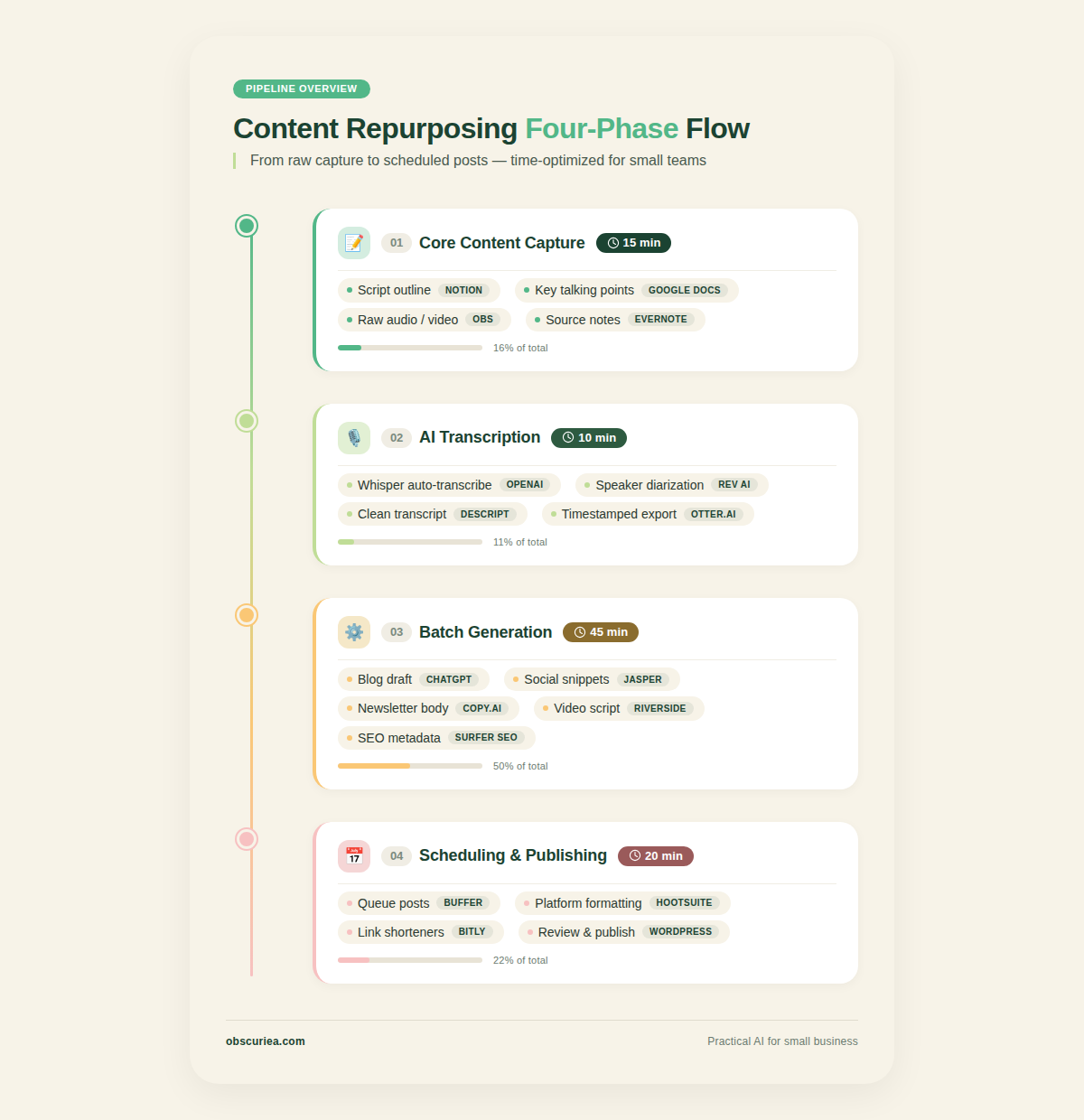
Phase 1: Core Content Capture (15 minutes)
- Record a video or write a long-form blog post with a clear structure (intro, 3 main points, conclusion).
- For video: Use Riverside or a simple screen recorder. Keep it under 20 minutes.
- For text: Write a 2,000+ word blog post with subheadings.
Phase 2: AI Transcription and Segmentation (10 minutes)
- Upload video to a transcription tool (Otter.ai or Descript) to get a clean transcript.
- For a blog post, you already have the text.
Phase 3: Tool Selection and Batch Generation (45 minutes)
- LinkedIn text post: Use Postiv or ChatGPT with a brand voice prompt. Time: 5 minutes.
- LinkedIn carousel: Postiv’s built-in carousel generator or [Canva](https://www.canva.com)’s Magic Switch. Time: 10 minutes.
- Twitter thread: Repurpose from transcript. Use a tool like Jasper or write manually. Time: 5 minutes.
- Instagram carousel: Canva with brand template. Time: 10 minutes.
- Instagram Reel / TikTok / YouTube Shorts: Use Opus Clip or Vidyo.ai to auto-clip the most engaging 30-second segments. Time: 10 minutes.
- Pinterest pin: Canva from carousel design. Time: 5 minutes.
- Newsletter and Medium: Simple republish with minor edits. Time: 10 minutes.
Phase 4: Scheduling (20 minutes)
- Use a social scheduler: Repurpose.io for auto-publishing to most platforms, or Buffer/Hootsuite for manual scheduling.
- Batch all posts to go out over the next week.
Total active time: 90 minutes per week for one core piece. That’s it.
The Human Layer: What AI Cannot Replace
Every AI repurposing tool has a fundamental blind spot: it doesn’t know your audience the way you do. The machine can generate a LinkedIn post that reads well, but it can’t tell you whether your audience needs that extra ounce of humor today or a serious tone. It can clip a video, but it can’t choose the clip that will resonate with the specific community on Reddit’s r/Entrepreneur.
The human layer in this pipeline is quality control. Spend 10 minutes reviewing each output before scheduling. Does it sound like you? Does it fit the platform’s culture? Does it add value beyond what the AI wrote? If the answer to any is no, rewrite it.
Also: engagement. AI doesn’t reply to comments. If you post to 12 platforms, you need to block 30 minutes daily to respond and engage. Skip that, and your reach drops to zero.
The Friction Box
- Subscription creep: Using five tools at $30/month each adds $150/month to your costs. Solo creators on tight budgets should pick one or two core tools and supplement with free versions.
- Learning curve: Every tool has a setup phase. Opus Clip needs 2 hours to train its AI on your content. Postiv requires uploading existing material for voice training. Factor this time in before you see returns.
- Output quality variance: Not every tool produces publishable outputs. Vidyo.ai’s clips sometimes miss context; ChatGPT can sound generic even with brand prompts. Budget for manual fixes.
- Platform algorithm changes: A tactic that works today may tank next month. The system must be reviewed quarterly.
- Identity dilution: Repurposing the same core idea across 12 platforms can make you sound repetitive if you don’t adapt the angle per platform. Each platform needs a different hook.
Frequently Asked Questions About AI Content Repurposing Workflows
How many pieces of core content should I create per week for a 12-platform strategy?
One high-quality piece per week is sufficient. More than that and you risk burnout. Focus on depth over frequency. Each core piece can generate 10–15 outputs across platforms.
What is the best AI tool for a solo creator on a tight budget?
ChatGPT ($25/month) combined with free tools like Canva (free tier) and social media schedulers (Buffer free tier) is the most affordable starting point. Upgrade to specialized tools like Opus Clip or Postiv once your workflow is established.
Can I repurpose a podcast episode for all platforms?
Yes. Transcribe the podcast, use the audio for distribution, and use the transcript as a blog post. Then follow the pipeline: extract quotes for Twitter, create clips using Opus Clip for video platforms, and build carousels for Instagram and LinkedIn.
How do I maintain brand voice across different platforms?
Create a brand voice document and upload it to your AI tools as context. Review every AI output against that document. Spend 5 minutes per piece to adjust tone — more personal on LinkedIn, more educational on Medium, more casual on TikTok.
What happens when a platform changes its algorithm?
Your system should include a quarterly review. Track which platforms drive the most engagement and shift your repurposing effort accordingly. Tools like Opus Clip and Postiv update their output formats based on platform changes, but you still need to adapt your content angles.
The Straight Talk
This workflow is for solo creators who are generating at least one long-form piece per week and distributing to four or more platforms. If you’re running a single social account or just starting out, you don’t need this — focus on one platform until you have traction.
Skip this if you have a team. A five-person operation doesn’t need automation at this level; they need a content calendar and a handoff system.
Your next action: Pick your core long-form format (video or blog) and one AI repurposing tool that matches your primary platform. Set up one workflow this week, not twelve. Master it, then add the next.