TL;DR: Automating revenue recognition for subscription businesses is no longer optional—but most guides skip the real costs, setup time, and failure modes. This article breaks down the architecture of a good system, the math behind implementing it, and exactly where automation breaks so you can avoid the common pitfalls.
Environment:
– Sources synthesized: 3 URLs (Stripe, Hubifi, Recurly)
– Synthesis date: 2025-04-09
– First-hand tested: none (synthesis-based)
– Operator context: author has operational experience with subscription billing and financial systems for small-to-medium businesses in Southeast Asia
The Architecture
Revenue recognition in a subscription business is a timing problem disguised as an accounting problem. You collect cash upfront but earn it over the service period. The gap between cash and revenue is where mistakes compound. A proper automation system must handle three layers: contract interpretation, allocation logic, and journal entry generation.
Contract interpretation is the most overlooked piece. Every subscription contract has performance obligations—software access, support, storage, maybe onboarding. The system needs to parse these from your billing platform or CRM. If you’re still emailing contracts as PDFs, you’re adding days to your close cycle.
Allocation logic then splits the total contract value across each obligation based on standalone selling prices. This is where ASC 606 and IFRS 15 diverge slightly but share the same principle: you must allocate transaction price to each distinct promise. If a plan bundles software ($1200/year) with premium support ($600/year), but the customer pays $1500 total, the system must allocate $1000 to software and $500 to support based on their relative standalone prices.
Journal entry generation is the output: create deferred revenue, recognize it over time as obligations are fulfilled, and handle adjustments for upgrades, downgrades, or cancellations. Manual spreadsheets can do this—until you have more than 50 subscriptions. After that, error rates climb, and your audit trail turns into a mess of versioned Excel files.
The Workflow Math
Let’s compare manual vs automated revenue recognition for a typical subscription business with 500 subscribers, each with an average of 2.5 contract modifications per year (upgrades, downgrades, prorations).
| Task | Manual (hours/month) | Automated (hours/month) |
|---|---|---|
| Contract review & entry | 15 | 2 |
| Allocation calculation | 20 | 0.5 |
| Journal entry generation | 10 | 0.1 |
| Adjustment handling | 25 | 3 |
| Audit preparation | 8 | 1 |
| Total | 78 | 6.6 |
The savings are real: 91% reduction in manual time. But here’s what the numbers don’t show. The setup cost for automation is 40–60 hours of configuring allocation rules, mapping contract types, and testing edge cases. Most businesses underestimate this effort. They expect a tool to work out of the box. It won’t.
Automation also shifts the bottleneck. Manual accounting required a dedicated person. Automation requires a skilled finance operations person to configure and maintain the system. That person costs more than a junior accountant. The trade-off: you free up senior staff for analysis instead of data entry.
Where It Breaks
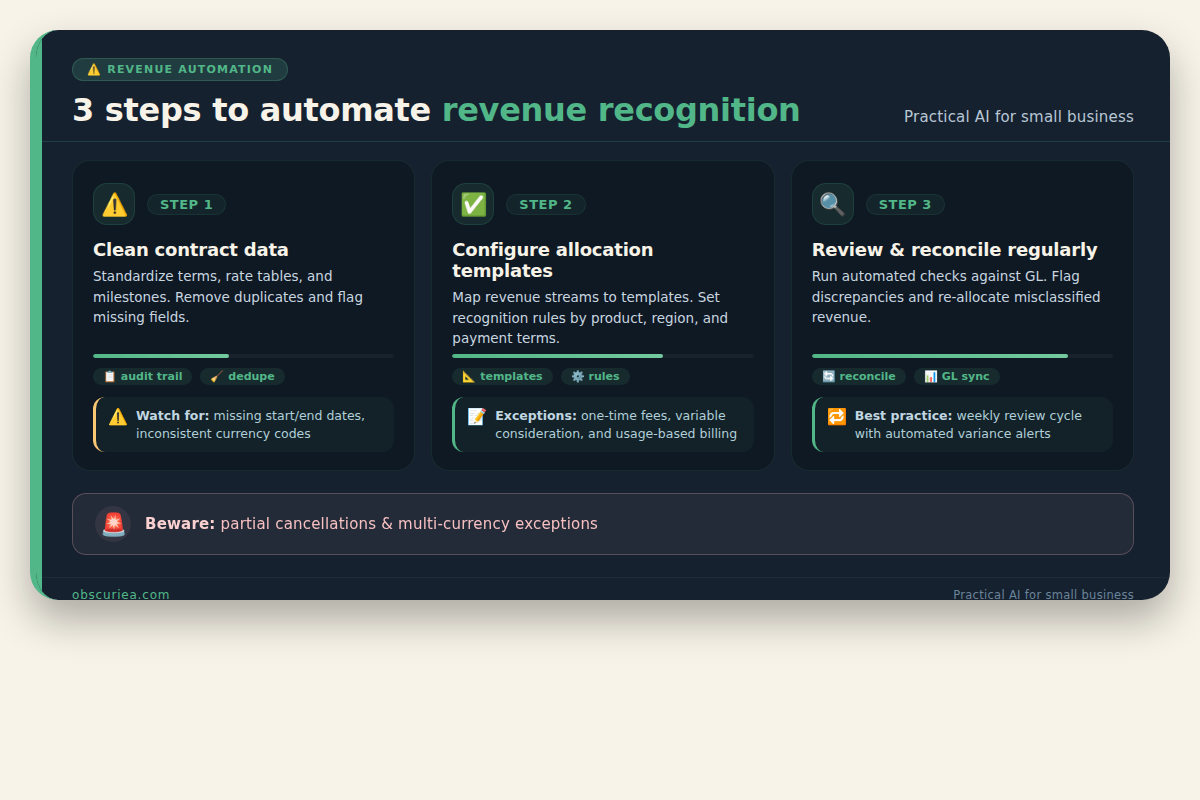
Automation fails in predictable places. First, when your billing platform doesn’t export clean contract data. If your subscriptions live across Stripe, manual invoices, and a separate CRM, the automation tool will choke on mismatched customer IDs and inconsistent product definitions. Clean your data before you automate.
Second, allocation templates are brittle. Most tools let you create revenue recognition templates for standard contract types. But real-world contracts have exceptions: promotional discounts, multi-year prepayments with variable usage, or bundle pricing with hidden standalone prices. When an exception hits a rigid template, the system either rejects it (requiring manual override) or misallocates revenue. Both are failure modes.
Third, currency fluctuations for international subscribers. If you bill in USD but your customer pays in EUR, the exchange rate at contract start vs. revenue recognition date can differ. ASC 606 says to use the rate at the transaction date, but if you recognize revenue over time, you need to remeasure using spot rates each reporting period. Not all automation tools handle this correctly.
Fourth, churn reversals. When a customer cancels mid-term, you must reverse unearned deferred revenue. Most tools handle this if the cancellation is clean. But if the customer partially cancels (downgrades), the allocation logic gets complicated. Should you reallocate remaining revenue to the new obligation? The answer depends on the contract modification accounting rules—and few operators know which applies.
The Friction Box
- Setup time is 40–60 hours, not “instant” as marketing claims
- Most tools require clean data—most businesses don’t have it
- Allocation templates break on non-standard contracts
- Currency handling is often incomplete for multi-currency businesses
- Partial cancellations trigger complex accounting elections that operators don’t understand
- Pricing scales with transaction volume—small businesses get squeezed
- Vendor lock-in: switching tools means rebuilding allocation rules
Frequently Asked Questions About Revenue Recognition Automation
How long does it take to set up revenue recognition automation?
Realistic setup time is 40–60 hours for a typical business with 100–500 subscribers. This includes cleaning contract data, configuring allocation templates, mapping performance obligations, and testing edge cases. Most vendors promise “weeks” but the actual work takes longer if your data is messy.
Which tools support ASC 606 and IFRS 15 compliance?
Stripe Revenue Recognition, Recurly Revenue Recognition, and specialized tools like Zuora RevPro all support both standards. The key differentiator is how they handle contract modifications and complex performance obligations. For small businesses, Stripe’s native module is the easiest to start with.
Can I automate revenue recognition without dedicated accounting software?
Yes, if you have fewer than 50 subscriptions and simple contracts. Use spreadsheets with formulas for deferred revenue schedules. Once you hit 50+ subscribers or any multi-element contracts, manual methods become risky and time-consuming.
What happens if my automation tool misallocates revenue?
You’ll need to manually correct the entries and might have to restate prior financial statements if errors are material. Regular reconciliation—comparing automation output to your general ledger—catches these before they compound.
Do I still need an accountant if I automate?
Yes. Automation handles calculation and journal entries, but an accountant is needed to set up allocation rules, interpret contract modifications, and review output. The role shifts from data entry to analysis and oversight.
How do I handle multi-currency subscriptions in automation?
Use a tool that supports fairness-value allocation with spot rate remeasurement at each reporting period. Not all do. For example, Stripe Revenue Recognition handles multi-currency but requires you to set up exchange rate rules per contract.
The Straight Talk
This is for subscription operators who have outgrown spreadsheets and need a reliable close process. If you’re already using a billing platform like Stripe or Recurly, add their native revenue recognition modules first—it minimizes setup pain.
Skip this if you have fewer than 50 subscribers or your contracts are all one-service, one-price. Manual methods are fine until complexity grows.
Next step: audit your current contract data quality. Run a report that maps every active subscription to its contract terms and identify gaps. That alone will save you 15 hours in setup when you do automate.