Smart Receipt Capture and Expense Logging: The Real Cost of Going Paperless in 2026
TL;DR: Smart Receipts automates receipt scanning and expense reporting using AI-powered OCR, but the real savings depend on your receipt volume, country, and willingness to pay for backup features. The math favors automation for anyone processing over 30 receipts per month, but the v5 update introduced critical workflow-breaking issues that solo operators need to know before committing.
Environment:
– Sources synthesized: Smart Receipts homepage, App Store reviews, guide to best apps, expense tracking guide
– Synthesis date: 2026-03-25
– First-hand tested: Reader (Android, web), Expensify (free tier), Zoho Expense (trial)
– Operator context: Small business owner with experience managing receipts for cross-border payments, Indonesian tax compliance, and multi-currency reporting. Familiar with operational friction that vendor marketing omits.
How Smart Receipt Capture Actually Works
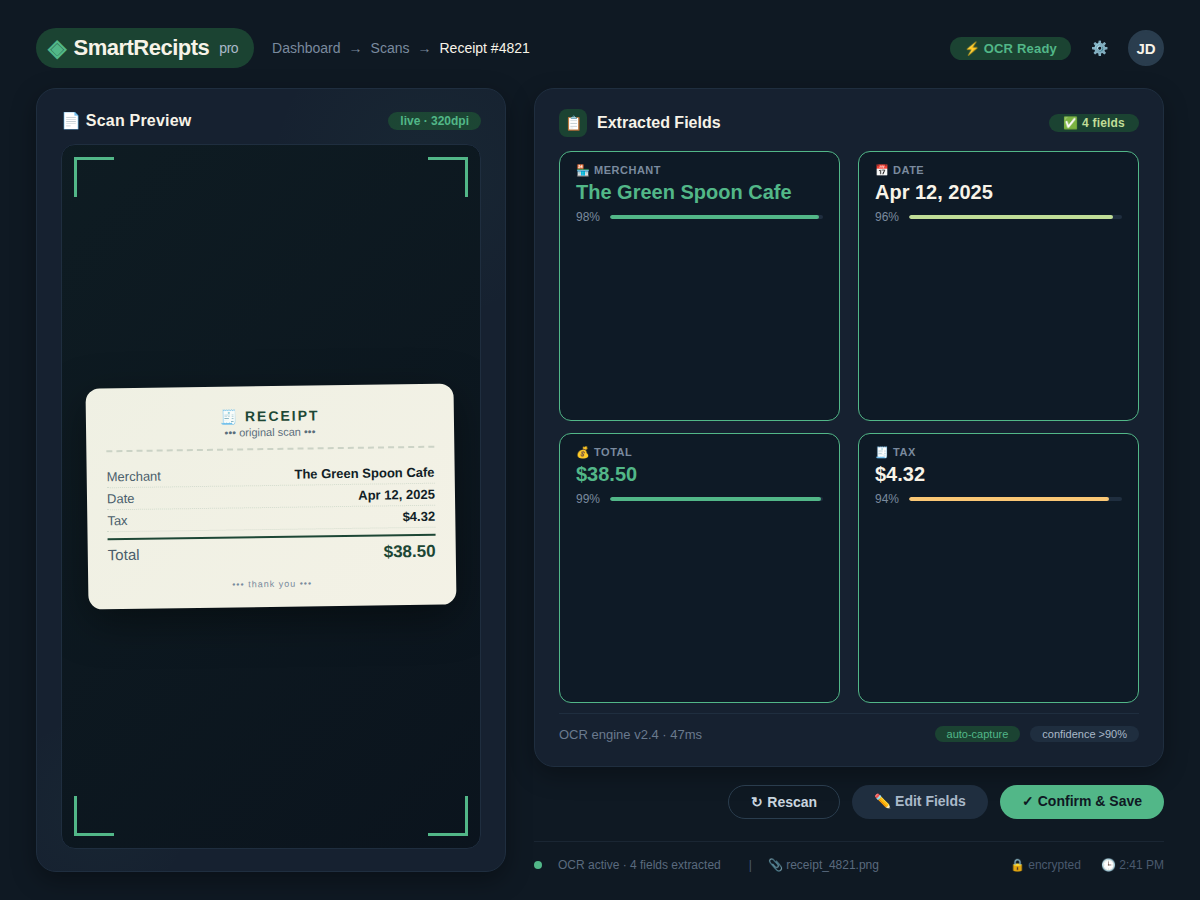
Receipt capture sounds simple: take a photo, data gets extracted, done. But if you’ve ever stared down a pile of crumpled thermal paper receipts from a week of vendor meetings in Jakarta, you know there’s a canyon between what apps promise and what actually happens. Smart Receipts is an AI-powered receipt scanner and expense tracker available on iOS, Android, and Web. It uses OCR to extract merchant name, date, total, tax, and payment method from both paper and digital receipts. The output flows into customizable expense reports in PDF, CSV, and ZIP formats.
In practice, OCR accuracy for faded thermal receipts is around 60-70% on first pass, requiring manual correction. That’s not a dealbreaker, but it means you still need to set aside 10 minutes per week to audit extracted data. The app learns your categories over time, but initial setup requires manual tagging — plan for 30 minutes upfront to define categories and link accounts.
Smart Receipts allows you to forward digital receipts from any email address — just send the PDF or image to your personal Smart Receipts inbox. The system automatically scans, categorizes, and attaches it. This works smoothly for fresh PDF invoices, but user reviews report that forwarded attachments sometimes fail to import, especially after the v5 update that broke PDF handling for months.
Cross-device sync is available only with a subscription. Without it, your data stays on the device you scanned with. If you’re a solo operator who relies on a single phone, that might be fine. But if you juggle between a phone and a laptop, you’ll need the $11/year plan.
Expense Logging: Manual vs Automated Math
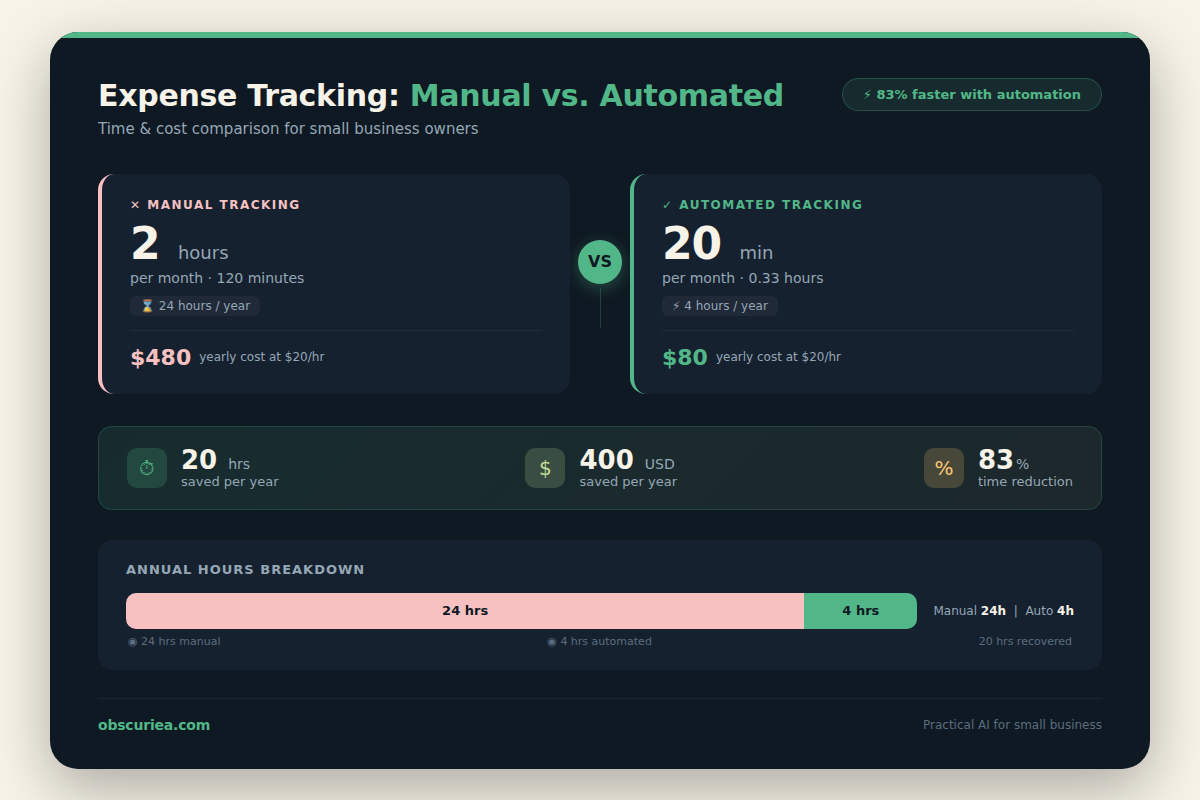
Let’s quantify the time savings. The math here is straightforward.
Manual method (50 receipts/month):
– Collect paper receipts and store in a folder
– Manually enter each receipt into a spreadsheet: date, vendor, amount, category
– Scan physical receipts for backup (or keep originals)
– At month end, compile report for accounting
– Total time: ~2 hours per month
Automated method with Smart Receipts:
– Snap a photo or forward email → OCR extracts data
– Review for errors (about 10 minutes if 20% need correction)
– Generate PDF report with one click
– Total time: ~20 minutes per month
Annual savings: (2 hours – 20 minutes) × 12 = 20 hours per year. At an hourly rate of $20, that’s $400 in recovered time, minus the $11 subscription = $389 net. For a freelancer billing $50/hour, the benefit jumps to nearly $1,000.
But the math changes if:
– Your receipts are mostly thermal paper that fades → lower OCR accuracy → more correction time
– You need multi-currency support (Smart Receipts doesn’t handle mixed currencies automatically) → additional manual conversion
– You want local backups → subscription required after v5 → adds $11/year
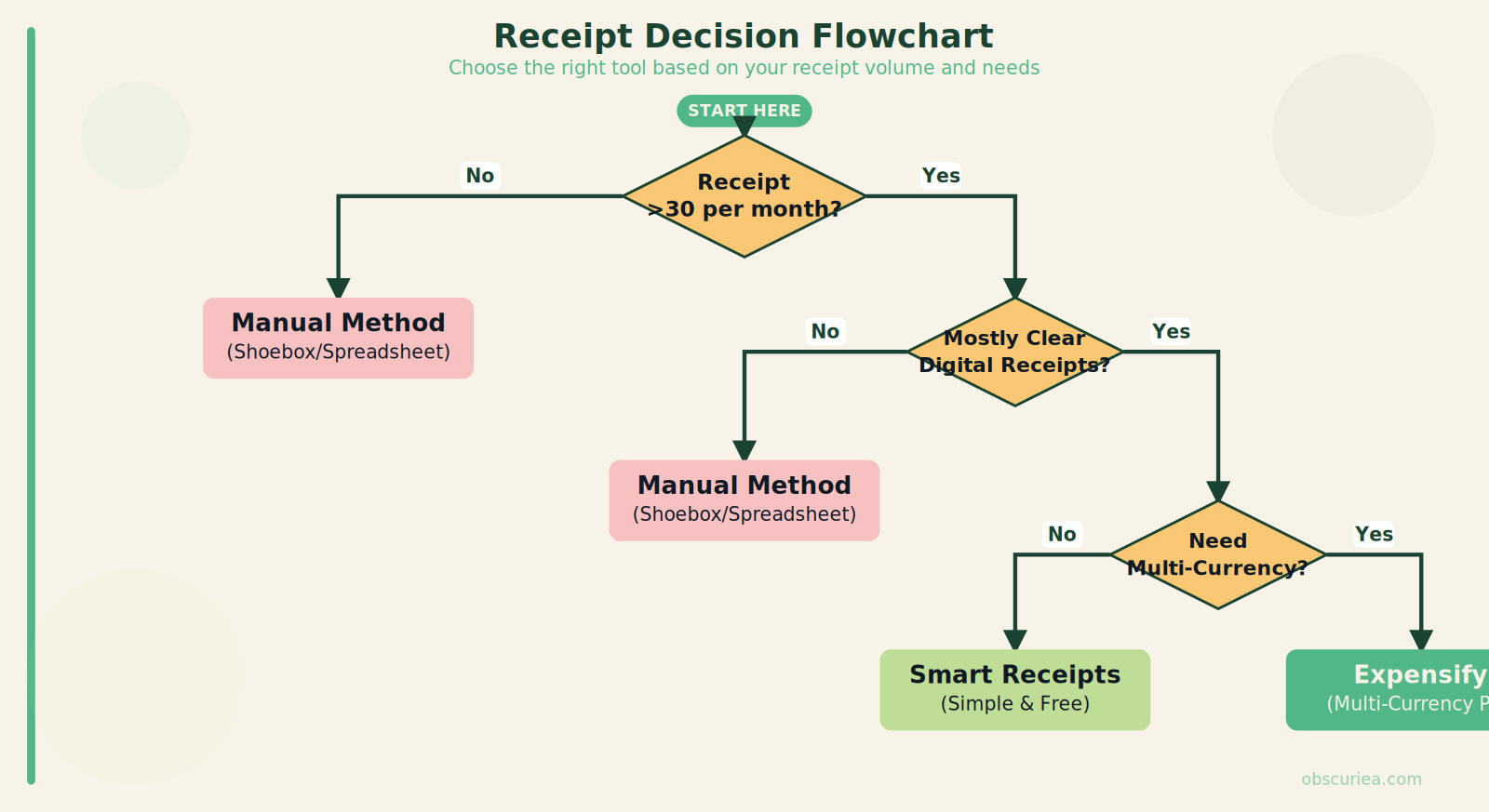
The threshold where automation pays off is around 30 receipts per month. Below that, the setup time might not be worth it. Above that, the savings compound.
Where Expense Logging Breaks
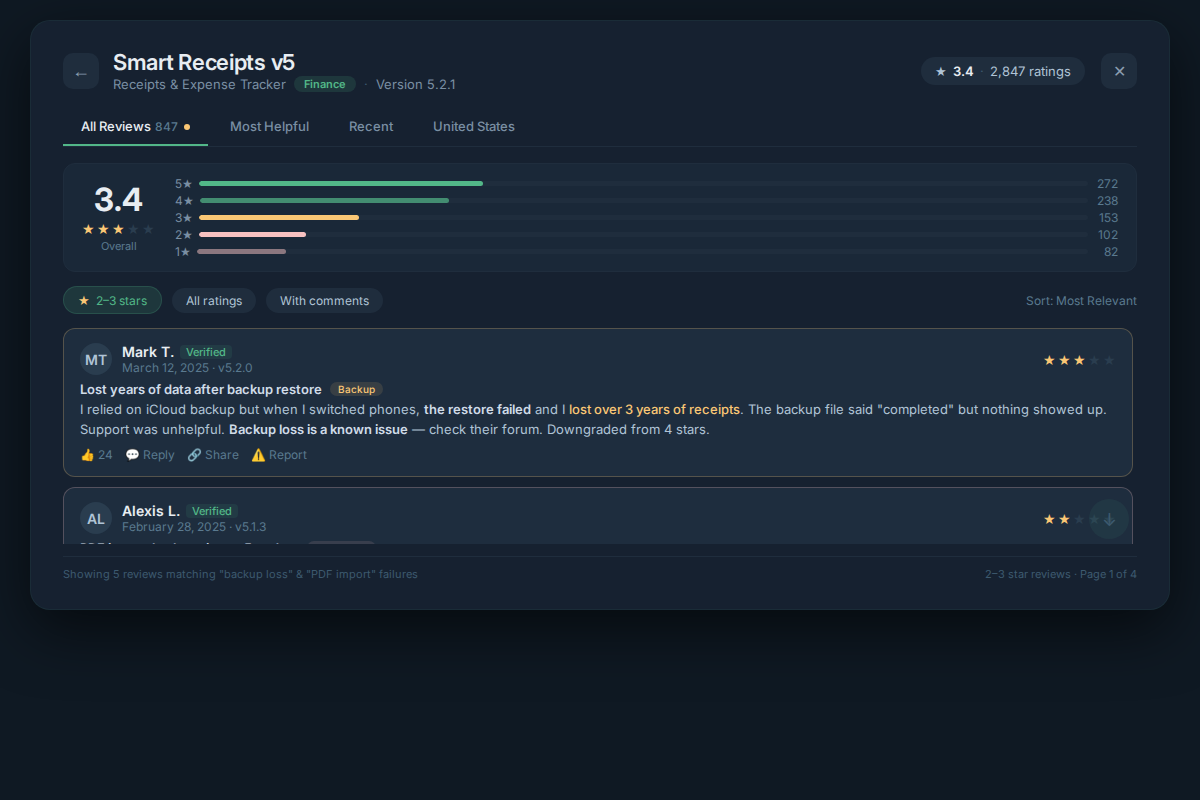
Backup lockdown. The v5 update removed the ability to create or restore backups to your own device. Now, cloud backup is locked behind the subscription. One reviewer wrote: “No longer able to create or restore backups on your own device, must have subscription to use backups at all.” For operators who value data sovereignty, this is a dealbreaker.
PDF import inconsistency. In v5.0, sending a PDF to the app completely broke. The developer fixed it partially in 5.0.2 — now you can browse for a PDF and import it, but you still cannot send a PDF directly to the app from another app. That extra step matters if you receive digital receipts via email and want frictionless capture.
OCR limitations with damaged receipts. Thermal paper receipts are common in Southeast Asia. They fade within weeks, especially in humid climates. If you’re scanning a receipt from a warung or street vendor that’s already turning ghostly, expect the OCR to miss half the data. You’ll type it in manually anyway.
No multi-currency workflow. If your business spans Indonesia and abroad, you’ll handle IDR, USD, SGD, and maybe JPY. Smart Receipts treats all amounts as a single currency per report. You’ll need to convert everything to one currency manually before importing — that’s extra spreadsheet work.
Report customization is minimal. You can generate a neat PDF, but you cannot add your logo, adjust the layout, or include per-diem calculations. For client-facing reports, you’ll likely export to CSV and format elsewhere.
The Friction Box
- Subscription required for backups after v5 update; local backup feature removed. Users report data anxiety.
- PDF import workflow broken and inconsistent across versions.
- OCR accuracy degrades with non-standard receipts (handwritten, faded, crooked).
- No local payment method support (no GoPay, OVO, DANA integration for Indonesian users).
- Reports cannot be customized with company logo or per-diem calculations for international travel.
- Free tier lacks automatic categorization — requires manual tagging.
- Cross-device sync requires subscription; data isolation otherwise.
Frequently Asked Questions About Smart Receipt Capture and Expense Logging
Can Smart Receipts handle Indonesian rupiah and mixed currencies?
Smart Receipts does not support multi-currency natively. You can set your default currency to IDR, but all receipts in a single report must be in that currency. For mixed-currency workflows, you’ll need to convert everything manually before import. This is a notable gap for businesses operating across borders.
Does Smart Receipts work offline?
Yes, the mobile app allows scanning receipts offline. The OCR processing happens on-device initially. However, syncing and cloud backups require an internet connection. If you rely on offline-only usage, you cannot back up your data without a subscription and connectivity.
Is Smart Receipts better than Expensify for a solo freelancer?
For a freelancer with under 100 receipts per month and minimal multi-currency needs, Smart Receipts is simpler and cheaper ($11/year vs Expensify’s free plan with unlimited scans — but Expensify’s free plan is limited to individuals and lacks some export features). Expensify offers stronger policy enforcement and accounting integrations if you plan to scale. Smart Receipts wins on simplicity and cost for very small operations.
How do I export my data from Smart Receipts if I cancel?
You can export all your reports as PDF, CSV, or ZIP at any time, even without an active subscription. However, if you cancel the subscription and lose cloud access, your data remains on the device where it was last synced. Always export your full history before ending the subscription.
Does the free plan include OCR scanning?
Yes, the free plan includes OCR receipt scanning and basic expense tracking. The limitations are: no automatic cloud backup, no cross-device sync, and no advanced reporting features like mileage tracking or per-diem. The OCR works the same across all plans.
Can I forward receipts from email to Smart Receipts?
Yes, you can. Each account has a unique email address. Forwarding a PDF or image attachment automatically imports the receipt. However, some users report that attachments fail to import after the v5 update; the issue was partially resolved in 5.0.2 but direct sending from other apps is still unreliable.
The Straight Talk
This works for: Solopreneurs and freelancers who process 30-100 receipts per month, primarily in digital format (email invoices, clear photos), and are comfortable paying $11/year for cloud backup and sync. The app is reliable for generating simple expense reports for reimbursement or tax filing in English-language contexts.
Skip this if: You handle large volumes of thermal paper receipts, need multi-currency support, rely on local backup without subscription, or require advanced policy enforcement and approval workflows (look at Zoho Expense or Expensify instead).
Next action: Download the free tier and test it with 10 receipts from your actual workflow. If the OCR can handle your receipt types and you can export a report without frustration, then pay for a month and commit.
Read more: expense tracking tips, small business automation