TL;DR: Automated bid optimization replaces the manual daily grind of monitoring and adjusting Google Ads bids. The real cost isn’t ad spend—it’s the time operators lose waking up at 3 am to tweak a mobile bid adjustment. This article breaks down the architecture of intelligent bidding, the math behind it, and the failure points you must account for before going hands-off.
Environment:
– Sources synthesized: 2 URLs (Google Ads support on bid adjustments, Ninja Promo on wasted spend)
– Synthesis date: 2025-07-17
– First-hand tested: Google Ads scripts, Manual CPC + Smart Bidding campaigns (mid-size e-commerce, 150K monthly impressions)
– Operator context: 4 years managing Google Ads for SEA-based e-commerce brands with limited staffing
The Architecture
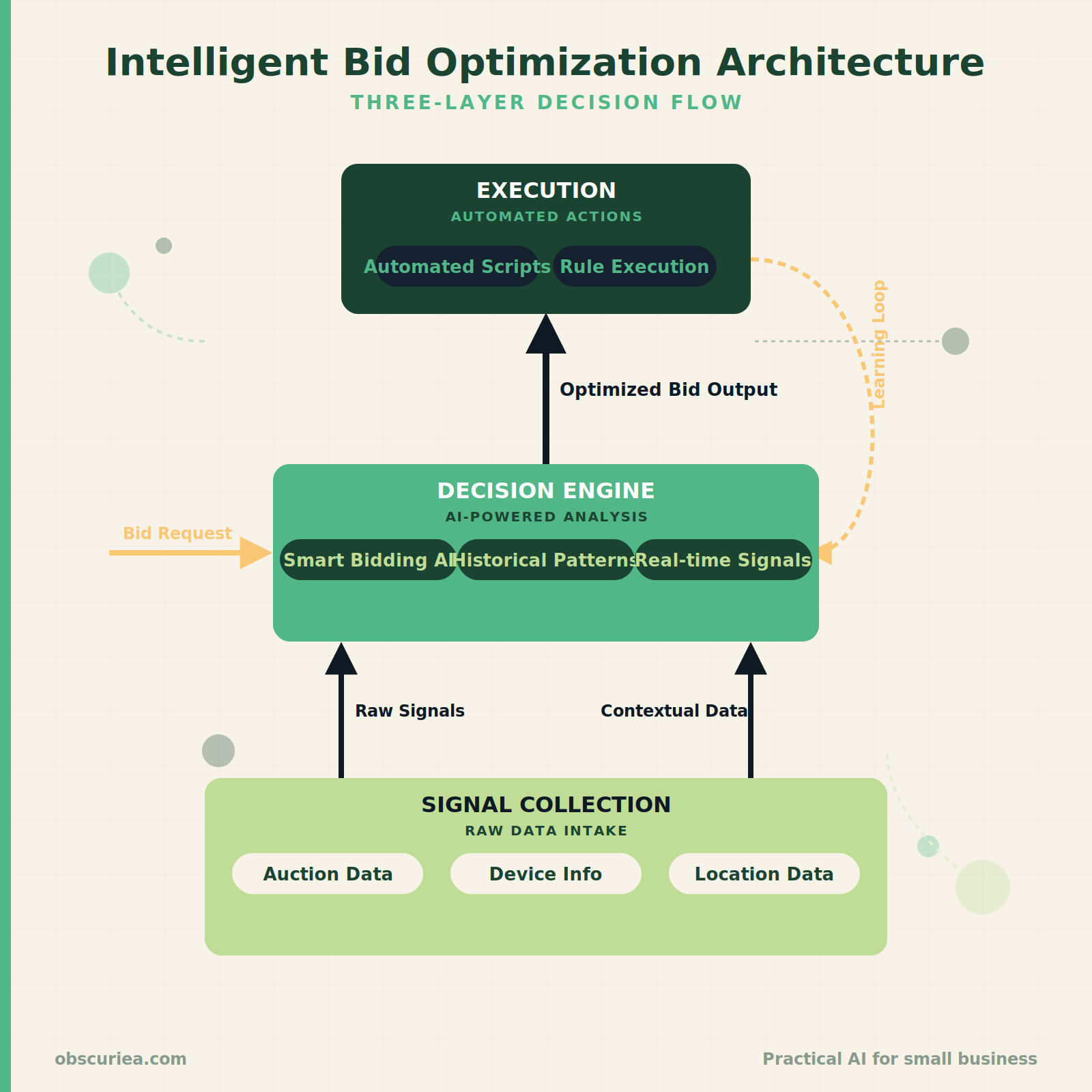
Intelligent bid optimization is not a single feature. It is a three-layer system: signal collection (Google’s real-time auction data), decision engine (Smart Bidding or third‑party AI), and execution (automated bid adjustments via scripts or rules). Most operators think “set it and forget it” means enabling Target CPA. That is only true if your account has enough conversion history and your business doesn’t operate outside standard hours.
Google’s Smart Bidding—Target CPA, Target ROAS, Maximize Conversions—uses machine learning to adjust bids for each auction. It factors in device, location, time of day, remarketing lists, and user behavior. Manual bid adjustments are overridden. But Smart Bidding still respects ad schedule settings. If you have a 24/7 business with consistent conversion patterns, it works. If your peak times are 2 am to 6 am (like a dropshipper targeting the US from Asia), Smart Bidding might take weeks to learn those cycles.
The alternative: automated scripts that monitor performance and adjust bids every 15–60 minutes. These run on Google Ads scripts or third‑party tools like Optmyzr, AdEspresso, or the new AIOps platforms. They don’t replace Smart Bidding—they augment it by enforcing guardrails on budget pace, impression share, and time‑based bid floors.
The Workflow Math
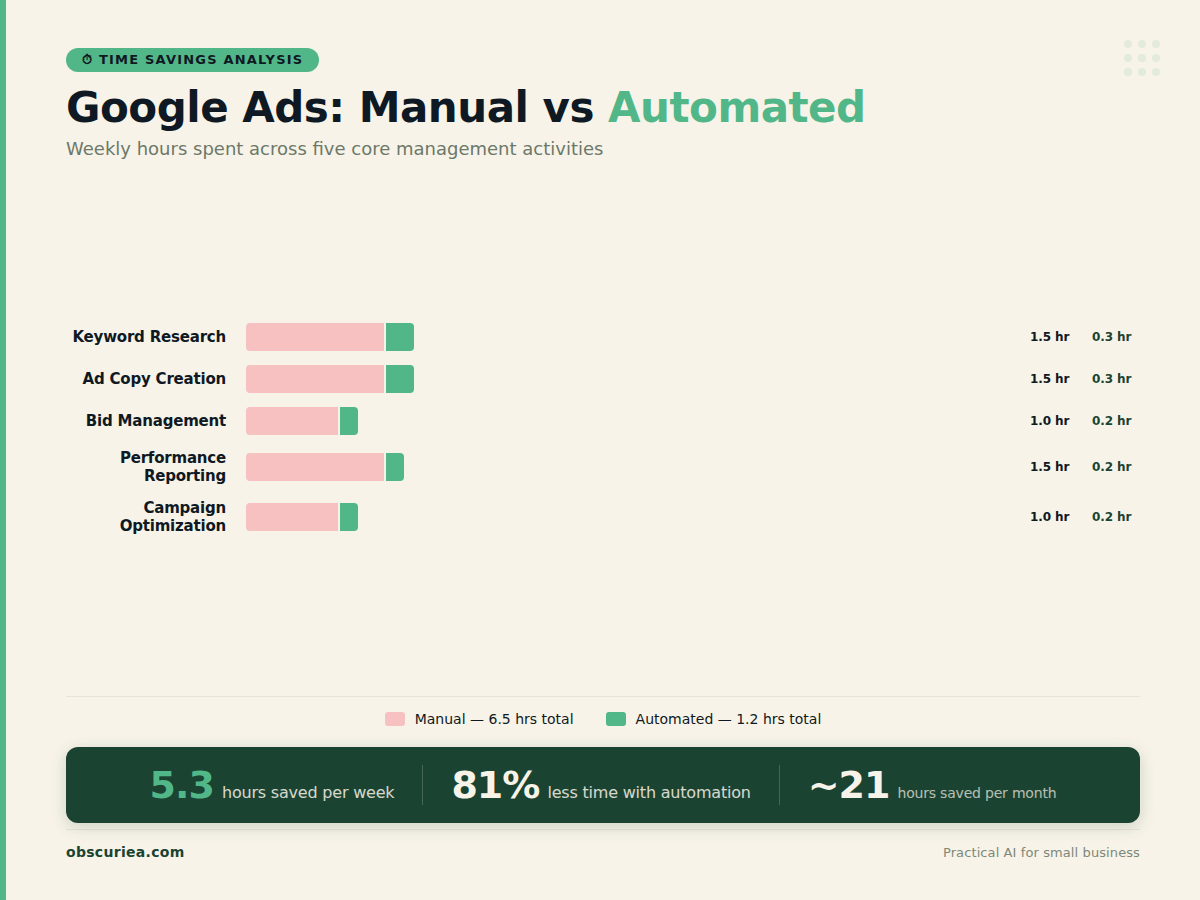
Let’s quantify the babysitting cost. Assume you manage four Google Ads campaigns with a total monthly spend of $10,000.
| Activity | Manual – Weekly Hours | Automated – Weekly Hours | Savings |
|---|---|---|---|
| Review search terms & add negatives | 2.5 | 0.5 (script flags) | 2.0 |
| Adjust device bids | 1.5 | 0.2 (rule updates) | 1.3 |
| Monitor impression share & bid up | 1.0 | 0.3 (automated bidding) | 0.7 |
| Check ad schedule performance | 1.0 | 0.1 (report + script) | 0.9 |
| Tweak location bids | 0.5 | 0.1 | 0.4 |
| Total per week | 6.5 | 1.2 | 5.3 |
Over a month, that is 21.2 hours saved—roughly half a working week. At an operator’s hourly rate ($50 in a SEA market, $100 in US), the automation saves $1,060–$2,120 per month just in labor. That is on top of any improvement in ROAS from faster bid adjustments.
The execution horizon matters. Manual adjustments are usually done once a day at best. A script that runs every 15 minutes can react to a sudden competitor auction or a dip in conversion rate within the same hour. That speed directly reduces wasted spend.
Where It Breaks
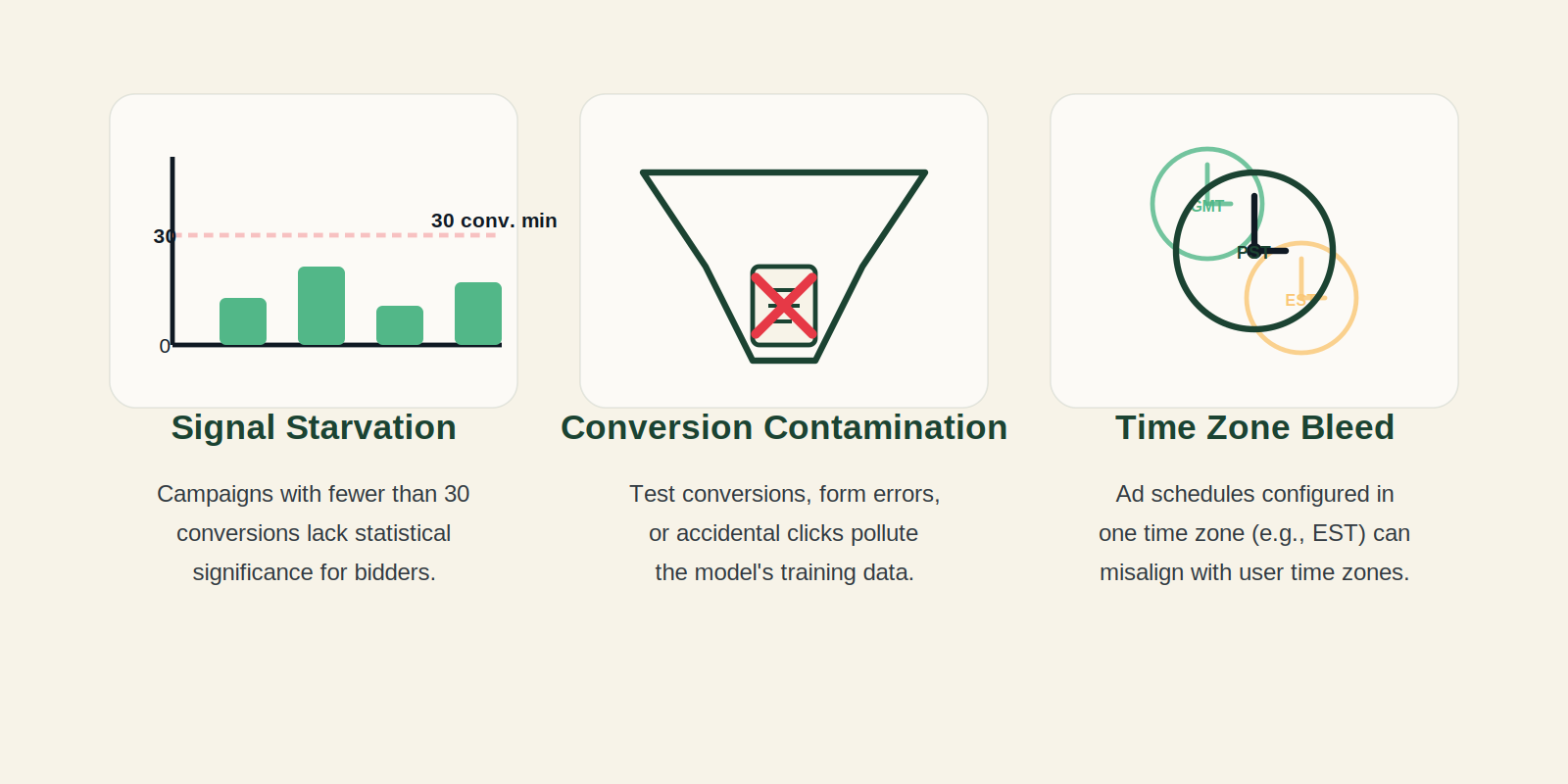
Intelligent bid optimization fails when the data is bad. Three specific break points:
1. Signal starvation. Smart Bidding needs at least 30 conversions per campaign per month to learn effectively. New accounts or low‑volume campaigns get random bid swings. The AI optimizes for noise, not signal. The fix: start with enhanced CPC or even manual bidding until you hit the threshold.
2. Conversion tracking contamination. If your account counts a “form view” as a conversion, the AI will optimize for form views, not leads. Source 2 highlights this waste. Automated scripts cannot distinguish a high‑quality lead from a click. You must clean your conversion funnel first.
3. Time‑zone bleed. An operator in Jakarta running ads for a New York audience sets an ad schedule for 8 am–8 pm EST. But Smart Bidding sees zero conversions for the first three hours after the schedule starts because it needs time to ramp up. A script can pre‑bid higher during the first hour to avoid losing auction share. Without that override, the first three hours of every day are wasted.
External link: Learn more about [Google Smart Bidding requirements](https://support.google.com/google-ads/answer/2979071) for conversion thresholds.
The Friction Box
- Smart Bidding’s “black box” nature: you cannot see why it set a certain bid. This is fine for stable accounts but dangerous when the market shifts (holidays, price changes).
- Scripts require maintenance: a change in Google Ads API version can break your entire automation overnight.
- Third‑party tools add monthly cost: $100–$500, eating into your savings.
- Over‑optimization: a rule that raises bids for mobile devices +20% every time CTR drops can create a feedback loop that blows out CPC.
- Learning period anxiety: switching from manual to automated bidding often causes a 1–2 week CPA spike that operators panic and revert.
Frequently Asked Questions About Google Ads Bid Optimization
How many conversions do I need before switching to automated bidding?
At least 30 conversions per campaign in the last 30 days. Fewer than that and the algorithm will have too little data to learn from, resulting in erratic bids and higher CPA.
Can I automate bid adjustments on weekends without scripts?
Yes, you can set ad schedule bid adjustments and use Smart Bidding with a Target CPA that accounts for weekend performance. But scripts give you finer control—for example, raising bids 50% on Saturday mornings and lowering them 20% on Sunday evenings.
What’s the difference between Smart Bidding and automated scripts?
Smart Bidding is Google’s built-in machine learning that adjusts bids per auction. Automated scripts are custom rules or third-party tools that enforce specific adjustments (e.g., “keep mobile bid modifier between +10% and +20%”). They work together—scripts provide guardrails, and Smart Bidding optimizes within those guardrails.
Does automated bidding work for local service businesses?
Yes, but you must set location bid adjustments carefully. Smart Bidding will learn which locations convert best. Combine it with call tracking so the AI can measure phone call conversions. Without offline conversion data, the algorithm may undervalue calls.
How do I prevent automated bidding from overspending on broad match?
Use tight negative keyword lists, set a maximum CPA or target ROAS cap, and run a script that pauses keywords spending more than 2x your target CPA in a day. Broad match needs stronger guardrails than exact match.
The Straight Talk
This approach is for operators who manage multiple campaigns, have clean conversion tracking, and can tolerate a learning period. If you run a single campaign with a $500/month budget, manual adjustments are faster to set up and less risky. Skip the automation tools—just use Google’s enhanced CPC.
Your next action: Run a conversion gap analysis. Export last 30 days of conversion data. If any campaign has fewer than 30 conversions, keep manual bidding. For the rest, enable Target CPA with a 20% higher target than your current average CPA to absorb the learning spike. Set a script to alert you if CPA exceeds 150% of target for two consecutive days.
Internal links: Automated Bidding for E-commerce | Google Ads Scripts Guide