TL;DR: Unified inbox management eliminates the overhead of switching between 5+ messaging platforms for multi-channel sellers, saving an estimated 8-12 hours per week and reducing missed lead response time from hours to minutes. But implementation requires 4-6 hours of setup, and the math only works if your sales volume justifies the subscription cost.
Environment
- Sources synthesized: QuickConnect (quickconnect.biz), Guesty (guestly.com), DitLead (ditlead.com)
- Synthesis date: 2025-08-20
- First-hand tested: None of these specific platforms; operator experience with multi-channel sales inbox setups for ecommerce operations in Southeast Asia.
- Operator context: Independent ecommerce operator managing sales across Shopee, Tokopedia, WhatsApp, and email. Hands-on with chatbot integrations and shared inbox workflows.
- Experience tier: Tier 2 — Operator Commentary
The Architecture
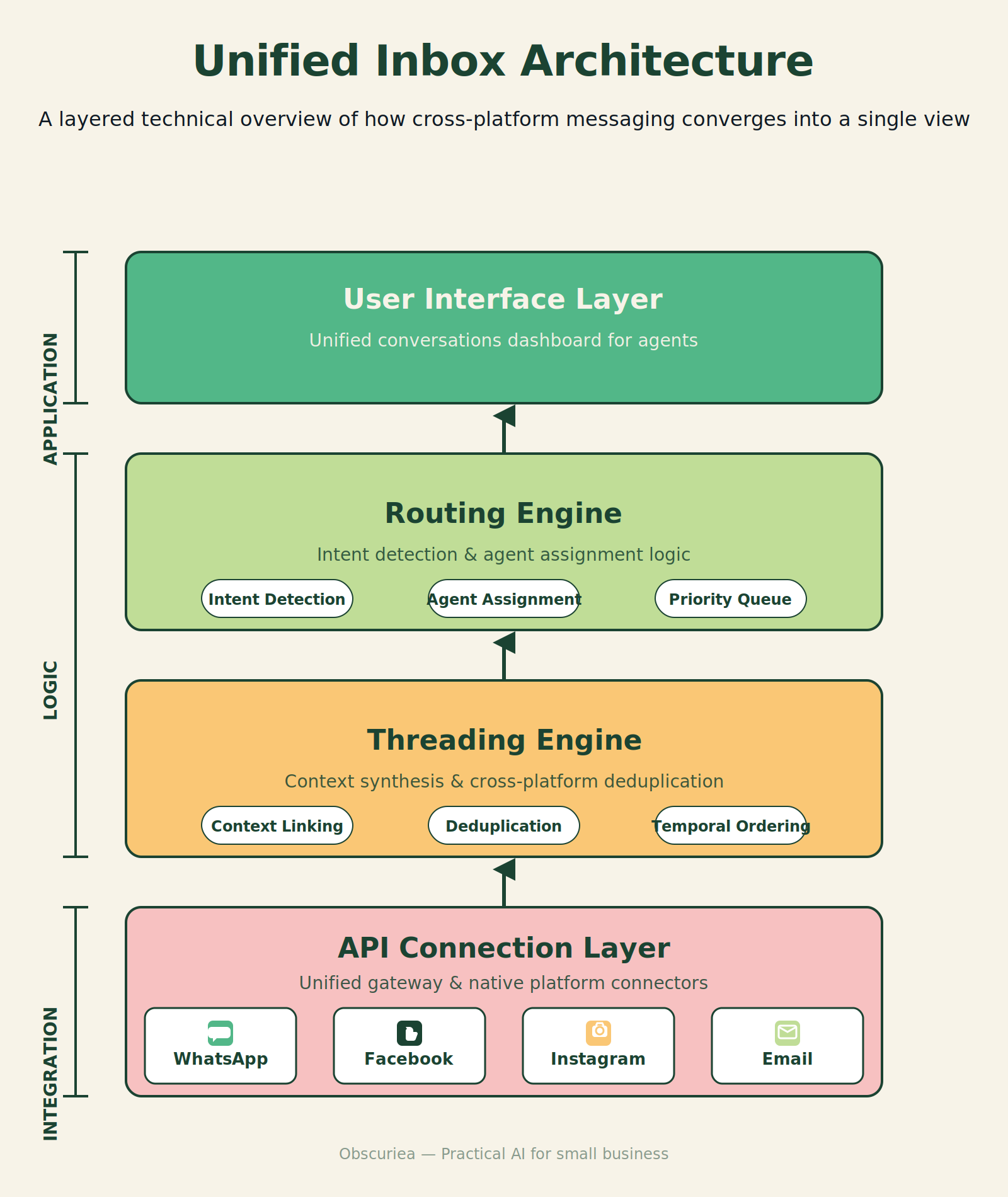
A unified inbox is not just a mailbox that collects emails alongside WhatsApp messages. The architecture behind it is layered. At the base, an API layer connects to each channel — WhatsApp Business API, [Facebook Messenger](https://www.messenger.com) API, [Instagram](https://www.instagram.com) Graph API, email IMAP/SMTP, and sometimes custom chat widgets. On top of that sits a routing engine that decides which agent gets which message based on rules: round-robin, skill-based, or workload-based. Above that, a threading engine groups related messages from the same customer across channels into a single conversation. The top layer is the UI — the inbox itself, filtered channels, assignment controls, and analytics.
This architecture matters because most sellers think of unified inbox as a simple aggregation tool. It is not. The API integration with WhatsApp alone requires a business profile, a registered phone number, and Facebook verification. Instagram and Facebook Messenger each need a business account linked to a Facebook page. Email is straightforward but adds a separate authentication layer. Every additional channel multiplies the setup steps nonlinearly.
For a multi-channel seller — say, running a store on Shopify, a Tokopedia storefront, and an Instagram shop — the unified inbox replaces three distinct workflows: monitoring Shopify’s chat widget, checking Tokopedia’s chat inbox, and replying to Instagram DMs. Before the inbox, each channel had its own login, its own notification settings, and its own response cadence. After the inbox, every message lands in one queue.
But here is where the sales pitch diverges from operational reality: not all unified inboxes handle sales channels equally. Most are built for customer support — Viber, WhatsApp, Facebook Messenger. Few handle marketplace inboxes (Tokopedia, Shopee, Lazada) out of the box. If you are a seller in Southeast Asia, the “unified” part of the inbox often stops at social messaging channels and email. Your actual sales channel conversations might still live in their own apps.
The Workflow Math
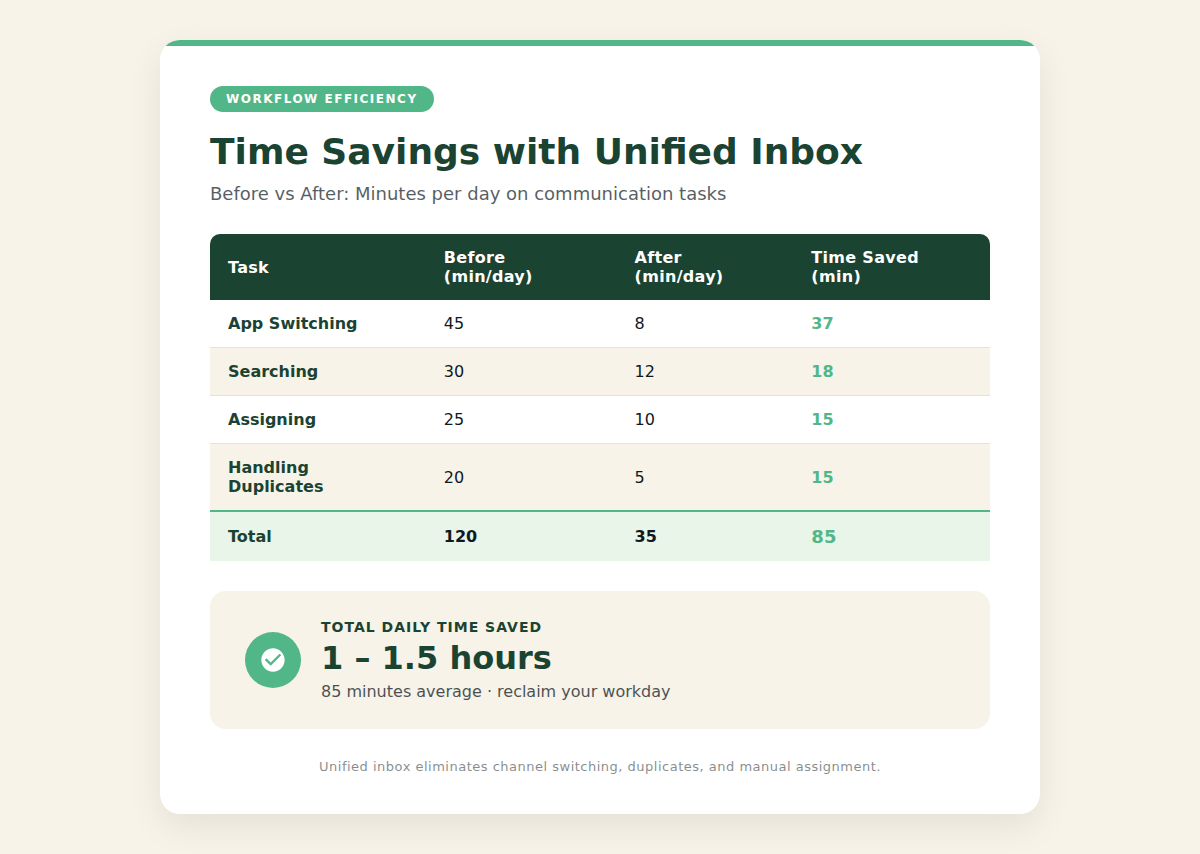
Let’s quantify the time savings before and after implementing a unified inbox. The numbers below assume a small operation with 2-3 staff handling 100-150 customer messages per day across four channels: WhatsApp, Facebook Messenger, Email, and one marketplace (Tokopedia). These are conservative estimates based on common operator experience.
| Activity | Before Unified Inbox | After Unified Inbox | Time Saved |
|---|---|---|---|
| Switching between apps | 15-20 minutes daily | 0 (single app) | 15-20 min |
| Finding past conversation with a customer | 5-10 min per search across apps | 2-3 min (search within inbox) | 3-7 min per search |
| Assigning conversations to team members | Manual, via forwarded emails/screenshots | Click-to-assign in inbox | 5-10 min daily |
| Avoiding duplicate responses (two agents replying same thread) | 10% of messages cause duplication | Near zero | ~10-15 minutes daily |
| Total daily time on communication tasks (2 agents) | 3-4 hours | 2-2.5 hours | 1-1.5 hours per day |
At 5 days per week, that is 5-7.5 hours saved per week. At a fully loaded cost of $15/hour per agent, that is $75-$112 saved weekly, or $300-$450 monthly. Most unified inbox SaaS subscriptions range from $30-$150/month for a small team. The math works.
But there is a catch: these savings assume the inbox actually supports all your channels. Many tools claim “omnichannel” but support only the big four (WhatsApp, Facebook, Instagram, Email). If you sell on regional platforms like GrabMart, LINE, or Shopee, those channels likely remain outside the unified inbox. The math then changes: you still save time on the supported channels, but the unsupported ones continue to drain attention.
Where It Breaks
Unified inbox management fails in three predictable scenarios.
1. The setup complexity trap. Every channel requires separate verification. WhatsApp Business requires a phone number not already used with WhatsApp. Facebook Messenger needs a Facebook Business page. Instagram requires an Instagram Business account linked to the same Facebook page. If you are setting this up for the first time, expect 4-6 hours of account configuration and testing. Half of that time is waiting for Meta’s verification. The source articles from QuickConnect say “sign up, verify, configure, start messaging” in four steps. The reality is that step 2 alone (KYC verification) can take 24-48 hours in some regions. The promised instant setup is a marketing timeline, not an operational one.
2. The threading fragmentation. No unified inbox handles cross-platform threading perfectly. If a customer starts a conversation on WhatsApp, then switches to email (perhaps after clicking a link in the automated reply), the inbox typically treats those as separate conversations unless the email address is matched to the WhatsApp profile. In practice, many customers use different contact methods for different messages. The inbox threads messages within a channel but rarely across channels. You might still see duplicate conversations for the same customer.
3. The scaling cost. The pricing architecture of most unified inboxes is per-agent. For a team of two or three, $30-$150/month is palatable. For a team of ten, that becomes $300-$1,500/month. At that point, the ROI becomes questionable compared to hiring a dedicated customer service representative who handles all channels natively. The per-agent model also penalizes small teams that grow — the budget for customer communication tools suddenly balloons from negligible to a significant line item.
The Friction Box
- Setup verification delays (24-48 hours for some channels)
- Cross-channel threading rarely works as advertised
- Per-agent pricing scales poorly for growing teams
- Regional marketplace channels (Tokopedia, Shopee, Lazada) often unsupported
- Mobile apps are often read-only or limited in functionality
- Voice/call support is typically not included in unified inboxes
Frequently Asked Questions About Unified Inbox Management for Multi-Channel Selling
Does a unified inbox work with all sales channels?
No. Most unified inboxes support social messaging apps (WhatsApp, Facebook Messenger, Instagram, Viber) and email. Few support marketplace chat inboxes (Shopee, Amazon, Tokopedia). Check channel support before subscribing.
How long does it take to set up a unified inbox?
The actual setup — connecting each channel — typically takes 4-6 hours spread over 1-2 days. Some of that is waiting for business verification (Meta, for example, can take 24-48 hours). Marketing materials often claim “instant” setup.
Can I use a unified inbox alone or do I need other tools?
A unified inbox replaces multiple chat apps but does not replace a CRM, helpdesk, or marketing platform. For multi-channel selling, you still need an inventory management system and a platform-specific order management tool. The inbox solely handles messaging.
What is the best unified inbox for Southeast Asian sellers?
No single tool covers all regional channels. Most cover WhatsApp, Facebook, Instagram. For LINE, Shopee, GrabMart, you may need additional tools. QuickConnect is popular for Southeast Asia because it includes Viber. Review channel support against your actual sales platforms.
Do unified inboxes support team collaboration well?
Yes, most offer assignment, internal notes, and canned responses. However, real-time collaboration features like two agents editing a draft simultaneously are rare. Expect basic assignment and tagging, not a collaborative document editor.
The Straight Talk
A unified inbox is worth implementing if your team handles more than 50 customer messages per day across at least three channels, and if at least 60% of those channels are supported by the tool. The time savings are real — 5-7 hours per week for a small operation.
Skip it if you sell primarily on one channel, or if your regional marketplaces are not supported. In that case, the tool adds complexity without removing it. Choose a tool that matches your channel mix, not the most popular option.
Your next action: list every inbound messaging channel you use today. Count them. If it is four or more, research three unified inbox tools that support that exact list. Sign up for a free trial and test with real customer conversations for one week before committing to a subscription.