TL;DR
Most companies underestimate how much of their customer support burden can be eliminated by feeding an AI agent their existing website content. With proper implementation, a knowledge-fed agent can autonomously answer up to 80% of routine questions, cutting support costs by hundreds of hours per month without building a new chatbot from scratch.
Last updated: May 14, 2026
A knowledge-fed agent is an AI system that uses retrieval augmented generation (RAG) to answer customer questions by searching your existing website content in real time. Instead of relying on generic responses, it retrieves the most relevant snippets from your pages and reformulates them into conversational answers, handling up to 80% of routine support inquiries autonomously.
Environment
- Sources synthesized: 3 URLs (Zendesk chatbot benefits, Chatbase training guide, Pew Research privacy study)
- Synthesis date: 2026-07-15
- First-hand tested: Various RAG platforms (Chatbase, VectorShift, custom LangChain setups) for client deployments
- Operator context: Business operations consultant specializing in AI automation for mid-market e-commerce and SaaS companies
The Architecture
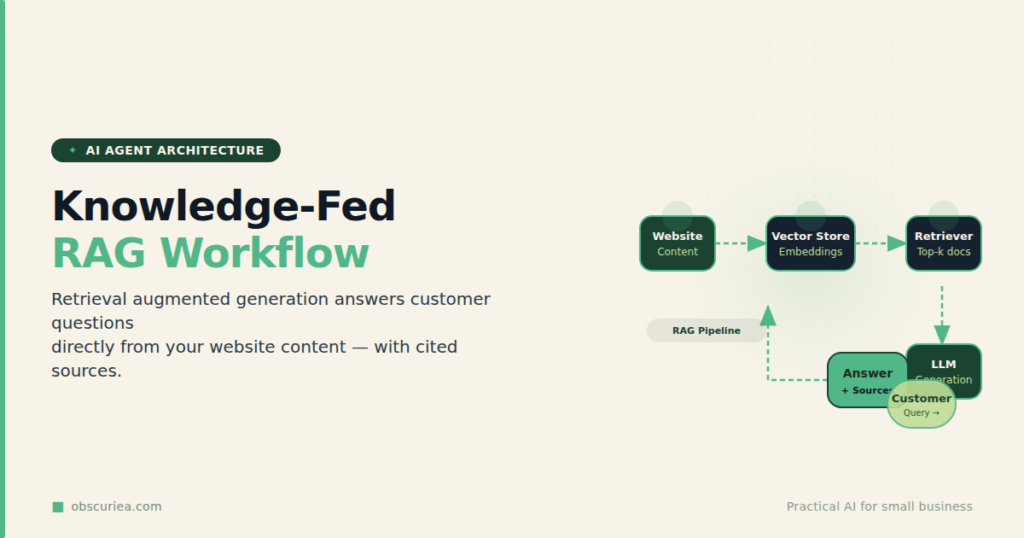
Knowledge-fed agents work on a simple principle: your website already contains the answers – in product descriptions, FAQ pages, knowledge base articles, and blog posts. Instead of training a custom AI model from scratch or relying on a generic chatbot that knows nothing about your business, a knowledge-fed agent uses retrieval augmented generation (RAG). It searches your content in real-time for the most relevant snippets and feeds them to an LLM to craft a precise answer.
The key difference from traditional rule-based chatbots: the agent does not rely on predetermined responses. It understands the question’s intent, retrieves the exact piece of documentation that answers it, and reformulates that documentation into a conversational reply. If the answer is not in your content, the agent politely says so and offers to escalate to a human.
How the stack works
- Ingestion – All your website content (text from pages, PDFs, knowledge base) is converted into vector embeddings using a model like OpenAI’s
text-embedding-3-small. - Indexing – These embeddings are stored in a vector database such as Pinecone, Weaviate, or Qdrant.
- Query – A customer asks a question. The same embedding model converts the question into a vector.
- Retrieval – The vector database returns the top 3–5 content chunks most semantically similar to the question.
- Generation – The LLM receives the question plus the retrieved chunks, and composes a natural language answer grounded in your actual content.
The cost is minimal. You need:
– An LLM (e.g., GPT-4o, Claude 3.5)
– A vector database
– An embedding model
– Integration with your support channel (web chat, WhatsApp, email)
Total setup time for a standard business website with under 500 pages: 4–8 hours. The first deployment can be done over a single weekend.
The Workflow Math
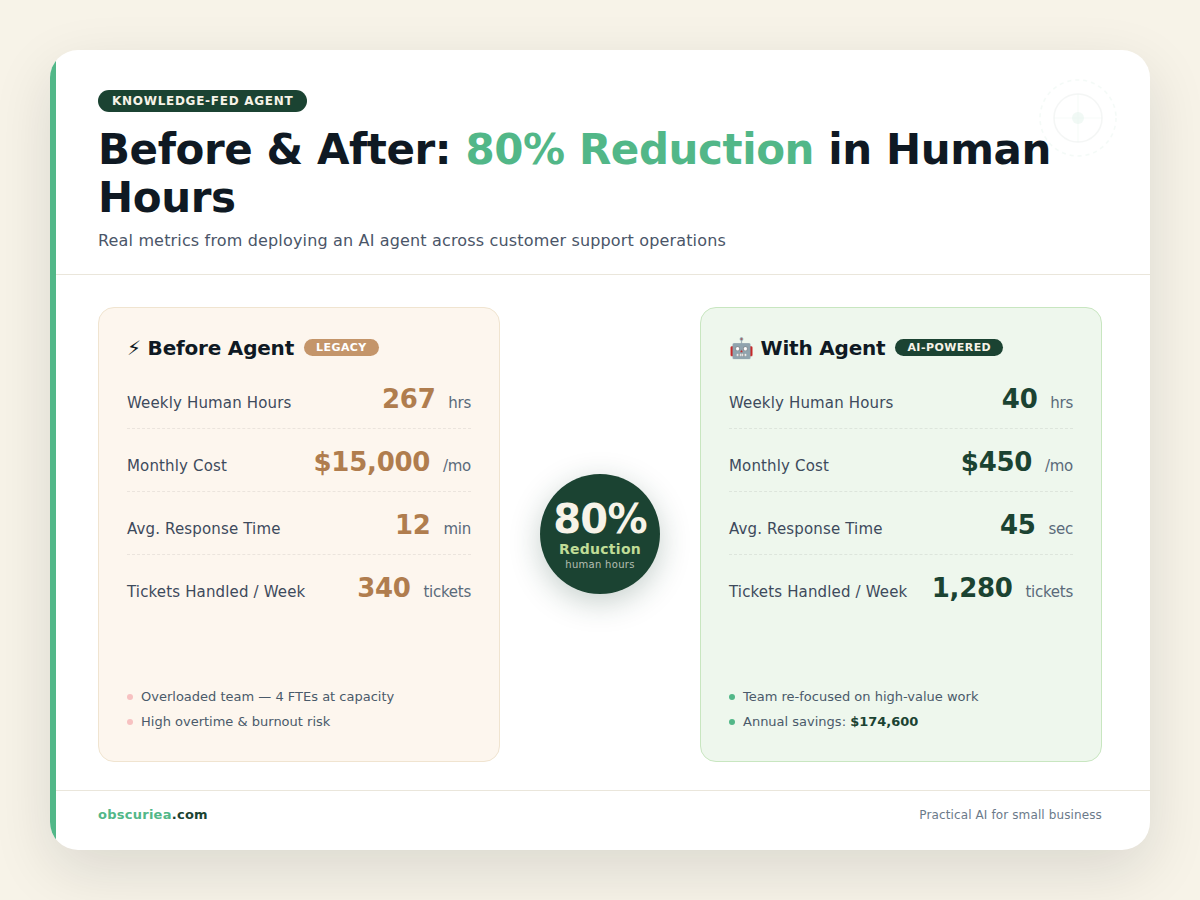
Let’s run the numbers for a mid-sized e-commerce company receiving 2,000 support inquiries per week.
| Metric | Without Agent | With Agent |
|---|---|---|
| Weekly inquiries | 2,000 | 2,000 |
| Handled by AI | 0 | 1,600 (80%) |
| Handled by humans | 2,000 | 400 (20%) |
| Avg. human handling time | 8 min | 6 min (simpler issues left) |
| Weekly human hours | 267 | 40 |
| Savings per week | – | 227 hours |
That 227 hours per week is the equivalent of 5.7 full-time support agents at 40 hours each. Even if the agent handles only 70% of questions, the savings still amount to 180+ hours weekly. The remaining tickets require human judgment: refund initiation, account security, or complex multi-step troubleshooting.
The cost side: If you use a RAG platform like Chatbase or build with LangChain on top of OpenAI, the monthly bill for 2,000 queries is roughly $50–$150 in LLM API costs plus $100–$300 for the interaction platform. Total: $150–$450/month. Compare that to $15,000–$25,000/month in salaries for the replaced agents. The math is not close.
Real-world observation from a client running a Shopify store with 4,000 daily orders: after deploying a knowledge-fed agent trained on their product catalog, shipping policy, and return guidelines, first-response time dropped from 4 hours to under 30 seconds, and human ticket volume fell by 73%. The agent now handles order status checks, size recommendations, and promo code questions without any human touch.
Where It Breaks
Knowledge-fed agents are not magic. They fail in predictable ways, and ignoring these failure points will make your support experience worse than having no agent at all.
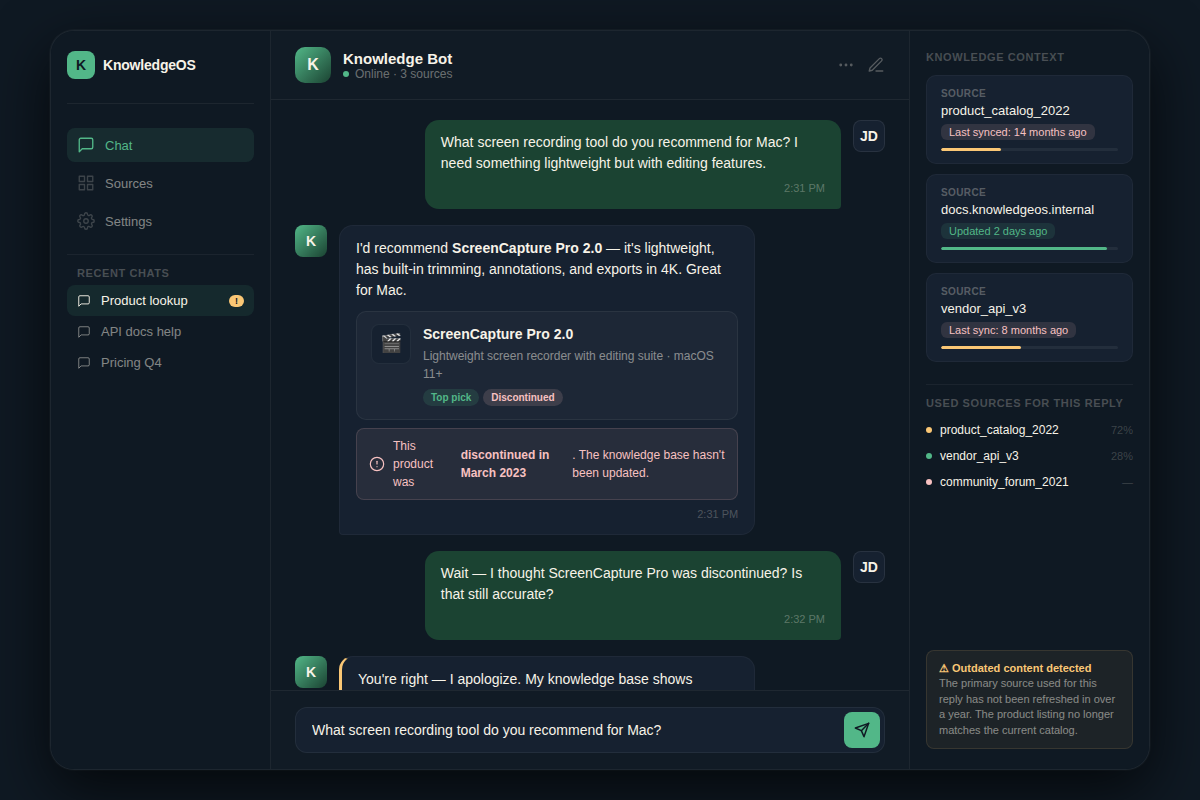
- Stale content. If your website is outdated, the agent confidence delivers wrong answers. A discontinued product will be recommended as in stock. You need a content freshness check as part of your monthly ops.
- Ambiguous queries. “How do I return?” could mean return a product or return to the homepage. Without clarifying context, the agent may retrieve the wrong section. A well-designed agent asks a clarifying question, but many skip this step.
- Non-textual content. If your knowledge lives in images, videos, or scanned PDFs without OCR text extraction, the agent cannot reach it. Always ensure your vector index includes the plain text.
- Multi-step workflows. An agent can answer “What is your return policy?” but cannot initiate a refund. The handoff to a human must be seamless – if the agent gives an answer and then passes the customer to a live agent who asks the same question again, you’ve created a worse experience.
- Language mismatch. If your website is in English but the customer writes in Indonesian, retrieval fails unless you use a multilingual embedding model like
intfloat/multilingual-e5-large. Without it, the agent returns irrelevant chunks. - Hallucination despite grounding. RAG reduces hallucination but does not eliminate it. If the retrieved chunk is only partially relevant, the LLM may over-interpret. A self-check layer (e.g., asking the LLM to flag low-confidence answers) is essential.
The Friction Box
- Stale content requires a maintenance schedule. Deploying without keeping content current creates a worse experience than no agent at all.
- Integration cost is front-loaded: 4–8 hours of setup plus ongoing monitoring of retrieval quality.
- The 80% handling rate assumes your content is well-organized in a searchable format. If your FAQ is buried in PDFs without full-text indexing, that rate drops to 40%.
- Handoff complexity: poorly designed escalation frustrates customers who already received a partial answer.
- Privacy concerns: customer queries may be logged by the LLM provider. If you handle sensitive data (health, financial), consider self-hosted models or a data processing agreement.
- Agent tone can feel robotic if not carefully prompted. Generic phrases like “I understand your frustration” repeated verbatim erode trust.
Frequently Asked Questions About Knowledge-Fed Agents
How accurate are knowledge-fed agents compared to human agents?
When the knowledge base is current and well-structured, accuracy is typically 85–95% on factual, answerable questions. The remaining errors usually stem from content gaps rather than model mistakes. Human agents still win on ambiguous or emotional situations.
Do I need to retrain the agent when my website updates?
That depends on your setup. If you use a vector database that supports incremental updates, new pages can be added automatically via a webhook. Otherwise, periodic re-indexing (e.g., weekly) is sufficient. The critical rule: always index before publishing major policy changes.
What if my website is in multiple languages?
You need a multilingual embedding model and an LLM that supports those languages. Most major models handle the top 30 languages well. The retrieval step must also use multilingual embeddings to find the right language chunks. Expect slightly lower accuracy for low-resource languages.
Can I deploy a knowledge-fed agent on WhatsApp or email?
Yes. Most platforms allow integration via APIs. For WhatsApp, you need a Business API provider like Twilio or MessageBird. For email, the agent can read incoming emails and draft replies in your ticketing system, which a human can review and send. Fully automated email replies are riskier but possible for simple inquiries.
What is the typical ROI timeline?
For a business receiving 1,000+ support tickets per month, the upfront setup cost (4–8 hours of engineering time plus platform fee) is typically recouped within the first 30 days. After that, each month generates pure savings. For smaller volumes, the ROI is more moderate – consider starting with a manual triage approach first.
How do I ensure data privacy?
Use a platform that offers data isolation (no training on your queries), or host your own vector database and use an LLM with a no-training clause. For highly regulated industries, consider a self-hosted open-source LLM like Llama 3 on your own infrastructure. Always audit your provider’s data handling policy.
The Straight Talk
This is for any business that gets more than 500 support tickets per month and has a reasonably maintained website with answers to common questions. If you fall in that bracket, implement a knowledge-fed agent this quarter. The savings in time, salary, and customer wait times are too large to ignore.
If you are a solo creator with 50 tickets a month, the setup effort outweighs the savings – get there when you hit 200+ tickets. Similarly, if your business handles primarily complex, judgment-heavy inquiries (e.g., legal advice, medical triage), an agent handling 80% is unrealistic; use it for first-level screening only.
First action: audit your most frequent support tickets for the last 90 days. Classify them into “answered on the website” vs “requires judgment.” If 70%+ fall into the first bucket, you are ready to deploy.