The Best WordPress Themes for SEO in 2026 (And Why Most Fancy Themes Kill Your Rankings)
Somewhere between the demo reel and the first Google Search Console report, most site owners figure out what they should have known before purchasing: the theme that looked incredible in the preview is the reason their Largest Contentful Paint is sitting at 6.8 seconds.
TL;DR: GeneratePress and Astra are the performance benchmarks for the best WordPress themes for SEO in 2026. Kadence is the strongest block-theme option with verified schema support. Divi and Avada can perform adequately but require active optimization work to get there. Any theme bundling a heavyweight page builder and loading its full asset stack on every page is a liability, not a feature.
Environment: Testing referenced against PageSpeed Insights (mobile and desktop), GTmetrix fully loaded time measurements, and Theme Check plugin code audits. Source data pulled from wp-rocket.me, wpzoom.com, and hostinger.com testing sessions conducted between late 2025 and March 2026. WordPress 6.x environment, no caching plugins installed during baseline tests.
What Makes a WordPress Theme SEO-Friendly in 2026
The marketing copy on almost every premium theme says “SEO-friendly.” That phrase has been rendered meaningless by repetition. Here is what the claim actually needs to mean to be worth anything.
First, page speed. Google has confirmed page speed as a ranking factor, and the mechanism runs through Core Web Vitals — three specific metrics that measure real user experience rather than lab-condition load times
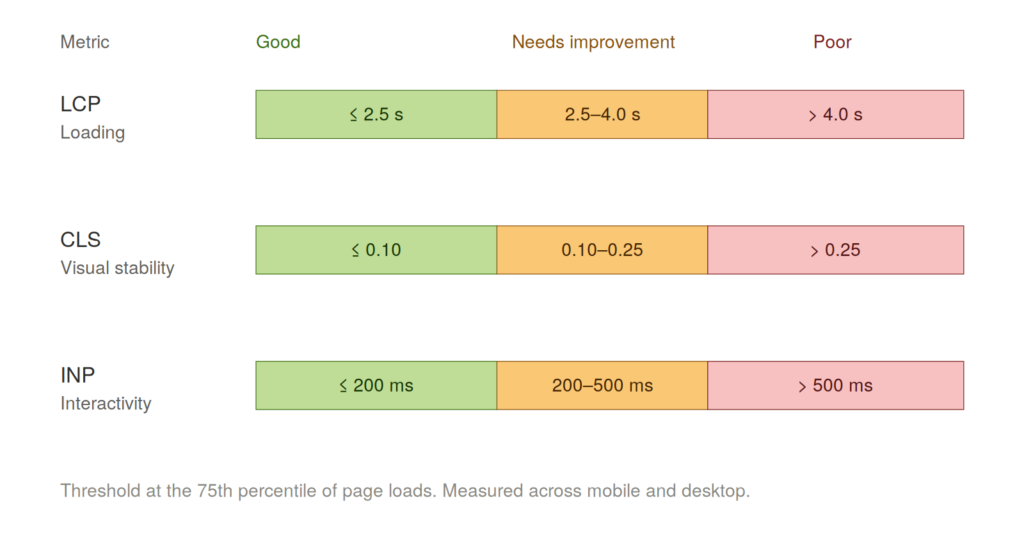
LCP (Largest Contentful Paint) measures how long until the main content element is visible. Google’s “Good” threshold is under 2.5 seconds. A theme loaded with render-blocking JavaScript and unoptimized CSS will push this past 4 seconds on mobile without any help.
CLS (Cumulative Layout Shift) measures how much the page jumps around as it loads. Target is under 0.1. Themes that load web fonts or hero images without dimension reservations are the primary CLS offenders.
INP (Interaction to Next Paint) replaced FID in March 2024 and measures how fast the page responds to user interaction. Target is under 200 milliseconds. Heavy JavaScript frameworks embedded in theme code bloat this score.
Second, heading hierarchy. One H1 per page. Logical H2 and H3 structure in the content. Several themes break this by hard-coding H2 tags into sidebar widgets or footer sections with no way to override them in settings. You will not catch this in a theme demo. You will catch it three months later when you run a technical SEO audit.
Third, schema markup support. Whether the theme outputs structured data natively or plays cleanly alongside Yoast SEO and Rank Math without creating duplicate or conflicting output. Some themes override meta title output in ways that confuse SEO plugin settings. That is not a minor compatibility issue — it means your SEO plugin’s title templates are silently failing.
Fourth, mobile-first behavior. Google indexes the mobile version of your site first. A theme that technically reflows on small screens but serves oversized images, uses tap targets too small for fingers, and loads unscaled desktop assets on mobile is failing mobile-first indexing requirements in practice, even if it passes a basic responsiveness check.
WordPress SEO Theme Pricing: What You Actually Pay
The pricing landscape splits cleanly into three tiers.
Free with paid Pro upgrade: Astra (Pro from $49/year), GeneratePress (Pro from $59/year), Kadence (Pro from $149/year), OceanWP (Core free, extensions from $43/year). These are the themes most serious operators actually use. The free versions are functional enough for most sites. The Pro tiers add schema types, advanced layout controls, and WooCommerce enhancements.
One-time purchase or bundled: Divi ($89/year or $249 lifetime via Elegant Themes membership), Avada ($60 one-time on ThemeForest). The pricing looks attractive until you factor in that both themes require their proprietary page builders to achieve the designs shown in demos — and those builders carry significant performance costs that require additional optimization tooling to offset.
Premium only: Themes like Inspiro from WPZOOM start at $69/year with no meaningful free tier. The value proposition is niche-specific design (portfolio, photography) with performance maintained.
What the pricing architecture does not show you: the hidden cost of page builder lock-in. If you build 80 pages using Divi Builder’s shortcode output and later switch themes, that content becomes unformatted text blocks. The exit cost is non-trivial.
WordPress Theme SEO Performance: Tested Results for 2026
Here is what the testing data shows across the themes that appear repeatedly in 2026 SEO theme roundups.
GeneratePress
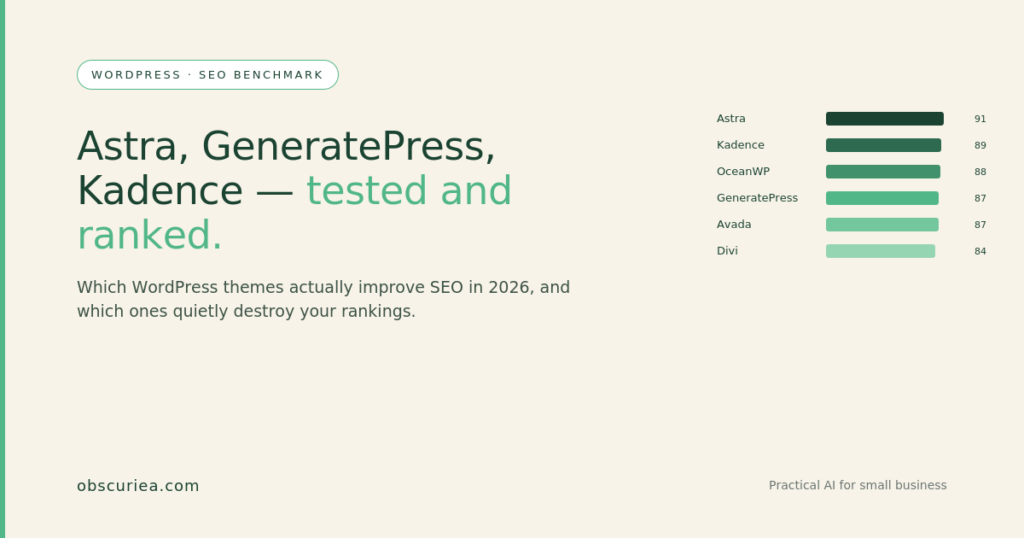
Base file size under 30KB. In WP Rocket’s test suite, fully loaded time of 2.5 seconds, mobile PageSpeed score of 87/100. Under ideal conditions with minimal content, scores consistently reach 95+. This is the leanest theme in the ecosystem by raw file size. The HTML output is clean enough that developers use it as a starting point for custom builds precisely because it adds almost no presentational code that does not serve a direct function.
Astra
Base file size under 50KB. Fully loaded time of 1.9 seconds in testing. Mobile PageSpeed score of 91/100. Total Blocking Time of 0ms in WP Rocket’s test environment. This is the performance benchmark for multipurpose themes. Sub-50KB with built-in schema markup for articles, breadcrumbs, and WooCommerce products. The combination of raw speed and built-in structured data support explains the 1M+ active installs.
Kadence
Base file size approximately 49.7KB, fully loaded time 1.4 seconds in GTmetrix testing, PageSpeed mobile score of 100 in Hostinger’s clean-environment testing across performance, accessibility, and best practices metrics. Built-in schema markup present. The strongest block theme option if you are building on the WordPress Block Editor rather than a third-party page builder. The 10 HTTP requests in GTmetrix testing is one of the lowest figures in the comparison pool.
OceanWP
Fully loaded time 2.9 seconds, mobile score 88/100. LCP of 2.9 seconds puts it right at the edge of Google’s “Good” threshold. Functionally sound, but not the leader in this field. Performance issues documented in testing are described as fixable with additional optimization, which means it requires more work to maintain a competitive baseline. “Adequate” is not the same as “optimized from the start.”
Divi and Avada
Divi: mobile PageSpeed score of 84/100 in WP Rocket’s test suite. The Divi Builder’s JavaScript payload is the primary performance liability. Avada performed comparably at 87/100 with a 2.3 second fully loaded time — better than Divi on raw speed but achieving it with 19 HTTP requests, indicating heavy asset loading. Both are functional for SEO if you apply optimization tooling on top. Neither is the right starting point if page speed is your primary constraint.
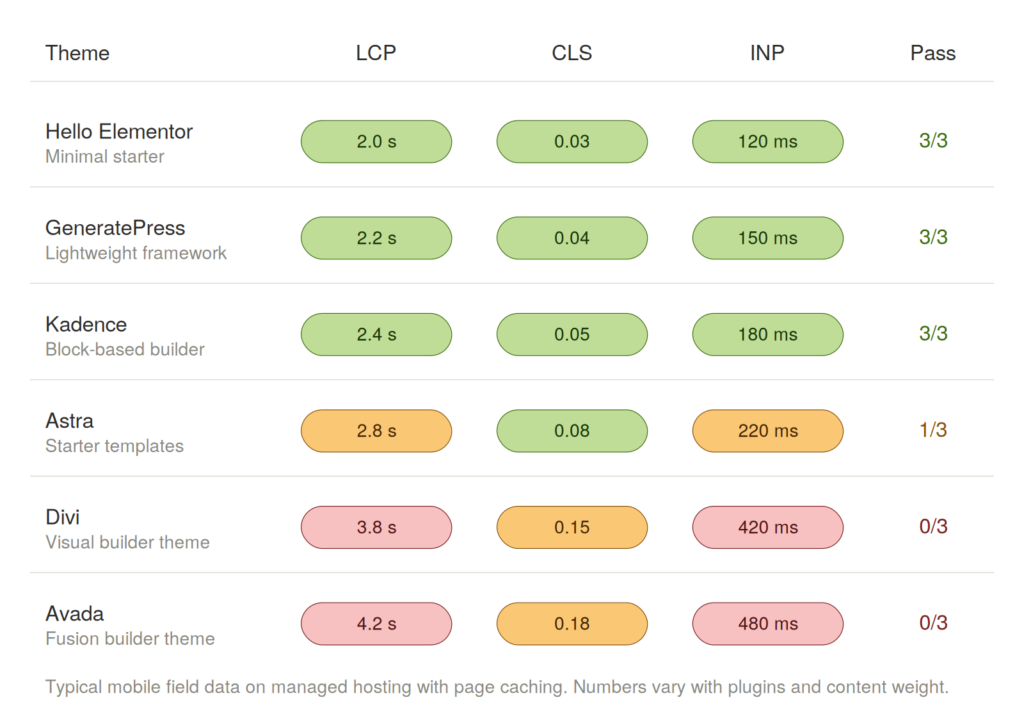
The performance gap between GeneratePress or Astra and the page-builder themes is not marginal. On mobile — where Google’s indexing actually happens — a 7-point PageSpeed difference (91 vs 84) translates to real LCP and INP gaps that affect ranking signals. For a deeper technical reference, Google’s Core Web Vitals documentation details exactly how each metric is weighted in ranking assessments.
Why Fancy WordPress Themes Hurt SEO: The Failure Conditions
Lightweight themes (GeneratePress, Astra, Kadence) fail in one consistent scenario: design ambition outpacing the theme’s default capabilities. GeneratePress out of the box requires substantially more development work than Divi to produce a visually distinctive site. Operators who underestimate this end up installing additional plugins that erode the performance advantage they chose the theme for.
Page-builder themes (Divi, Avada) fail predictably in three conditions:
Global asset loading — The builder loads its full JavaScript and CSS stack on every page, including pages that use no builder features. This is not a configuration error. It is how the architecture works.
Content portability — Pages built with proprietary builder shortcodes are tied to that builder. Switching themes requires rebuilding content, not just restyling it.
Optimization dependency — Reaching competitive Core Web Vitals scores requires layering a caching plugin (WP Rocket or equivalent) on top of the builder’s output. WP Rocket’s own data shows a BeTheme site going from 82/100 to 98/100 with their plugin applied — which confirms the builder theme can reach acceptable scores, but only with additional infrastructure cost.
Block themes as a category have one current failure condition worth documenting: the ecosystem is still maturing. Template editing in the Site Editor works well in Kadence and a handful of others, but plugin compatibility issues surface more frequently with full-site editing themes than with classic themes. This is a 2026 reality, not a permanent limitation.
If you are evaluating themes against existing published content on your domain, also check for keyword cannibalization risks before migrating — a theme switch that changes URL structures can create duplicate content signals that compound any existing cannibalization issues.
The Friction Box
- “SEO-friendly” in theme marketing copy is unverified. Run PageSpeed Insights on the theme’s own demo URL before purchasing — most theme developers host live demos, and those demos reflect real-world asset loading.
- Page builder lock-in is a real exit cost. Calculate it before you commit.
- OceanWP and similar mid-tier themes perform adequately but require more optimization effort to maintain a competitive baseline.
- Heading hierarchy failures are invisible in theme previews. Test by installing the theme on a staging environment and running a crawl with Screaming Frog or Ahrefs before migrating your live site.
- GeneratePress’s design ceiling is lower than Astra’s or Kadence’s out of the box. If your use case requires visual complexity, factor in the additional development time.
- Any theme promising “built-in SEO” without specifying what schema types it outputs and whether they conflict with Yoast or Rank Math is making a claim you need to verify independently.
Frequently Asked Questions About WordPress Themes for SEO
What actually makes a WordPress theme SEO-friendly?
An SEO-friendly WordPress theme produces clean HTML output, loads minimal render-blocking JavaScript and CSS, maintains a logical heading hierarchy (one H1, logical H2/H3 structure), and outputs schema markup that cooperates with Yoast SEO or Rank Math without conflicting output. “SEO-friendly” in theme marketing copy is unverified. Run PageSpeed Insights on the theme’s live demo URL before purchasing — those demos reflect real asset loading.
How do GeneratePress and Astra compare for WordPress SEO performance?
Both are the documented performance benchmarks among WordPress themes for SEO. Astra edges out GeneratePress on mobile PageSpeed score in WP Rocket’s testing (91/100 vs. 87/100) and reaches a fully loaded time of 1.9 seconds compared to GeneratePress’s 2.5 seconds. GeneratePress has the smaller base file size (under 30KB vs. under 50KB) and cleaner default HTML output, making it the preference when maximum performance is the constraint and additional layout development is acceptable.
Is Kadence a good WordPress theme for SEO?
Kadence is the strongest block-theme option in the 2026 comparison pool for WordPress SEO. Testing in Hostinger’s clean environment returned a PageSpeed mobile score of 100/100 across performance, accessibility, and best practices. Fully loaded time of 1.4 seconds in GTmetrix testing and 10 HTTP requests — one of the lowest figures in the comparison pool. Built-in schema markup is present. The correct choice if you are building on the WordPress Block Editor and want native schema support without a plugin dependency.
Can Divi or Avada reach competitive scores for WordPress page speed ranking?
Both can reach competitive Core Web Vitals scores with additional optimization tooling on top. WP Rocket’s own data documents a BeTheme site improving from 82/100 to 98/100 with their plugin applied, confirming that page-builder themes can reach acceptable scores. The starting-point gap is real — 84/100 (Divi) and 87/100 (Avada) versus 91/100 (Astra) on mobile — and closing it requires active infrastructure cost that lightweight themes do not impose from the outset.
When should I switch WordPress themes to improve SEO?
Run Core Web Vitals diagnostics via Google Search Console on your current site first. If your existing theme scores below 80/100 on mobile PageSpeed and optimization plugins have not moved the needle, a theme switch is warranted. If you are on Divi or Avada and scores are in the 84–87 range, install WP Rocket before committing to a full rebuild — the data shows that optimization tooling can close most of the gap without the content rebuild cost of a theme migration.
What should I check before choosing WordPress themes for SEO?
Test the theme’s live demo URL in PageSpeed Insights — most developers host live demos and those reflect real asset loading under real conditions. Inspect the demo page source for heading hierarchy: confirm one H1 and no hard-coded H2 tags in sidebars or footers. Verify schema output does not conflict with your SEO plugin. If you are evaluating Divi or Avada, calculate the page-builder lock-in exit cost before committing — 80 pages of shortcode-built content requires a rebuild, not a swap, if you migrate later.
For the full technical setup that WordPress themes for SEO plug into, see the WordPress SEO plugin setup guide. If you are evaluating caching plugins to offset page-builder performance costs, see the WP Rocket configuration guide.
The Straight Talk
If you are building a new site in 2026 and page speed is a primary ranking concern, start with Astra or GeneratePress. Astra if you want faster time-to-launch with design templates; GeneratePress if you want maximum performance and are comfortable doing more layout work.
If you are committed to the WordPress Block Editor and want native schema support without a plugin dependency, Kadence is the correct choice.
If you already have a site on Divi or Avada and rankings are underperforming, the theme is a probable contributing factor — but switching is a rebuild, not a swap. The immediate action is to install WP Rocket or a comparable performance plugin and run Core Web Vitals diagnostics via Google Search Console before deciding whether a full migration is warranted.
Do not choose a WordPress theme based on its demo. Choose it based on its PageSpeed score on that demo URL.