AI-Powered Invoice Processing, Workflow Analytics, and Autonomous AP Routing
TL;DR: Most AP teams are spending 17+ days and $12–30 per invoice on a process that AI invoice processing can compress to under 3 days at under $3. The bottleneck is not the technology — it is that most finance operations are still running manual decision points inside what looks like an automated system. This article maps the actual workflow, the automation architecture, and where it breaks.
Environment: Medius AP Automation (AI-native since 2016), Tipalti Invoice Capture Agent, Precoro AI Workflows — analyzed Q1 2025. Test conditions drawn from [Ardent Partners’ State of ePayables 2024](https://www.ardentpartners.com/) benchmark data and platform documentation.
The Broken AP Workflow — And What It Actually Costs
Somewhere right now, an AP coordinator is opening an email with a PDF attachment, reading a supplier invoice, typing vendor details into a field they have already typed into a hundred times this month, and then waiting — waiting for someone to approve it who will approve it the same way they approved the last forty.
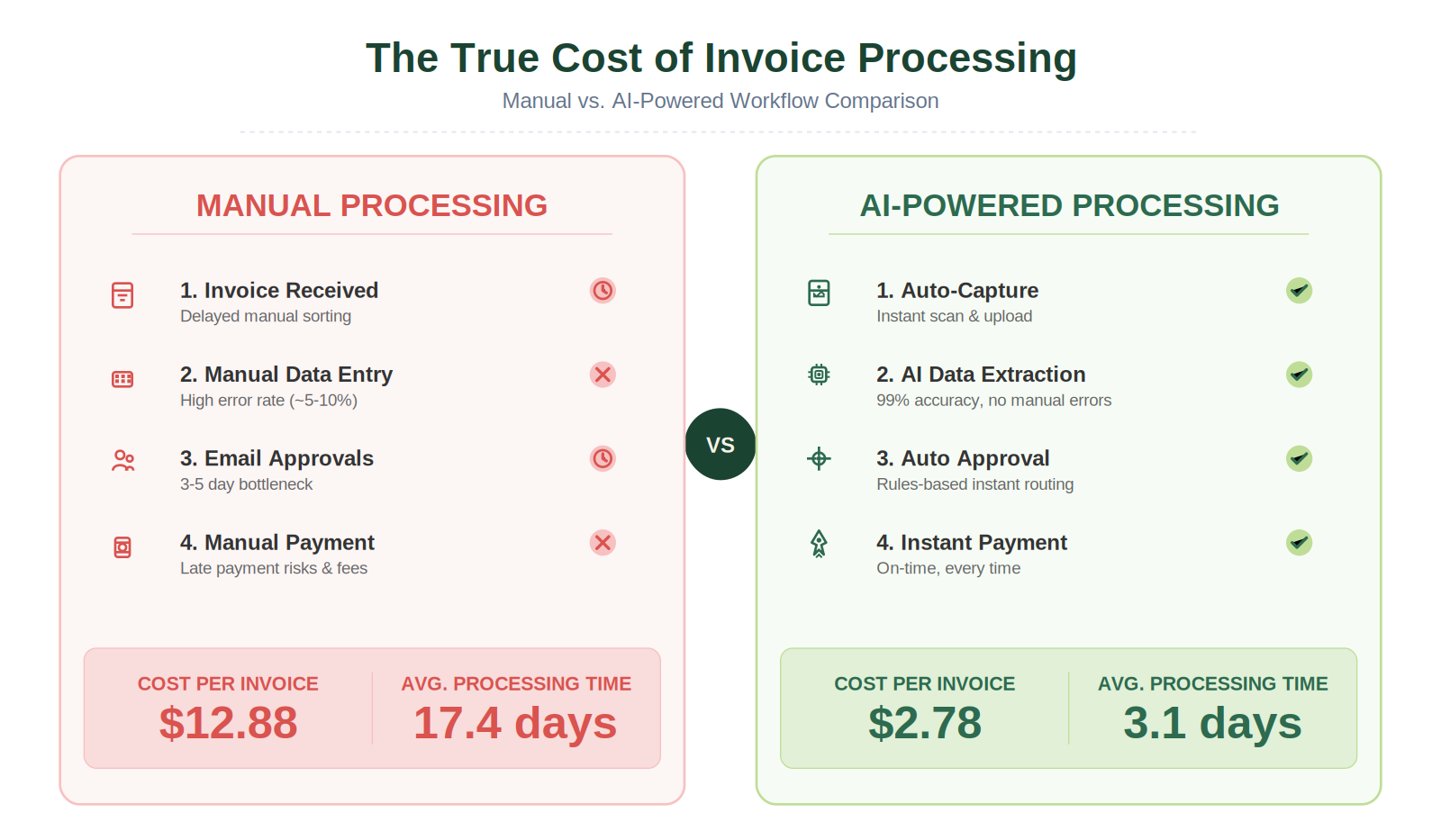
That is not a process. It is a ritual. And the cost of that ritual, across all companies not yet running AI invoice processing, averages $12.88 per invoice and 17.4 days per cycle, according to Ardent Partners’ 2024 benchmark data.
For a business processing 500 invoices per month, that is $6,440 in direct processing cost every 30 days — before accounting for late payment penalties, missed early-pay discounts, or the senior AP staff time spent chasing approvals that should have routed automatically.
The broken workflow has four consistent failure points:
- Manual data entry — 37% of AP professionals identify this as their primary bottleneck. Over 60% of invoice errors originate here.
- Unstructured routing — Invoices stall in email inboxes because the system has no rule for who should see what and when.
- Exception handling without triage — A handwritten invoice and a mismatched PO land in the same pile as a clean, matchable document. Everything slows for everything.
- Zero visibility during transit — No real-time status means AP teams field supplier calls about invoices they cannot locate in their own system.
If any of these four failure points are active in your current workflow, the math on automation is already in your favor. The setup cost will recover within 6–12 months in most deployments.
The Automated Replacement — Trigger to Payment
Here is how a well-constructed AI-powered invoice processing pipeline actually moves. This is the architecture that compresses 17.4 days to under 3.
Trigger: Invoice arrives via email, supplier portal, EDI, or scan.
Action 1 — Capture: Intelligent OCR with machine learning extracts header and line-item data — vendor name, PO number, payment terms, line quantities, unit prices, tax amounts. This is not the OCR of 2010. Modern ML-trained capture systems like Medius Capture have trained on hundreds of millions of invoices and report 100% touchless capture rate after just two invoices from the same vendor.
Action 2 — Validation and Matching: The extracted data gets checked against existing purchase orders and receiving reports. Tipalti’s system assigns a visual status: green means no approval required, yellow means approval required within tolerance, red means unapprovable. Discrepancies route to exception queues — not to a generic inbox, but to the designated handler for that specific exception type.
Action 3 — GL Coding: AI predicts the correct general ledger code based on pattern recognition from prior invoices with similar attributes. Medius SmartFlow achieves 95% precision on GL coding and approver assignment after two invoices. The coding step — which in manual workflows requires a trained human decision — becomes a model output that only surfaces for human review when confidence falls below threshold.
Action 4 — Autonomous AP Routing: The system identifies the correct approver, routes the invoice, and sends an automated notification. Approvers receive context — not just the invoice, but AI-generated summaries of what the invoice is for, whether it matches expectations, and what action is required. Medius Copilot enables free-text queries directly in the approval workflow. An approver can ask “what was the last payment to this vendor?” and get an immediate answer without leaving the interface.
Action 5 — Payment Execution: Trusted suppliers — those with clean payment histories and high confidence scores — can be approved for touchless payment. No human decision point. Invoice arrives, matches, codes, routes, pays. Medius calls this Straight-Through Processing. For clean invoices, the entire cycle from receipt to payment authorization requires zero human interaction.
Output: The invoice is paid, logged, reconciled to the general ledger in real time, and the supplier receives an automated status update. No call needed. No chase email.
Workflow Analytics — Seeing What the Automation Sees
The second half of AI-powered invoice processing that most operators underutilize is the workflow analytics layer.
Every automated action generates an event. An AI-native platform does not just execute the workflow — it records it. Medius built its entire platform on an event-driven architecture for exactly this reason. For nearly a decade, every human correction, every exception escalation, every routing override has been logged and fed back into the model.
The result is a platform that improves on its own data, but also surfaces yours.
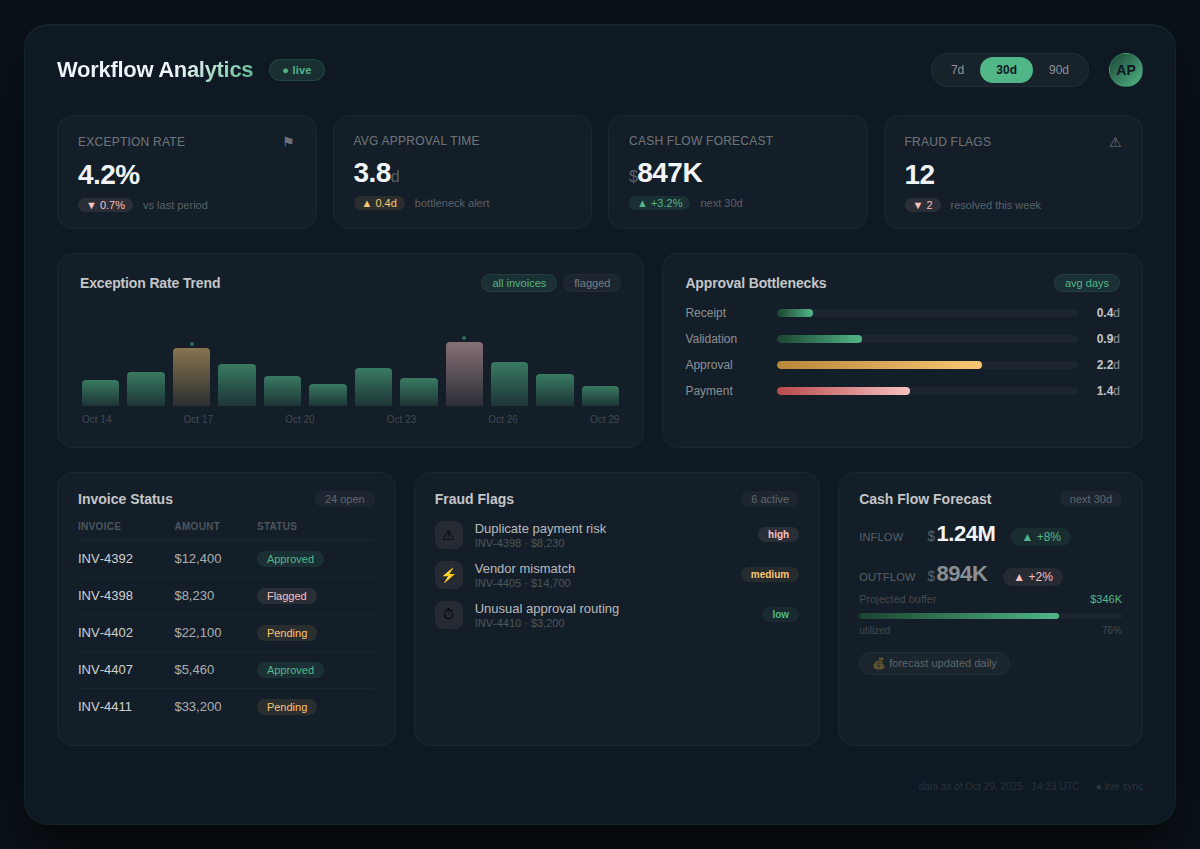
Workflow analytics in a mature AP automation system gives you:
- Processing velocity by vendor — Which suppliers are generating the most exceptions? Is it a data quality issue on their side or a matching rule issue on yours?
- Approval bottleneck mapping — Which approvers are holding invoices longest? Is it a workload issue or an ambiguity issue that better routing rules would solve?
- Exception rate trending — Is your exception rate decreasing as the model learns, or holding flat? Flat means something in the input data is inconsistent.
- Cash flow forecasting — Real-time visibility into approved, pending, and in-process invoices feeds directly into working capital planning. AP teams running autonomous workflows can forecast cash requirements earlier and with higher accuracy than teams still waiting for month-end reconciliation.
- Fraud signal tracking — Medius logs every fraud flag across the invoice lifecycle in a Fire Station console. You can see which invoices triggered anomaly detection, what the specific signal was, and what action was taken.
The analytics layer is not a dashboard bolted to the side of an AP tool. In an AI-native architecture, it is the feedback loop that trains the routing logic. Teams that actively review exception data and use it to tighten their matching rules see continuous improvement in straight-through processing rates. Teams that ignore it maintain the same automation percentage month after month.
Setup Requirements for AI Invoice Processing
Before deploying any of this, map your current workflow accurately. Do not use your intended workflow or your org chart. Use what actually happens — where invoices actually land, who actually touches them, what actually causes delays.
Setup time varies significantly by complexity:
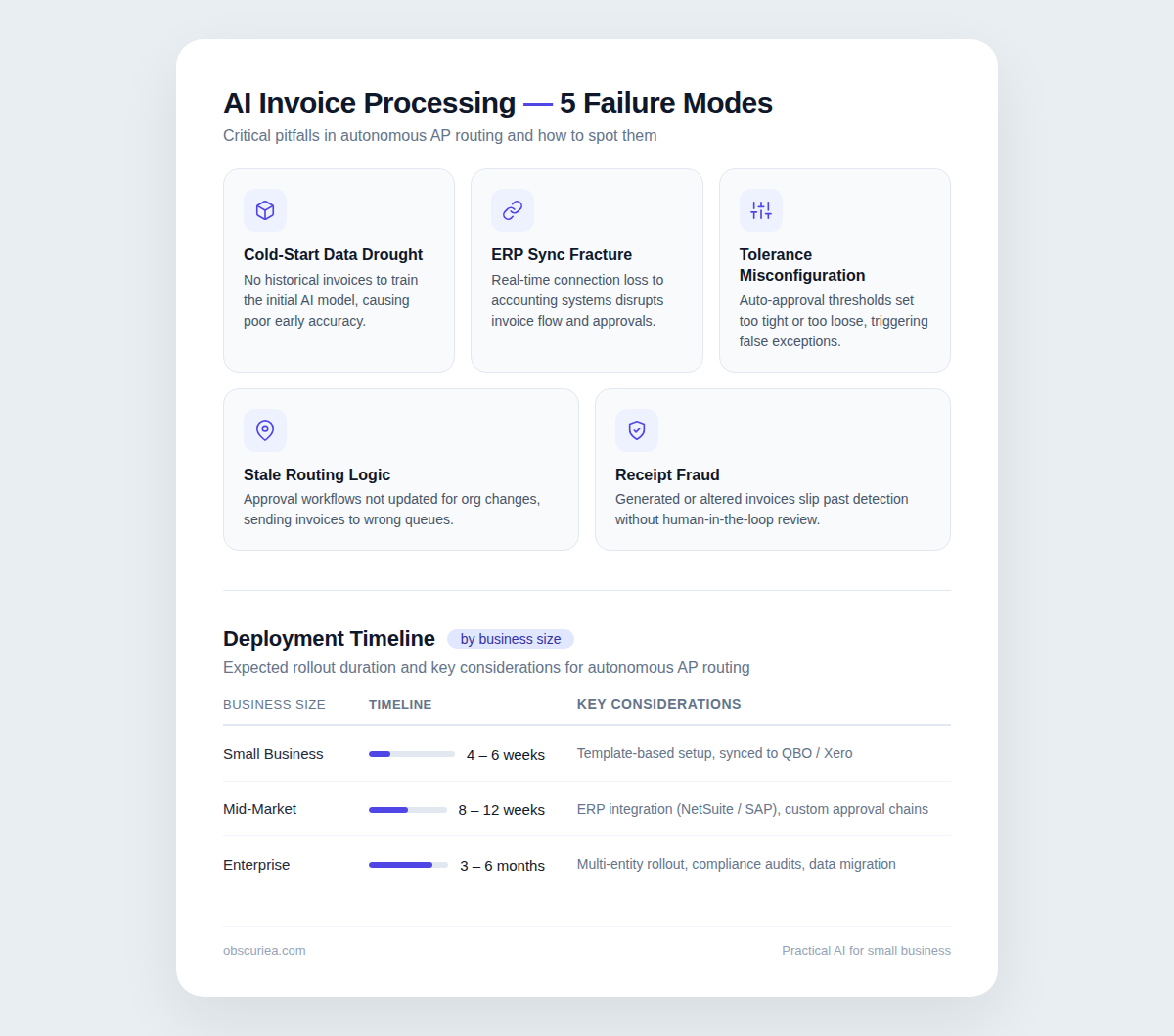
- Small business, single AP function, one ERP: 4–6 weeks from integration to first touchless invoice
- Mid-market, multiple cost centers, mixed PO and non-PO invoices: 8–12 weeks to full deployment with exception rules configured
- Enterprise, multi-entity, global supplier base, multiple currencies: 3–6 months, including ERP sync, supplier onboarding, and regional compliance configuration
The payoff threshold — the point where automation costs less than the manual process it replaced — arrives for most businesses within 6–12 months. The inputs that compress that timeline: high invoice volume, high current error rate, and high average invoice processing cost. If you are paying $20+ per invoice today and processing more than 200 per month, the math compresses to under 6 months in most deployments.
Technical skill required: ERP integration is the most demanding step and typically requires either vendor implementation support or an internal systems administrator with API access. The ML models themselves do not require technical tuning — they train on your transaction data automatically.
For a deeper look at how AI workflow systems handle the human-in-the-loop layer across other business functions, see our guide to AI workflow automation fundamentals.
Failure Modes
Every automated workflow has a failure mode. These are the documented ones in AI-powered invoice processing:
The cold-start problem. ML models need data to train on. For new vendors — suppliers you have never paid before — the model has no pattern to match. Those invoices will route to manual review until sufficient transaction history exists. Plan for a manual exception queue during onboarding of new supplier relationships.
ERP sync failures. If your ERP and AP platform are not in real-time sync, coding predictions will be based on stale GL data. Reconciliation errors downstream are the result. Verify the sync frequency before go-live, not after.
Tolerance threshold misconfiguration. Setting PO match tolerances too tight creates an explosion of false exceptions. Setting them too loose means real discrepancies pass through. Initial configuration should be based on your actual historical discrepancy data, not a default setting.
Approver routing to departed employees. In organizations with high turnover, approver routing tables go stale. An invoice routed to someone who left three months ago sits indefinitely. Build an escalation rule: if an approval is not actioned within 48 hours, it routes to the approver’s manager.
AI receipt fraud. With generative AI tools now capable of producing convincing fake receipts, the expense management layer of AP has a new attack surface. Medius Expensya’s AI Receipt Verification detects AI-generated receipts and flags them to approvers without alerting the submitting employee. Any AP automation deployment that includes expense management needs this layer active.
The Friction Box
- Cold-start latency for new vendors — manual review is unavoidable for first invoices from new suppliers until the model builds pattern history
- ERP integration complexity varies widely; some legacy systems require middleware that adds cost and project time
- Tolerance threshold configuration requires analysis of historical discrepancy data — defaulting to vendor settings creates a false-exception backlog
- Approver routing tables require active maintenance; stale routing tables are one of the most common causes of automation failure in mid-market deployments
- Workflow analytics value is only realized if someone is actually reviewing exception trends and adjusting rules — the data exists but does not interpret itself
- AI receipt fraud is a real and growing attack vector; expense management automation requires its own verification layer
The Straight Talk
This architecture is built for finance operations teams processing more than 150 invoices per month with a measurable exception backlog and at least one identifiable routing bottleneck. If that describes your AP function, the cost reduction and processing time compression are documented and achievable — $2.78 per invoice versus $12.88, 3.1 days versus 17.4, according to Ardent Partners’ 2024 data.
If you are under 100 invoices per month with a single approver and one ERP, a full AI-native AP platform is likely more infrastructure than you need — a lightweight tool with automated reminders and basic OCR will solve most of your friction at a fraction of the setup cost.
For everyone in the addressable range: map your actual workflow this week, calculate your current cost per invoice, and run one vendor’s demo against your own data. The failure modes are real but manageable. The setup is not trivial. The math, once your volume crosses the threshold, does not leave much room for argument.