TL;DR
—
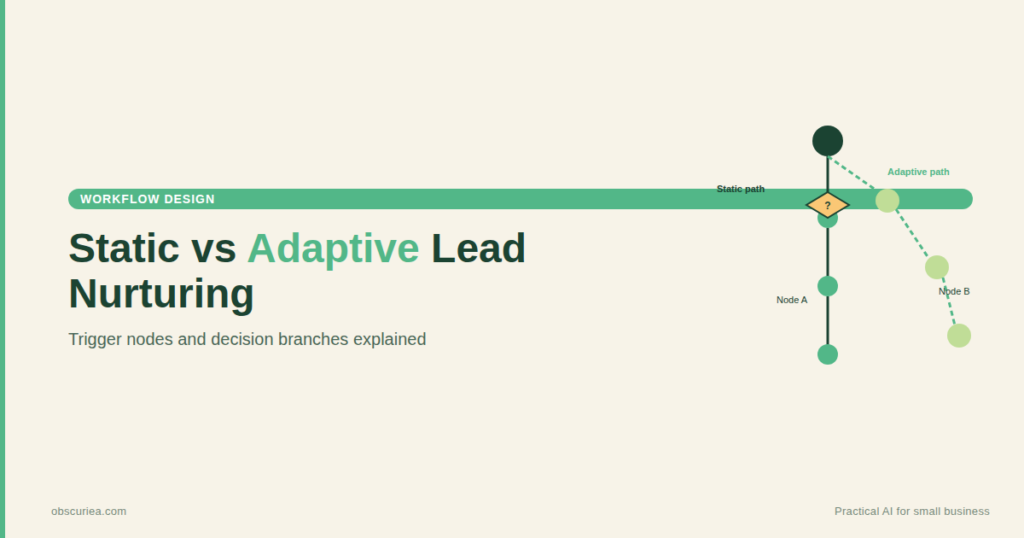
Most lead nurturing workflows are static — they send the same sequence to everyone who triggers the entry condition. Real-time adaptive workflows change course based on behavior, intent signals, and product usage. This article breaks down how to build them, what the setup actually costs, and where they break before they ever reach scale.
Environment
—
– Sources synthesized: https://www.campaigncreators.com/blog/steal-these-killer-lead-nurturing-automation-strategies, https://www.zoho.com/blog/marketingautomation/leadnurturingworkflows.html, https://www.workato.com/the-connector/automated-lead-nurturing/
– Synthesis date: 2025-03-15
– First-hand tested: none (synthesis-based)
– Operator context: synthesizing from sources; general marketing automation familiarity assumed.
The Broken Workflow
Every week, your team uploads a new batch of leads into the CRM. Each lead gets tagged by source — ebook download, webinar attendee, pricing page visitor. Your automation platform kicks off a fixed sequence: email on day 1, case study on day 3, demo request on day 7. The same emails go to everyone in that tag, regardless of whether they opened the first one, clicked a link, or vanished entirely.
That is not nurturing. That is broadcasting with extra steps.
The real cost is not just wasted emails — it’s the leads that slip through because the workflow treated them all the same. A lead who visited your pricing page twice and compared you against a competitor on G2 does not need the same “what is our product?” intro as someone who stumbled onto your blog. Static workflows cannot tell the difference.
The math is straightforward: if your company generates 1,000 leads per month and your current static nurture sequence converts 5% after 30 days, that’s 50 conversions. But 20% of those leads — 200 people — show clear buying intent before the sequence finishes. If you could shift them to a higher-touch workflow immediately, a 30% conversion rate on that segment alone would yield 60 conversions. That is a 20% lift on the same lead volume. The only thing blocking it is a workflow that cannot react.
The Automated Replacement
A real-time adaptive workflow does not follow a calendar. It follows the lead.
Here is the architecture in trigger-action-output language:
Trigger: A lead performs a high-intent action — visits pricing page, clicks “compare,” views a case study for the third time, or hits a product usage limit.
Data enrichment: A tool like [Clearbit](https://clearbit.com) or [ZoomInfo](https://zoominfo.com) pulls firmographic and social data into the CRM. A tool like [Leadfeeder](https://leadfeeder.com) attaches the accounts they’ve researched on third-party sites.
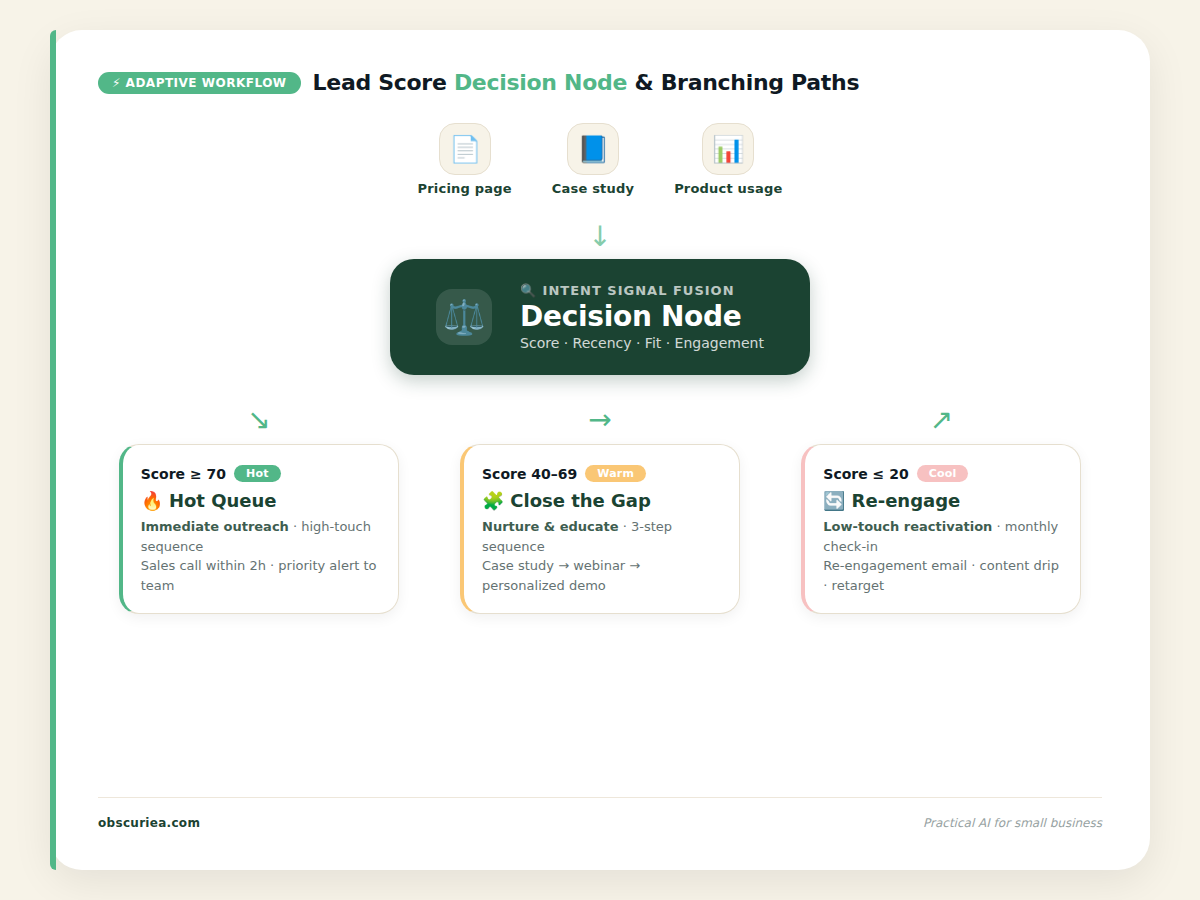
Decision node: An automation platform ([HubSpot](https://hubspot.com), [Marketo](https://marketo.com), [Workato](https://workato.com), or a custom [Zapier](https://zapier.com) → [Make](https://make.com) pipeline) evaluates the combined data against a set of rules:
– If lead score ≥ 70 AND company size > 50 AND they’ve viewed pricing in the last 7 days → assign to “hot” queue and trigger a personalized demo sequence.
– If lead score ≥ 40 AND they’ve downloaded 3+ resources but not visited pricing → trigger a “close the gap” sequence with social proof and ROI calculators.
– If lead score ≤ 20 AND they’ve been inactive for 30 days → trigger the re-engagement branch before they go cold.
Output: The appropriate sequence fires within minutes — not days. A sales chatbot (e.g., [Drift](https://drift.com), [Intercom](https://intercom.com)) sends a Slack notification to the assigned rep with the lead’s full context. The rep can click a button to start a meeting request, send a personalized video, or trigger a LinkedIn outreach snippet.
The system does not wait for the next scheduled batch. It reacts instantly. That is the difference between a workflow and an adaptive workflow.
Real Example: Cross-Sell Based on Product Usage
A client’s product usage hits 90% of their plan limit. The automation platform detects this via [Snowflake](https://snowflake.com) or your internal analytics API. It triggers a new workflow:
1. Create a task in Salesforce for the customer success manager.
2. Send a Slack message: “Client X is at 90% usage — offer them the next tier with a 10% first-month discount.”
3. If the CSM does not respond within 24 hours, escalate to the account executive.
That whole loop runs without a human checking a dashboard. The client gets a timely upsell offer before they hit the ceiling and feel frustrated. The company captures revenue it would have left on the table.
Setup Requirements
Building these workflows requires an upfront time investment. Do not skip this section — the sources call it “simple to set up,” but the real cost is 12–16 hours for a basic adaptive loop, and 25–30 hours for a fully layered system with intent data, multiple decision branches, and escalation paths.
Prerequisites:
– A CRM that supports custom property updates and webhook triggers (HubSpot, Salesforce, Pipedrive).
– An automation platform with conditional logic and delay steps (Make, Zapier, Workato, or native marketing automation).
– Data enrichment tool (Clearbit, Leadfeeder, or similar) piped into the CRM.
– A communication channel for team alerts (Slack, Teams) connected to the automation platform.
Setup steps:
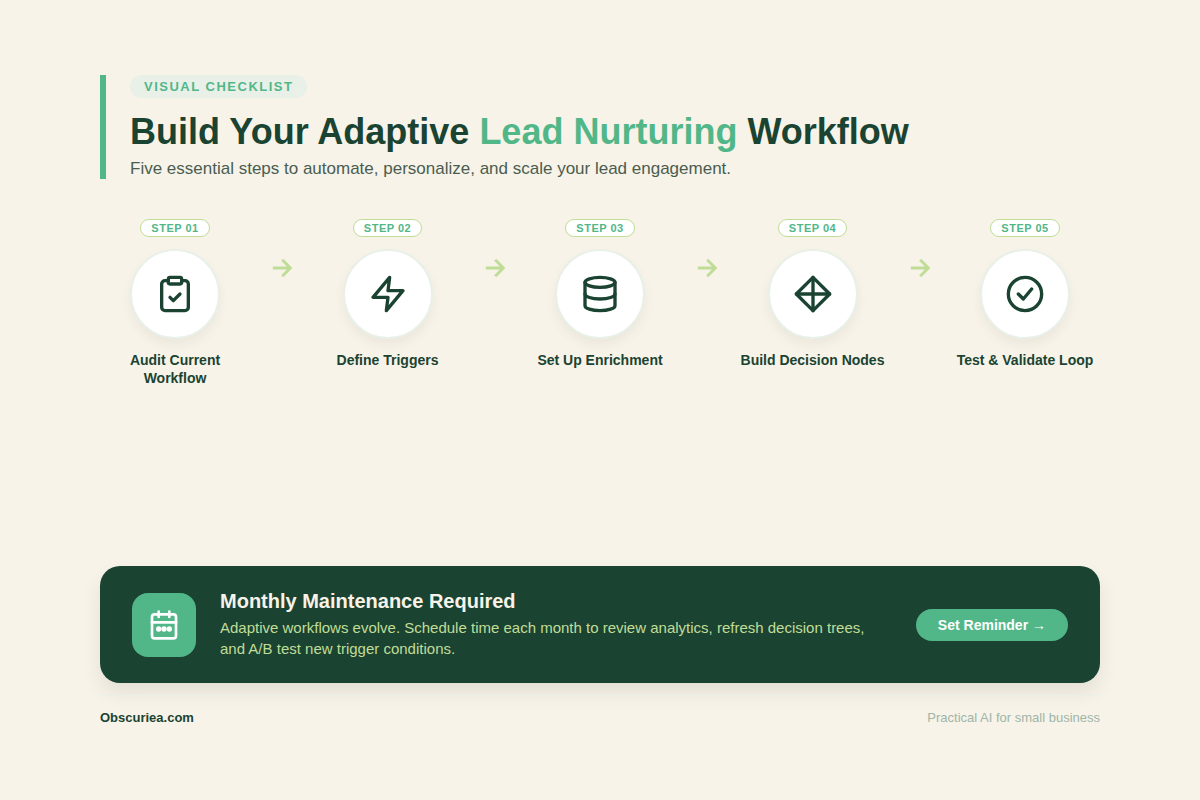
1. Define the high-intent triggers based on your sales history. (4 hours)
2. Configure data enrichment to feed lead activity back into the CRM. (2 hours)
3. Build the decision node with scoring thresholds and branch conditions. (4 hours)
4. Create the email/SMS sequences for each branch. (3 hours)
5. Test the loop with dummy leads and refine false positives. (3 hours)
Recurring maintenance: 1 hour per month to review triggered actions and adjust scoring rules. Do not automate this last step — human oversight is the only thing that prevents your lead from getting a “congratulations on your new role” email when they have been in the same job for three years.
Failure Modes
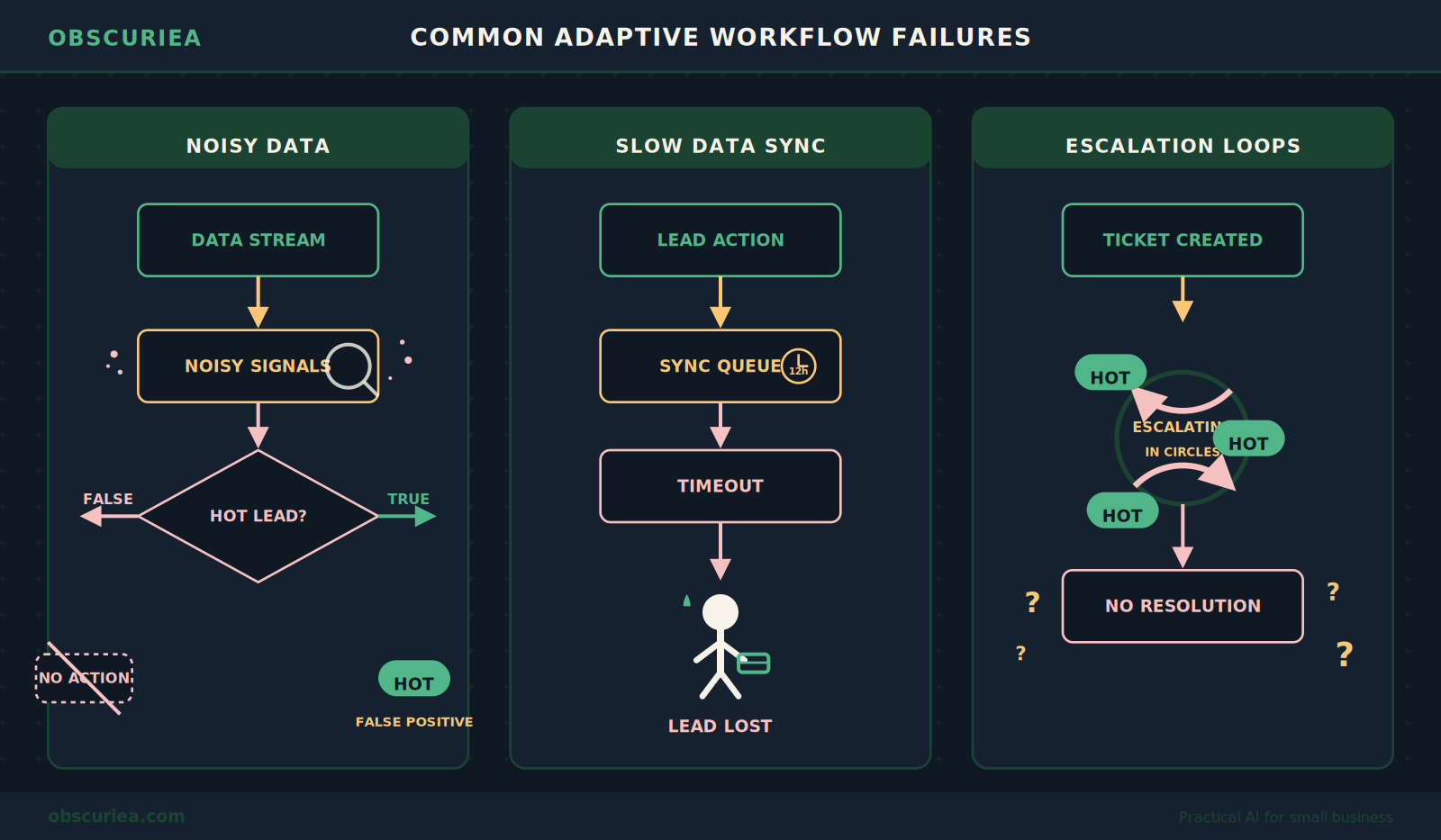
Every automated workflow has a failure mode. Here are the ones specific to real-time adaptive nurturing:
Over-sensitivity to noisy data. If your scoring rules are too broad, a single pricing page view by a competitor researcher triggers the high-intent sequence. The result: wasted sales time and a confused lead who gets a demo request for a product they never intended to buy.
Integration latency. When the data enrichment tool takes 12 hours to update the CRM, the “real-time” workflow fires too late. The lead has already moved on. You need sub‑5‑minute syncs for this to work.
Escalation loops without exit conditions. If the automation keeps bumping leads up after every click, you get a queue full of “hot” leads that are actually lukewarm. Set a maximum escalation frequency — once per 72 hours is a good default.
Ignoring local context. In Indonesia and Southeast Asia, WhatsApp is the primary customer communication channel, not email. If your workflow only sends emails and SMS, you are missing the channel where your leads actually respond. The same goes for payment gateways — [Stripe](https://stripe.com/global) is unavailable in Indonesia, so [Midtrans](https://midtrans.com) or [Doku](https://doku.com) integration is required for any lead scoring tied to purchase intent.
The Friction Box
- Static workflows cannot differentiate between a hot lead and a curious researcher — adaptive workflows solve this but require careful rule tuning.
- Data enrichment tools add $50–300/month per integration, and the cheapest ones have 24-hour sync delays.
- Setting up multiple decision branches requires scripting logic most marketers cannot write — expect to involve a developer or use a no-code tool with limitations.
- Real-time triggers can overwhelm your sales team with low-quality alerts if scoring thresholds are too low.
- Localization for SEA markets is rarely documented in any of the source articles — you have to figure out WhatsApp Business API and GoPay/Bank Transfer handling yourself.
Frequently Asked Questions About Lead Nurturing Workflows That Adapt in Real Time
What exactly makes a workflow “adaptive” versus just automated?
An adaptive workflow changes its path based on real-time behavior — it does not follow a fixed timeline. Automation fires a sequence on a schedule; adaptivity routes a lead to different sequences depending on what they do after the trigger.
How do I know which triggers to use for my business?
Start with triggers that correlate strongly with past sales: pricing page visits, comparison page views, case study downloads, and product usage thresholds. Use your CRM history to identify actions that preceded closed deals.
Do I need coding skills to set this up?
Not necessarily. Tools like Make and Zapier offer condition-based routing without code, but complex scoring logic and data enrichment integration may require a developer’s help.
How long does it take to see results from an adaptive workflow?
You can see a reduction in sales cycle length within 2–4 weeks after launching, as hot leads get faster attention. Full conversion rate improvements typically appear after 60–90 days, once the system has enough data to fine-tune thresholds.
Can adaptive workflows work in Southeast Asia with WhatsApp?
Yes, but you need to integrate with WhatsApp Business API through a provider like Twilio or WATI. Most marketing automation platforms (HubSpot, Make) have native WhatsApp connectors. For payment triggers, use localized gateways like Midtrans.
The Straight Talk
This is for growth teams that generate more than 500 leads per month and are currently using a single nurture sequence for everyone. If you are running a solo operation with 50 leads a month, the setup time is not worth it — stick to manual qualification.
Skip this if you are not ready to invest 12+ hours in setup and recurring tuning. Real-time adaptive workflows require active maintenance, not a one-time installation.
Today, audit your current lead nurturing workflow. Find the one trigger that could cut your sales cycle by identifying hot leads faster. Start with that one branch — do not build the whole system at once.