TL;DR: Automated follow-up sequences fail when they prioritize sending volume over timing, context, and human-like interaction. The fix is a trigger-based workflow that respects prospect behavior — not a calendar. This article walks through the broken manual process, the automated replacement, the setup cost, and where the automation breaks.
Environment:
– Sources synthesized: 3 URLs (https://www.sendr.ai/blog/how-to-automate-sales-follow-ups-without-sounding-like-a-robot, https://www.brandsbyday.com/blog/how-to-automate-follow-ups-without-losing-the-human-touch, https://www.indiehackers.com/post/ai-powered-follow-ups-how-to-automate-responses-without-sounding-like-a-bot-ffeb168654)
– Synthesis date: 2026-04-01
– First-hand tested: none
– Operator context: Hands-on experience with no-code automation tools (Zapier, Make), CRM workflows, and multi-channel lead follow-up sequences for small-to-medium businesses.
The Broken Workflow
Every Monday, you face the same inbox: 47 leads who went silent after the first call. By Wednesday, you’ve sent 32 “just checking in” emails. By Friday, seven people replied — two of them asked to be removed. You lost 14 hours on follow-ups and closed exactly zero deals from that batch.
This is the broken workflow. It’s not that follow-ups don’t work — it’s that manual follow-ups at scale are unsustainable. You either sacrifice quality or burn out. The traditional approach relies on static cadences: send email on Day 1, call on Day 3, email on Day 7. No context. No adaptability. No way to tell if a prospect opened a link or visited your pricing page.
The weekly time cost is real. For a solo operator or a small team managing 100 leads per week, manual follow-ups consume roughly 15-20 hours. That’s half a workweek spent on repetitive typing, not on closing deals or building relationships.
The Automated Replacement
Instead of a static calendar, build a trigger-based system. The core idea: every prospect action becomes a signal that triggers a specific, pre-written follow-up action. No more guessing when to send the next message.
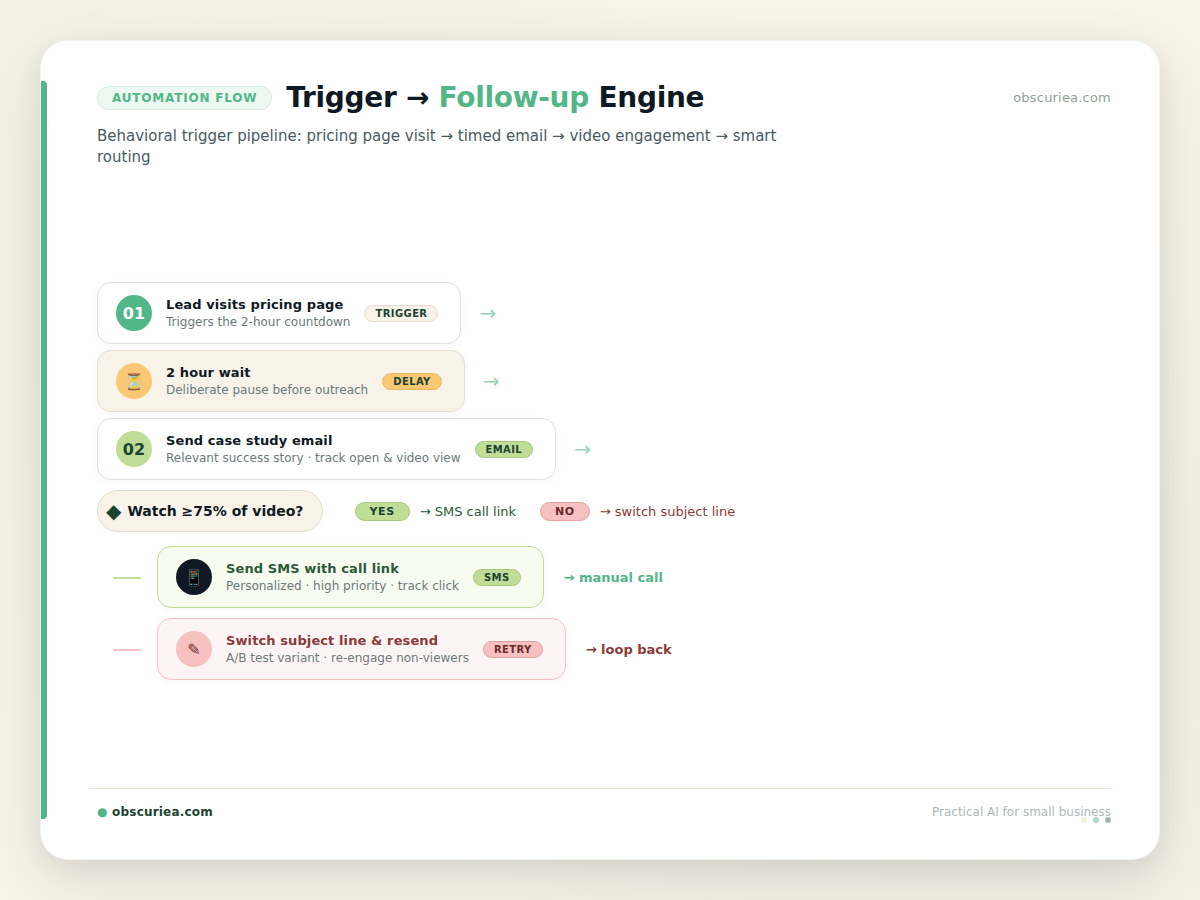
Here’s the trigger → action → output flow for a typical lead journey:
– Trigger: Lead opens your pricing page.
– Action: Wait 2 hours, then send an email with a case study relevant to their industry (pulled from CRM tags).
– Output: Email sent with merge fields for company name, pain point, and a personalized video thumbnail.
– Subsequent trigger: If lead watches 75% of the video, move to “hot lead” track and send SMS with a direct call booking link.
– Fallback: If lead doesn’t open any email within 5 days, switch subject line strategy and resend with a different angle.
This system removes the decision fatigue of “what to send next.” The automation decides based on real behavior, not your calendar.
Multi-Channel Orchestration
Don’t limit to email. If a lead goes cold on email, add a LinkedIn connection request with a note referencing their recent post. If they open the connection, trigger a personalized voice note via Loom. The key is redundancy—not because you want to spam, but because every prospect has a preferred channel. SMS has a 98% open rate. Use it sparingly and only for high-intent triggers.
Behavioral vs. Time-Based Triggers
A time-based trigger sends an email on Day 3 regardless. A behavioral trigger sends an email when a lead visits your pricing page or downloads a guide. Behavioral triggers convert 3-5x better because they arrive at the moment of intent. Build your sequence around behaviors, not intervals.
Setup Requirements
Setting this up requires an upfront time investment of 6-8 hours. Here’s the breakdown:
– Tool selection (2 hours): Choose a CRM that supports webhooks or API triggers, like HubSpot, [ActiveCampaign](https://www.activecampaign.com/), or a no-code automation platform like Make.
– Map the trigger paths (1 hour): List 3-5 common lead behaviors and the corresponding follow-up action. Keep it simple — you can always expand.
– Build the workflows (3 hours): Use an automation builder (Make, Zapier) to connect CRM events to email/SMS/LinkedIn actions. Test each path.
– Write the templates (2 hours): For each path, write 3-5 email/SMS templates that feel conversational, not salesy. Use merge fields beyond just first name: pain point, company name, recent activity.
Skill level: Intermediate no-code. You need to understand CSV mapping and simple conditional logic. If you’ve built a Zap before, you can handle this.
Cost: Most CRM plans start at $50/month. Automation tools add $20-30/month. Expect a monthly operational cost of around $100 for a basic setup handling up to 500 leads.
Failure Modes
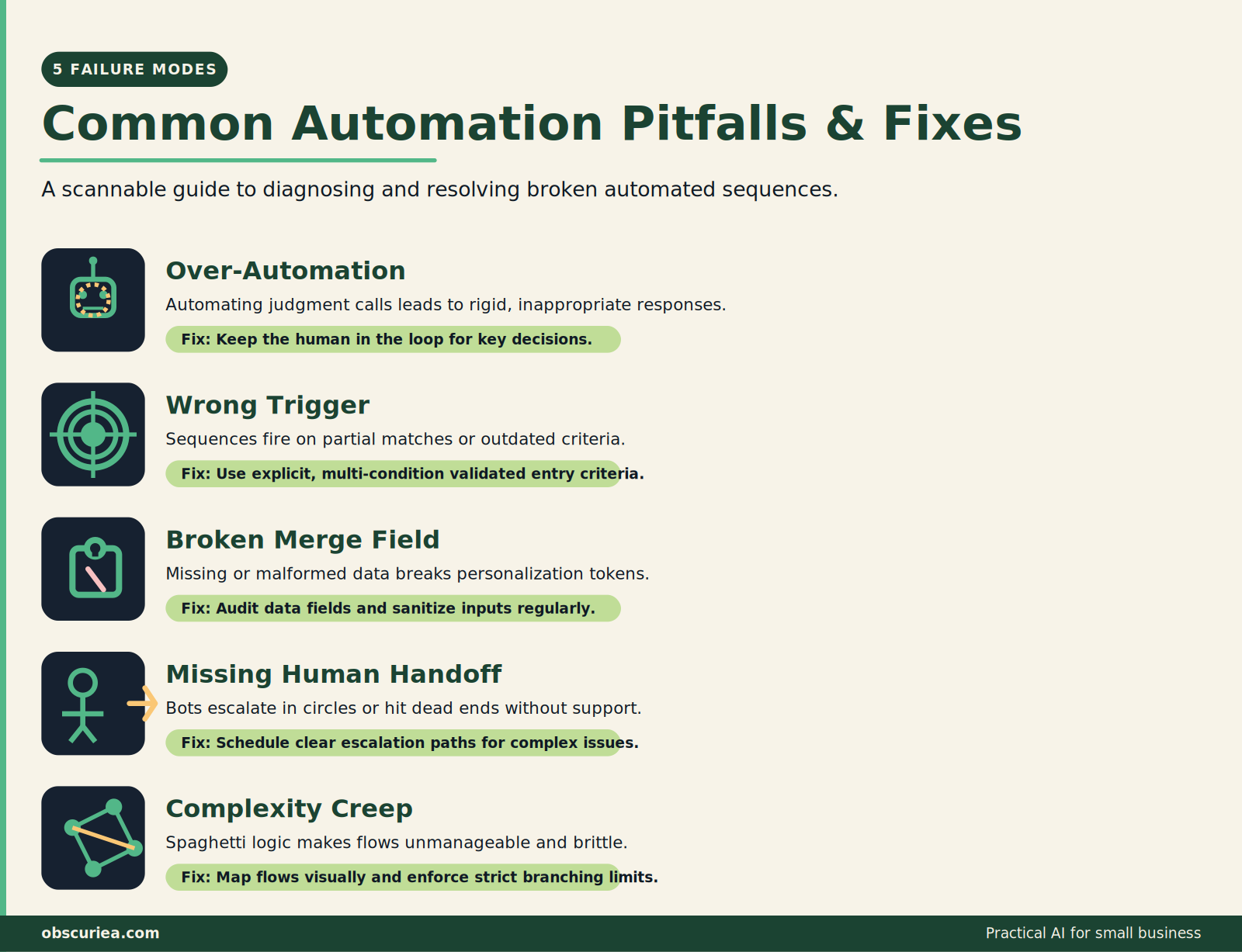
Automated follow-ups fail in consistent, predictable ways. Here are the top five:
-
Over-automation fatigue. Sending more than 4 automated messages per week per contact destroys engagement. Most CRMs will flag your domain. The fix: space out automated touches with manual ones (e.g., automated email → manual SMS → automated case study).
-
Wrong trigger, wrong time. If you send a pricing case study immediately after a lead signs up for a webinar, you’ve ignored the context. They were in education mode, not buying mode. The fix: tag leads by engagement phase and map triggers accordingly.
-
Broken merge fields. A failed merge field produces an unaddressed email like “Hey , we noticed you…” That kills credibility. Test every template with a dummy contact before enabling the workflow.
-
Lack of human handoff. Fully automated sequences often frustrate prospects who have specific questions. If they click “reply” and get an AI chatbot, they feel tricked. The fix: after two automated touches, the system creates a task for a human rep to reach out personally.
-
Complexity creep. You start with three trigger paths. A month later, you have twelve. Maintaining conditional branches becomes a full-time job. The fix: set a quarterly workflow audit day. Archive anything that hasn’t fired in 90 days.
The Friction Box
- Behavioral triggers require a connected CRM — not every small business has one set up properly.
- Video personalization at scale (recording 50 videos per month) still costs time — 30-60 minutes of recording and uploading.
- SMS integration requires ethical compliance (opt-out message, consent). Failure to include it risks legal issues.
- AI sentiment analysis is still immature; a model can misread sarcasm or frustration and respond inappropriately.
- Most CRM email delivery drops if you maintain a 50%+ automation rate; you need a secondary sending domain to stay out of spam.
Frequently Asked Questions About Automated Follow-Up Sequences That Don’t Sound Like a Robot
What is the difference between an automated follow-up and a robotic one?
A robotic follow-up uses generic language and no context. An automated follow-up can still feel human if it references specific actions the prospect took, uses a natural tone, and includes personalization beyond just a name.
How many automated follow-ups should I send per week per lead?
Stick to 2-4 automated touches per week maximum. Beyond that, engagement drops and your domain risks being flagged as spam. Mix in manual touches to keep the sequence feeling human.
Which tools are best for automating follow-ups without sounding like a bot?
Tools like HubSpot, ActiveCampaign, and Mailchimp offer behavioral triggers. For more advanced workflows, use Zapier or Make to connect CRM to email and SMS. For video personalization, Loom and Vidyard integrate well.
Can I use AI to write my follow-up messages?
Yes, but always edit the output. AI-generated copy often sounds sterile. Use it as a first draft, then add your personality, specificity, and a conversational tone before sending.
How do I know if my automated follow-up sequence is working?
Track reply rate, not just open rate. If people are replying and engaging further, the sequence is working. Also monitor unsubscribe rate and spam complaints. Adjust triggers and templates based on which behaviors produce replies.
What should I do if a lead doesn’t engage after multiple automated touches?
Switch channels. Send an SMS if emails didn’t work. Send a LinkedIn connection request. If they still don’t engage, move them to a long-term nurture list with monthly touchpoints — or remove them entirely after 90 days to protect deliverability.
The Straight Talk
This system is for solo operators and small teams managing 50-200 leads per month who are spending 15+ hours per week on follow-ups and seeing conversion rates below 10%. If you’re an enterprise with 2000+ leads and a full sales development team, you need a different scale of tool (like Outreach or SalesLoft) with a full-time administrator.
Your next action: Pick one behavioral trigger — the most common one in your pipeline — and build a single automated sequence around it this week. Start with one path. Expand after you see results.