TL;DR
Trigger-based workflow chains eliminate the manual handoff gaps between business tools. Instead of a person copying data from one system to another, a single event—like a new lead or invoice—kicks off a sequence of actions automatically. Here’s how to design these chains, what they cost to set up, and where they break.
Last updated: May 14, 2026
A trigger-based workflow chain is an event-driven automation sequence where a single trigger—like a form submission or payment confirmation—fires a series of actions across multiple tools, replacing manual handoffs with automated, conditional logic. These chains run unattended, logging every step, and are built using platforms like n8n, Make, or Activepieces.
Environment
- Sources synthesized: 3 URLs (Swiftask landing page, Activepieces blog, MindStudio tutorial)
- Synthesis date: 2026-03-17
- First-hand tested: Automation chains built with Zapier, Make, n8n, and custom webhook pipelines; no direct testing of Swiftask or Activepieces
- Operator context: Building and maintaining multi-step automations for e-commerce order processing and client onboarding workflows
The Broken Workflow
Every multi-tool process has a silent tax: the handoff. A customer submits a form. Someone checks the CRM, forwards the email, opens a new ticket, sends a confirmation—then forgets to log the interaction. That chain of manual steps costs your business measurable hours each week. For a support team handling 50 tickets a day, the cumulative time lost to tab-switching and copy-pasting can exceed 10 hours weekly. Worse, each handoff is an opportunity for error. The 10-15% error rate cited in manual data entry isn’t hypothetical—it’s the baseline.
The broken workflow doesn’t just slow things down; it erodes trust. When a customer follows up and the agent doesn’t have the context because a step was missed, the relationship takes a hit. The cost isn’t abstract—it shows up in churn and support tickets.
Consider a common scenario: a lead fills out a contact form on your site. The form sends an email to sales—but the email sits in an inbox for four hours before someone sees it. Sales copies the details into the CRM, creates a task in Asana, and then manually sends a “thanks for your interest” reply. Every move is manual. One mistake—like copying the wrong email address or misreading the budget field—and the whole chain derails.
The Automated Replacement
A trigger-based workflow chain replaces these manual sequences with an event-driven architecture. A trigger—like a form submission, a payment confirmation, or a status change—fires a chain of actions that execute in defined order, with conditional branching based on data values.
The pattern is always the same:
Trigger → Action 1 (e.g., update CRM) → Action 2 (e.g., create ticket) → Action 3 (e.g., send slack notification) → Conditional branch (if priority high, escalate to manager) → Action 4 (e.g., log audit entry)
Each action produces structured output that feeds the next step. The chain runs unattended, in seconds, with every step logged for review.
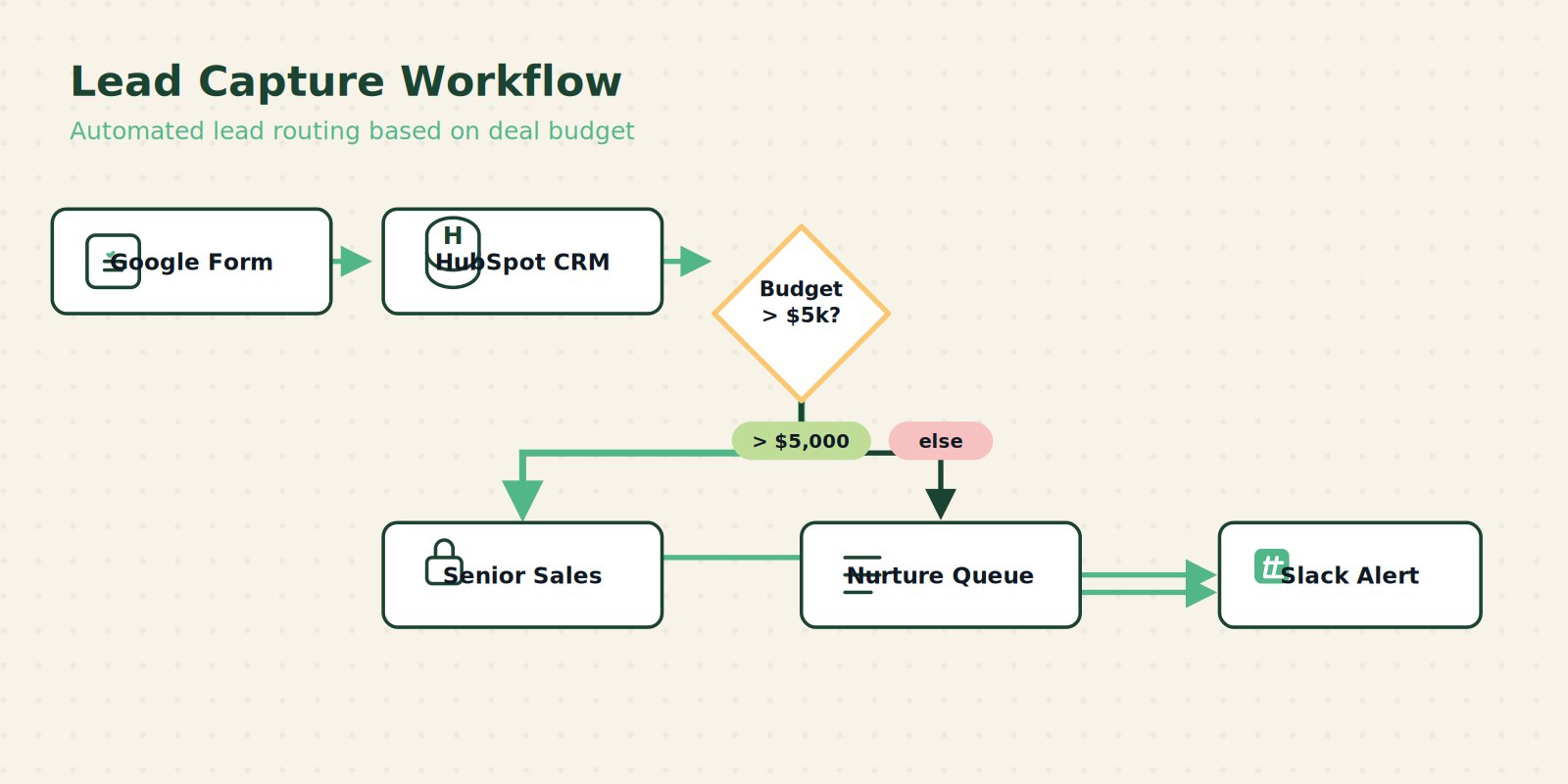
Example 1: Lead Capture
1. Trigger: New entry in Google Form (customer details + budget)
2. Action: HubSpot creates contact and deal
- Action (conditional): If budget > $5,000, assign to senior sales rep; else assign to standard queue
- Action: Send Slack message to assigned rep with deal summary
- Action: Log the event in a Google Sheet for pipeline tracking
Example 2: Support Ticket Escalation
1. Trigger: New support ticket in Intercom tagged “urgent”
2. Action: Create Jira issue with priority=critical
3. Action: Post to #urgent-alerts Slack channel with ticket summary
4. Action (conditional): If SLA breached (no response within 1 hour), escalate to Slack DM to on-call engineer
5. Action: Log escalation audit in database
Every step is pre-defined. The system does not forget. The data does not get corrupted by human retyping. The timing is immediate.
Setup Requirements
Building a trigger-based chain doesn’t require deep coding, but it demands upfront planning. The biggest mistake operators make is jumping straight into tool configuration without a workflow map.
Before you touch any tool, draw the chain: list every step, the data that passes between them, and who (or what) is responsible. This map becomes your specification.
Here’s what you need:
- A trigger source: Google Forms, Typeform, webhook, email integration, database change, etc.
- An automation platform: tools like Activepieces, n8n, Make, Zapier, or MindStudio for AI-driven chains. Each has varying complexity and pricing.
- Zapier: easiest for single-step automations, expensive at scale.
- Make (formerly Integromat): good for multi-step visual chains, credit-based pricing.
- n8n: open-source, self-hosted, powerful for complex logic, requires server.
- Activepieces: open-source with cloud option, growing rapidly.
- Credentials for every downstream tool: CRM, ticketing system, communication channels, storage.
- A shared data schema: define what fields travel through the chain. For example, a “lead” object has email, name, source, budget, assigned_rep.
The setup time for a three-step chain is typically 1-2 hours for initial configuration plus another hour for testing edge cases. Don’t skip the testing phase—use sample data to trigger the chain and verify each action fires correctly.
Cost considerations: If your chain runs 500 times a month, Zapier’s Starter plan ($20/month) covers it. At 5,000 runs, you’re looking at Team plan ($75/month). n8n self-hosted has no per-run cost but requires server maintenance (approx $10/month on a VPS). Always project your volume before choosing a platform.
Failure Modes
Automated chains fail predictably in four ways:
-
Integration point failures: An API call times out, a webhook returns a 4xx, or a tool changes its endpoint. Without timeout handling and error logging, the entire chain halts silently.
Fix: Add retry logic with exponential backoff. Most platforms offer this as a built-in setting—enable it. -
Data shape mismatches: The downstream tool expects a field name that doesn’t match the output of the previous step. For example, your CRM expects “company_name” but the form outputs “company”. This breaks mid-chain.
Fix: Use data transformation steps—map fields explicitly. In Make, you can use a “Set Variable” module; in n8n, you can use a “Function” node. -
Context pollution (especially in AI-driven chains): When using agents like Claude Code, each skill call appends data to the context window. After several steps, the agent loses track of what’s important. The fix: return minimal structured output, not full transcripts.
Fix: Design skills to output only the fields the next step needs—think of each return as a memo, not a report. -
Authentication expirations: APIs require tokens that expire. If your chain runs daily, a token that expires at midnight will cause the first run of the next day to fail.
Fix: Use platforms that handle OAuth token refresh automatically (most do), or schedule a token refresh routine.
Design for these failures: implement retries with exponential backoff, log every step outcome, and set up monitoring alerts for chain breaks. A failed chain that nobody notices is worse than no automation at all—it gives a false sense of reliability.
The Friction Box
- Setup time is real: don’t believe vendors that say “5-minute setup” for a multi-tool chain. Budget 2–4 hours for a production-grade workflow.
- Error handling is often overlooked: most automation templates assume perfect conditions. You must add conditions for null values, API errors, and rate limits.
- Maintenance overhead: API changes, credential rotations, and new team members require ongoing updates to chains.
- Cost can surprise: credit-based pricing in tools like Make scales painfully when your chain runs thousands of times. Always calculate per-execution cost.
- Testing is non-negotiable: a broken chain that runs unattended for a week can corrupt your entire CRM. Set up a test trigger and run it after every change.
Frequently Asked Questions About Trigger-Based Workflow Chains
What types of triggers work best for business logic chains?
Any event that produces structured data works: webhooks from forms (Typeform, Google Forms), database changes (Postgres triggers), email parsing (SendGrid inbound), or scheduled cron jobs. The key is that the trigger must include all the data the chain needs—if it doesn’t, you’ll need a lookup step.
Can I chain actions across different platforms like HubSpot and Slack?
Yes. That’s the whole point. Platforms like Activepieces and Make provide pre-built connectors that handle authentication and data mapping between hundreds of tools. You don’t need to write custom API integrations.
How do I handle errors in a chain without stopping everything?
Most platforms allow you to configure error handling per step: continue on error (with a fallback value), retry X times, or stop the chain and notify. For critical steps, stop the chain and alert. For non-critical logging, continue with a default value.
What is the difference between a trigger-based chain and a scripted workflow?
Trigger-based chains are event-driven and no-code/low-code—they react to data changes. Scripted workflows are batch-oriented and require coding; they typically run on a schedule. For business logic that needs to respond in real-time, trigger-based is better. For ETL processes, scripts are more appropriate.
Do I need programming skills to set up a chain?
Not necessarily. Platforms like Activepieces and Make are visual. You drag and drop modules. However, for complex conditional logic (e.g., multiple nested branches), some basic understanding of data structures helps. n8n and code nodes require JavaScript knowledge.
How often should I monitor and update my chains?
Set up monitoring alerts for failures and review logs weekly. Update chains when any connected tool releases a new API version—most platforms flag deprecated endpoints. Also review after adding new team members to ensure credential access is correct.
The Straight Talk
Trigger-based workflow chains are for any operator who manages multi-tool processes that run more than 20 times a week. If you’re manually copying data between your CRM, email, and project management tool, this pattern will save you hours weekly.
Skip this if your workflows are simple one-step alerts—like “send me an email when a form is submitted.” A single trigger-action is not a chain, and you don’t need the overhead.
Start by mapping your most painful process from end to end. Then build that chain first. Your second chain will take half the time.